EasyManua.ls Logo

ADJ Jelly Par Profile System - User Manual

ADJ Jelly Par Profile System
10 pages
Print Icon
To Next Page IconTo Next Page
Loading...
User Instructions
Jelly Par Profile System Introduction
©American DJ® - www.Americandj.com - Jelly Par Prole System User Manual Page 2
Rev. 1/13
Unpacking: Thank you for purchasing the Jelly Par Prole System
by American DJ®. Every Jelly Par Prole System has been thoroughly
tested and has been shipped in perfect operating condition. Carefully
check the shipping carton for damage that may have occurred during
shipping. If the carton appears to be damaged, carefully inspect your
xture for any damage and be sure all accessories necessary to oper-
ate the unit has arrived intact. In the case damage has been found
or parts are missing, please contact our toll free customer support
number for further instructions. Do not return this unit to your dealer
without rst contacting customer support.
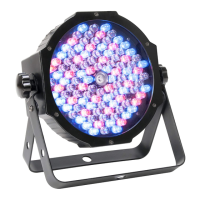
Introduction: The American DJ® Jelly Par Profile System is part of a
continuing pursuit to create high quality intelligent lighting. The Jelly
Par Profile System is an exciting all-in-one DMX intelligent LED par
system. This lighting system features four RGB color mixing LED fix-
tures. This xture can be used in a stand alone mode or connected in
a Master/Slave conguration. This system has six operating modes:
Sound Active mode, Auto mode, Built-In Program mode, Static Color
Mode, RGB dimmer mode, and DMX control mode.
Customer Support: American DJ provides a customer support line, to
provide set up help and to answer any question should you encounter
problems during your set up or initial operation. You may also visit us
on the web at www.American DJ.com for any comments or sugges-
tions. Service Hours are Monday through Friday 8:00 a.m. to 4:30 p.m.
Pacic Standard Time.
Voice: (323) 582-3322
Fax: (323) 582-3108
E-mail: support@AmericanDJ.com
Warning! To prevent or reduce the risk of electrical shock or re, do
not expose this unit to rain or moisture.
Caution! There are no user serviceable parts inside this unit. Do not
attempt any repairs yourself, doing so will void your manufactures war-
ranty. In the unlikely event your unit may require service please contact
American DJ.
PLEASE recycle the shipping carton when ever possible.
Question and Answer IconNeed help?

Do you have a question about the ADJ Jelly Par Profile System and is the answer not in the manual?

Summary

Introduction

Unpacking

Instructions for unpacking and inspecting the product for damage.

Product Overview

Details the Jelly Par Profile System's features and operating modes.

Customer Support

Contact information and service hours for customer support.

Safety Warnings

Important warnings to prevent electrical shock or fire.

General Instructions

General Instructions

Guidelines for optimizing performance and safe operation.

Features

Features

Lists key features like Multi-Colors, Dimming, DMX, etc.

Safety Precautions

Safety Precautions

Details precautions to prevent electrical shock, fire, and damage.

Warranty Registration

Warranty Registration

Information on registering the 3-year limited warranty.

Set Up

Power Supply

Details the auto-sensing voltage feature for global use.

DMX-512 Protocol

Explanation of DMX protocol and its use with intelligent fixtures.

DMX Linking

Guidance on connecting multiple DMX fixtures in a chain.

Data Cable Requirements

Specifications for DMX cables and connections.

XLR Pin Configuration

Diagrams and pinouts for 3-pin XLR DMX connectors.

Line Termination

Explanation of DMX line termination to prevent erratic behavior.

5-Pin XLR DMX Connectors

Information on using 5-pin DMX connectors and conversion.

Operating Instructions

LED Display On;Off

How to control the LED display's on/off status and timeout.

Operating Modes Overview

Lists the six available operating modes for the system.

Sound Active Mode

How to operate the unit using sound activation and adjust sensitivity.

Built-In Program Mode

Instructions for selecting and controlling built-in programs and speed.

Auto Run Mode

How to select and control auto run programs and speed.

Color Select Mode

Instructions for selecting static colors and applying strobe effects.

RGB Dimmer Mode

How to adjust individual Red, Green, and Blue color intensity.

DMX Mode

Overview of controlling the fixture via a DMX controller.

Master-Slave Configuration

Master-Slave Configuration

How to link multiple units to operate in Master/Slave mode.

Master-Slave Connections and Settings

Step-by-step guide for connecting and setting up Master/Slave.

Foot Controller

Foot Controller

Information on connecting and using the foot controller.

Foot Controller Functions

Details the functions of Blackout, Sound, Program, and Color pedals.

DMX Channel Modes

DMX Channel Modes

Details the 6, 12, and 15 channel DMX modes.

RFC Operation

RFC Operation

How to use the RFC remote for long-distance control.

RFC Remote Functions

Explains functions like Blackout, Auto Run, Program Selection, Flash, Speed, Sound, RGB.

6 Channel DMX Mode

6 Channel DMX Mode Table

Channel values and functions for 6-channel DMX mode.

6 Channel DMX Mode Notes

Important notes regarding channel usage in 6-channel DMX mode.

12 Channel DMX Mode

12 Channel DMX Mode Table

Channel values and functions for 12-channel DMX mode.

15 Channel DMX Mode

15 Channel DMX Mode Table

Channel values and functions for 15-channel DMX mode.

15 Channel DMX Mode Notes

Notes on channel usage in 15-channel DMX mode.

Fuse Replacement

Fuse Replacement

Step-by-step instructions for replacing the unit's fuse.

Trouble Shooting

Trouble Shooting

Solutions for common issues like no DMX response or no sound response.

Cleaning

Cleaning

Guidelines for cleaning optical lenses and external casing.

Warranty

MANUFACTURERS LIMITED WARRANTY

Details the terms and conditions of the limited warranty.

MANUFACTURERS LIMITED WARRANTY PERIODS

Lists warranty periods for different product types.

Specifications

Specifications

Technical details of the Jelly Par Profile System and Foot Controller.

Auto Sensing Voltage

Explanation of the automatic voltage sensing feature.

Company Information

Contact details and website for American DJ.

Summary

Introduction

Unpacking

Instructions for unpacking and inspecting the product for damage.

Product Overview

Details the Jelly Par Profile System's features and operating modes.

Customer Support

Contact information and service hours for customer support.

Safety Warnings

Important warnings to prevent electrical shock or fire.

General Instructions

General Instructions

Guidelines for optimizing performance and safe operation.

Features

Features

Lists key features like Multi-Colors, Dimming, DMX, etc.

Safety Precautions

Safety Precautions

Details precautions to prevent electrical shock, fire, and damage.

Warranty Registration

Warranty Registration

Information on registering the 3-year limited warranty.

Set Up

Power Supply

Details the auto-sensing voltage feature for global use.

DMX-512 Protocol

Explanation of DMX protocol and its use with intelligent fixtures.

DMX Linking

Guidance on connecting multiple DMX fixtures in a chain.

Data Cable Requirements

Specifications for DMX cables and connections.

XLR Pin Configuration

Diagrams and pinouts for 3-pin XLR DMX connectors.

Line Termination

Explanation of DMX line termination to prevent erratic behavior.

5-Pin XLR DMX Connectors

Information on using 5-pin DMX connectors and conversion.

Operating Instructions

LED Display On;Off

How to control the LED display's on/off status and timeout.

Operating Modes Overview

Lists the six available operating modes for the system.

Sound Active Mode

How to operate the unit using sound activation and adjust sensitivity.

Built-In Program Mode

Instructions for selecting and controlling built-in programs and speed.

Auto Run Mode

How to select and control auto run programs and speed.

Color Select Mode

Instructions for selecting static colors and applying strobe effects.

RGB Dimmer Mode

How to adjust individual Red, Green, and Blue color intensity.

DMX Mode

Overview of controlling the fixture via a DMX controller.

Master-Slave Configuration

Master-Slave Configuration

How to link multiple units to operate in Master/Slave mode.

Master-Slave Connections and Settings

Step-by-step guide for connecting and setting up Master/Slave.

Foot Controller

Foot Controller

Information on connecting and using the foot controller.

Foot Controller Functions

Details the functions of Blackout, Sound, Program, and Color pedals.

DMX Channel Modes

DMX Channel Modes

Details the 6, 12, and 15 channel DMX modes.

RFC Operation

RFC Operation

How to use the RFC remote for long-distance control.

RFC Remote Functions

Explains functions like Blackout, Auto Run, Program Selection, Flash, Speed, Sound, RGB.

6 Channel DMX Mode

6 Channel DMX Mode Table

Channel values and functions for 6-channel DMX mode.

6 Channel DMX Mode Notes

Important notes regarding channel usage in 6-channel DMX mode.

12 Channel DMX Mode

12 Channel DMX Mode Table

Channel values and functions for 12-channel DMX mode.

15 Channel DMX Mode

15 Channel DMX Mode Table

Channel values and functions for 15-channel DMX mode.

15 Channel DMX Mode Notes

Notes on channel usage in 15-channel DMX mode.

Fuse Replacement

Fuse Replacement

Step-by-step instructions for replacing the unit's fuse.

Trouble Shooting

Trouble Shooting

Solutions for common issues like no DMX response or no sound response.

Cleaning

Cleaning

Guidelines for cleaning optical lenses and external casing.

Warranty

MANUFACTURERS LIMITED WARRANTY

Details the terms and conditions of the limited warranty.

MANUFACTURERS LIMITED WARRANTY PERIODS

Lists warranty periods for different product types.

Specifications

Specifications

Technical details of the Jelly Par Profile System and Foot Controller.

Auto Sensing Voltage

Explanation of the automatic voltage sensing feature.

Company Information

Contact details and website for American DJ.

ADJ Jelly Par Profile System Specifications

Jelly Par Profile System

Power IconPower
voltage90V ~ 240V / 50~60Hz
power draw50W Max.
fuse1 Amp
Weight and Dimensions IconWeight and Dimensions
weight12 lbs / 5.1 kg
dimensions47.25” (L) x 11” (W) x 2.5” (H)

Foot Controller

Weight and Dimensions IconWeight and Dimensions
weight3 lbs / 1.4 kg
dimensions15.7” (L) x 5.5” (W) x 1.9” (H)

Related product manuals