ADJ Products, LLC - www.adj.com - Ikon Prole User Manual Page 10
The Ikon Profile gobo can be interchanged at any time and allows
you to customize your system.
To replace gobo;
1. Gently slide the gobo housing out of the top of unit. The gobo
housing is located in front of the top flag.
2. Once the gobo housing has been removed, remove the retaining
ring that holds the gobo in. This can easily be done using needle
nose pliers.
3. Remove and replace the gobo with your desired replacement.
Reinsert the retainer ring, and make sure the ring rests firmly
against the gobo.
4. Slide the gobo assembly back into place.
Ikon Profile Gobo Replacement Ikon Profile DMX Values & Traits
Channel Value Function
1 STROBING/SHUTTER
0 - 7 CLOSED
8 - 15 OPEN
16 - 131 STROBE SLOW - FAST
132 - 139 OPEN
140 - 181 FAST CLOSE - SLOW OPEN
182 - 189 OPEN
190 - 231 SLOW CLOSE - FAST OPEN
232 - 239 OPEN
240 - 247 RANDOM STROBE
248 - 255 OPEN
2 0 - 255 MASTER DIMMER 0% - 100%
3 DIMMER MODE
0 - 20 STANDARD
21 - 40 STAGE
41 - 60 TV
61 - 80 ARCHITECTURAL
81 - 100 THEATRE
101 - 255 DEFAULT DIMMER SETTING
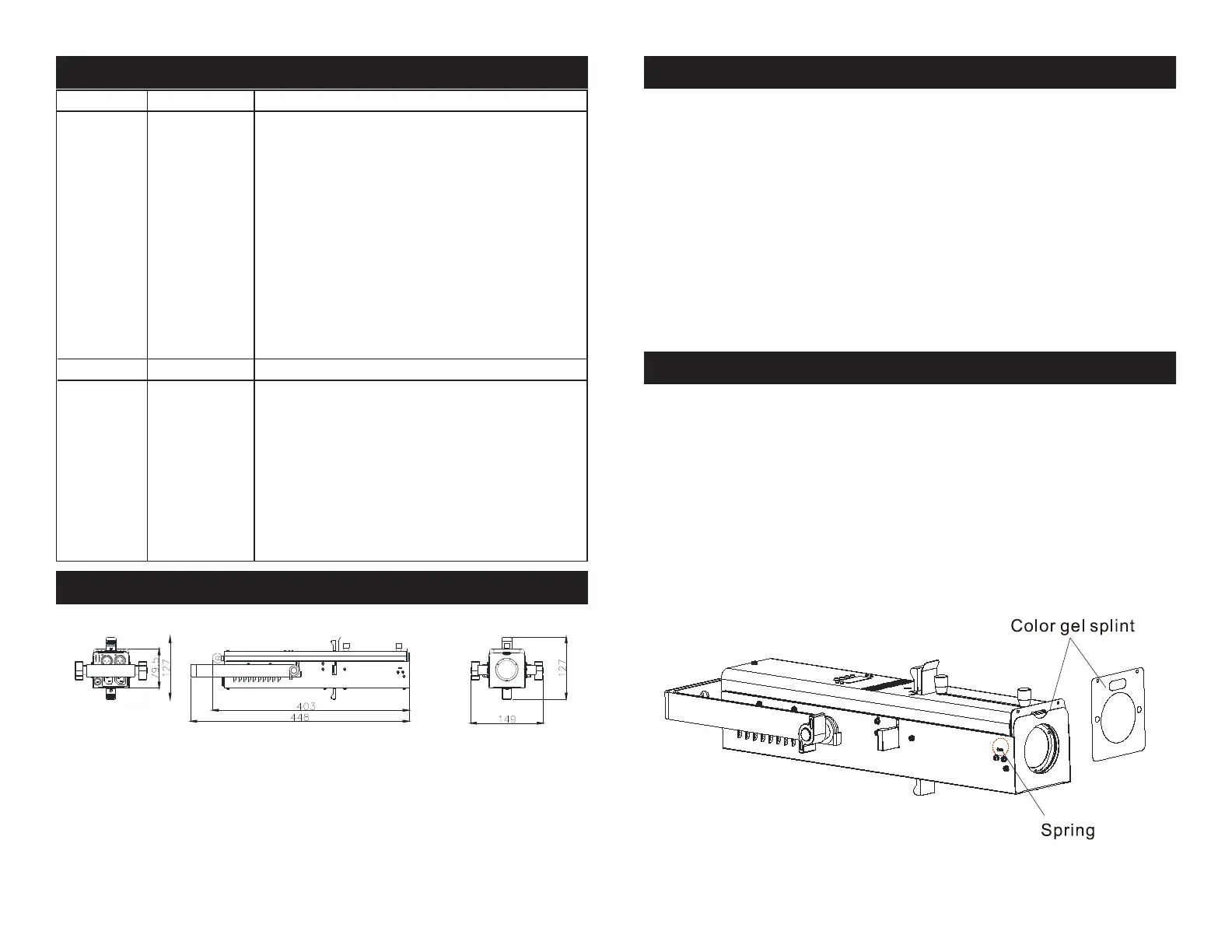
Ikon Profile Adding a Color Gel
A color gel (not included) can be added to the front of the Ikon Profile
and can be interchanged at any time. This allows you to customize
your system.
To add a color gel;
1. Locate the color gel frame at the front of the unit. Slide the spring
lever back and slide the gel frame out of the holder.
2. Once the gel frame has been removed slide your desired color gel
into the middle of the frame.
3. Slide the spring back and slide the gel frame into place.
ADJ Products, LLC - www.adj.com - Ikon Prole User Manual Page 11
Ikon Profile CAD Drawing







 To Next Page