ADJ Products, LLC - www.adj.com - Inno Spot ProInstruction Manual Page 16 ADJ Products, LLC - www.adj.com - Inno Spot ProInstruction Manual Page 17
Inno Spot Pro System Menu
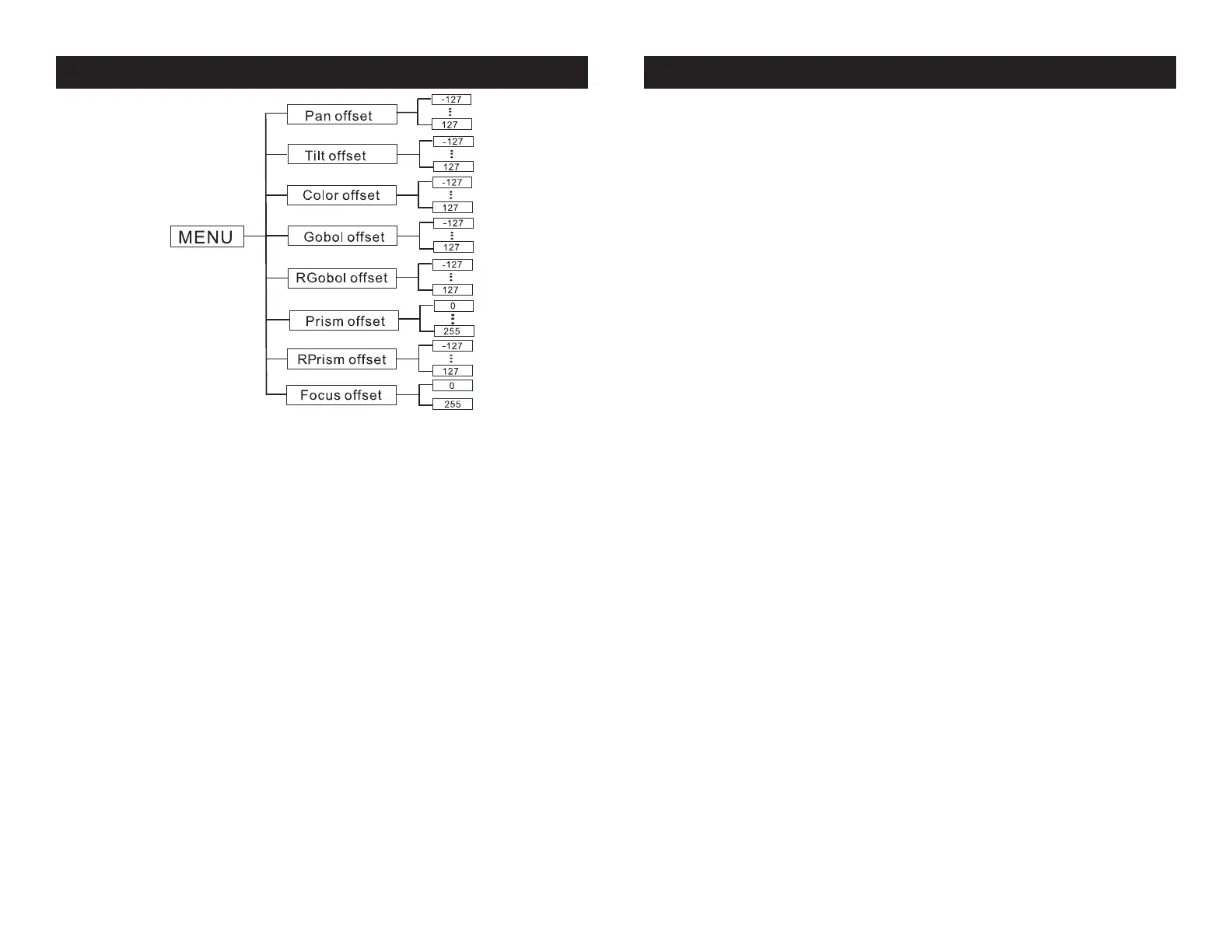
To enter the OTIL (Home position adjustment) & Gobo wheel adjust-
ment submenu, press the ENTER button for at least 3 seconds. In
this submenu you are able to adjust the home position of the pan,
tilt, color wheel, gobo wheel, RGobo (Rotating) wheel, prism, RPrism,
and focus position.
Pan Offset - Adjustment of the pan home position.
1. Press the ENTER button for at least 3 seconds, then press the UP
or DOWN buttons so that “Pan Offset” is displayed, press ENTER.
2. Use the UP and DOWN buttons to make your adjustments, and
then press ENTER to conrm. Press the MENU button for one second
to exit.
Tilt Offset - Adjustment of the tilt home position.
1. Press the ENTER button for at least 3 seconds, then press the UP
or DOWN buttons so that “Tilt Offset” is displayed, press ENTER.
2. Use the UP and DOWN buttons to make your adjustments, and
then press ENTER to conrm. Press the MENU button for one second
to exit.
Inno Spot Pro System Menu
Color Offset - Home setting adjustment for the color
wheel.
1. Press the ENTER button for at least 3 seconds, then press the UP
or DOWN buttons so that “Color Offset” is displayed, press ENTER.
2. Use the UP and DOWN buttons to make your adjustments, and
then press ENTER to conrm. Press the MENU button for one second
to exit.
Gobo Offset - Home setting adjustment for the gobo
wheel.
1. Press the ENTER button for at least 3 seconds, then press the UP
or DOWN buttons so that “Gobo Offset” is displayed, press ENTER.
2. Use the UP and DOWN buttons to make your adjustments, and
then press ENTER to conrm. Press the MENU button for one second
to exit.
RGobo Offset - Home setting adjustment for the
rotating gobo.
1. Press the ENTER button for at least 3 seconds, then press the
UP or DOWN buttons so that “RGobo Offset” is displayed, press
ENTER.
2. Use the UP and DOWN buttons to make your adjustments, and
then press ENTER to conrm. Press the MENU button for one second
to exit.
Prism Offset - Home setting adjustment for the prism.
1. Press the ENTER button for at least 3 seconds, then press the UP
or DOWN buttons so that “Prism Offset” is displayed, press ENTER.
2. Use the UP and DOWN buttons to make your adjustments, and
then press ENTER to conrm. Press the MENU button for one second
to exit.



 To Next Page