Control and Functions
4
Rear View
4. MIDI IN: to receive MIDI data.
6. DMX OUT: 3 Pin DMX output socket (female).
2. Audio input: to input audio data (0.1V-1Vp-p).
7. DC INPUT: to input main power (DC 9V~15V, 500mA Min).
3. DB-9 connector: to connect an external step controller.
Made in PRC
DC input:
9V-12VDC, 500mA Min
1 = Ground
2 = Data -
3 = Data +
POWER
MIDI IN
DMX OUT DC IN
FOG MACHINE
DB-9
EXT STEP CONTROL
AUDIO
Line Input 0.1V-1Vp-p
1 2
54
3
6 87
1. Label.
8. Power switch: to turn on/off the main power.
5. Fog machine connector: to connect with the fog machine.
Control and Functions
3
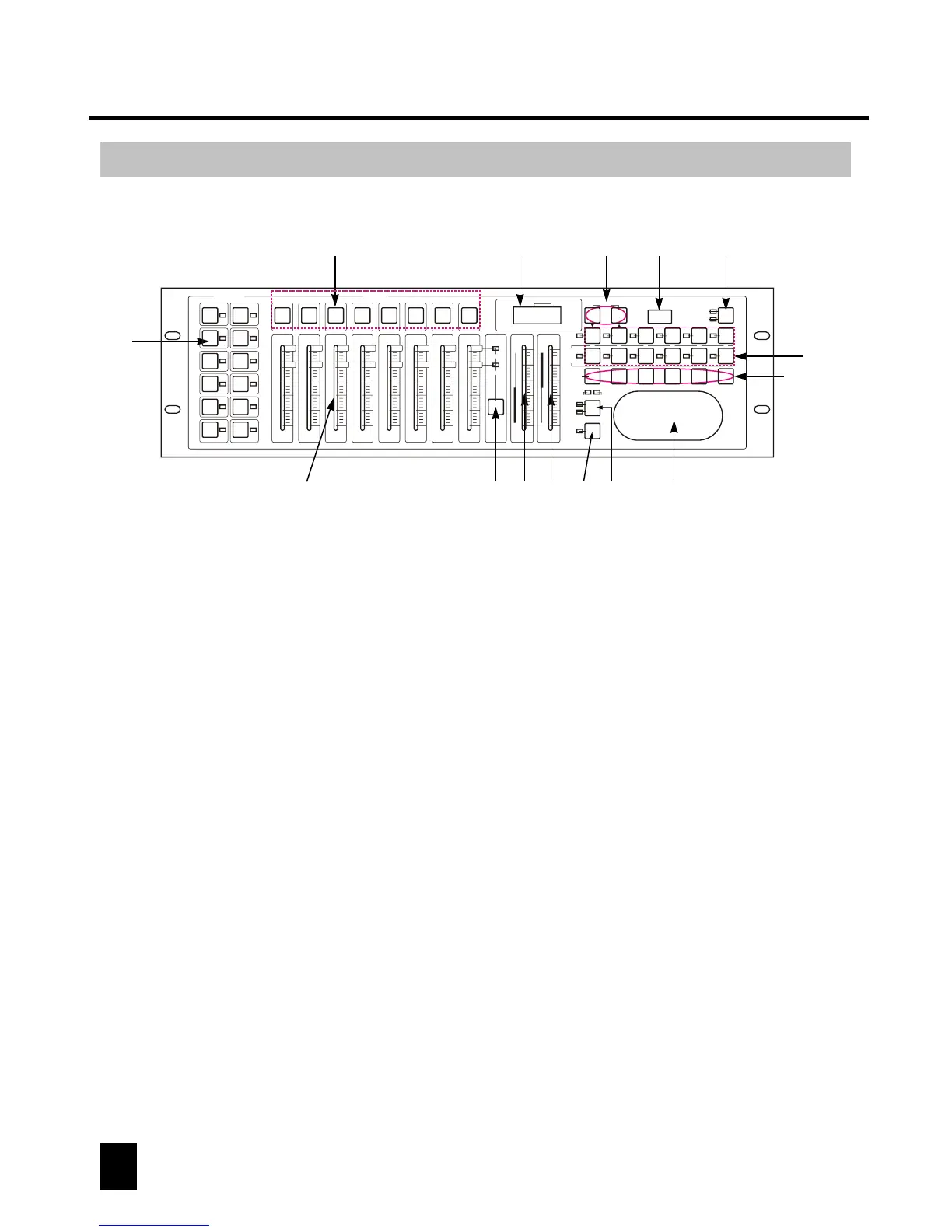
Front View
1
2
3
4
5 6
9 10 11 12
14
7
8
13
15~20
4. Speed fader:
To adjust the speed level (0.1 second ~10 minutes).
1. Fixture buttons(1~12):
Used to select relevant fixture.
5. Fade Time fader:
To adjust the fade time (0~30seconds).
3. Channel Bank button:
To switch between Ch1~8 and Ch9~16.
2. Channel faders(1~8):
Used to control the dimming output of each corresponding channel.
6. FINE button:
In the "FINE" mode, you can adjust the Pan/Tilt finely.
7. MODE button:
This is a multi-functional button, please see the operation for details.
8. Pan/Tilt joystick:
Used to adjust the Pan/Tilt level.
9. Scene buttons (1~8): to select a scene.
10. LED-display:
This LED-display shows you relevant information depending on your operation.
11. Bank Up/Down button:
To select a bank or step (see operation guide for details).
20. Black-out button:
This will allow the operator to instantly stop all channels' output (press this
button again to reactivate the output).
16. Music/Bkc button:
Used to enter audio control or to realize Bank copy.
17. Midi/Rec button:
It's for MIDI setting and/or for scene/chase recording.
15. Program button :
Used to enter/exit the programing mode.
19. Tap/Disp button:
It is a multi-functional button, please see the operation for details.
18. Audio/Del button :
Used to enter the AUTO mode, or to delete a scene/chase.
12. USB socket:
It's for data backup or USB light connection.
13. Fog-machine button:
It's for fog-machine control.
14. Chase button(1~12): to select a chase.
FIXTURES
1
2
3
4
5
6
7
8
9
10
11
12
Chase
Scene
Bank
Auto Trigger
Blackout
Step
PROG
Step/time
Audio Trigger
0
30S
Fade Time
Speed
10Min
0.1S
Channel
Bank
Channel 1/8
Channel 9/16
0
2
4
6
8
10
1
9
0
2
4
6
8
10
2
10
0
2
4
6
8
10
3
11
0
2
4
6
8
10
4
12
0
2
4
6
8
10
5
13
0
2
4
6
8
10
6
14
0
2
4
6
8
10
7
15
0
2
4
6
8
10
8
16
1 2 3 4 5
6
7 8
SCENES
Program
OPERATOR 192
Assign
Reverse
USB
PORT
Heating
Ready
FOG MACHINE
Music/Bkc Midi/Rec Auto/Del
Tap/Disp
Blackout
PAN TILT
MODE
FINE
BANK
1
7
2
8
3
9
4
10
5
11
6
12
CHASE



 To Next Page