9
1. Open the shipping carton and carefully remove the unit from the shipping carton. Make sure to
remove all the packing material, and pay particular attention to the area around the nozzle/sock.
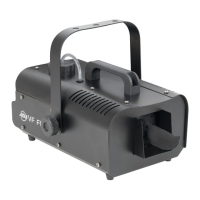
2. Set the snow machine on a at dry surface. Remove the included bracket from the package and
attach it to the side of the snow machine using the supplied hardware. Note: The bracket is an
optional accessory and is required when the device is installed in a hanging or suspended
setting.
3. Remove the uid reservoir and ll it with ADJ® brand snow juice only, then replace the reservoir.
4. Place the feeder tube with the lter deep inside the reservoir and tighten the cap.
5. Using the switch on the rear of the unit, set the air volume output to either the minimum setting
(small snow akes) or the maximum setting (large snow akes).
6. Firmly attach the remote control unit to the rear remote control socket on the unit. Turn the rotary
knob to adjust the snow output level. Turning the knob clockwise reduces the snow output, while
turning it counter-clockwise increases the snow output.
7. Plug the unit in to a matching power supply. Switch on the main power located on the rear panel
of the unit.
Note: The liquid reservoir will glow red when the device is connected to power.
SET UP
Always be sure to maintain an adequate supply of ADJ® Brand Snow Juice in the uid reser-
voir. The pump will shut o automatically when the snow juice is low. Running the snow ma-
chine dry will cause pump failure and or clogging. This is the largest cause of failure in snow
machines. Use only ADJ-brand snow juice for this device.
Manual Remote Operation: Connect the included remote control to the snow machine and plug the
machine into a matching power outlet. The red LED (inside the uid tank) will illuminate when there is
enough snow uid in the tank. When uid level is low, the red LED will ash. The green LED will glow
when the snow machine is in use. To emit snow, adjust the OUTPUT VOLUME knob to your desired
level and then press the ON/OFF button on the remote for desired length of time. If the green LED is
on and snow does not come out after holding the button down for 30 seconds, check the uid tank
and hose to make sure there is uid going through the hose.
Caution: Before removing or replacing the remote control unit, disconnect the power cord.
OPERATING INSTRUCTIONS








 To Next Page