ADJ Products, LLC - www.adj.com - XS 600 User Manual Page 9
ADJ Products, LLC - www.adj.com - XS 600 User Manual Page 8
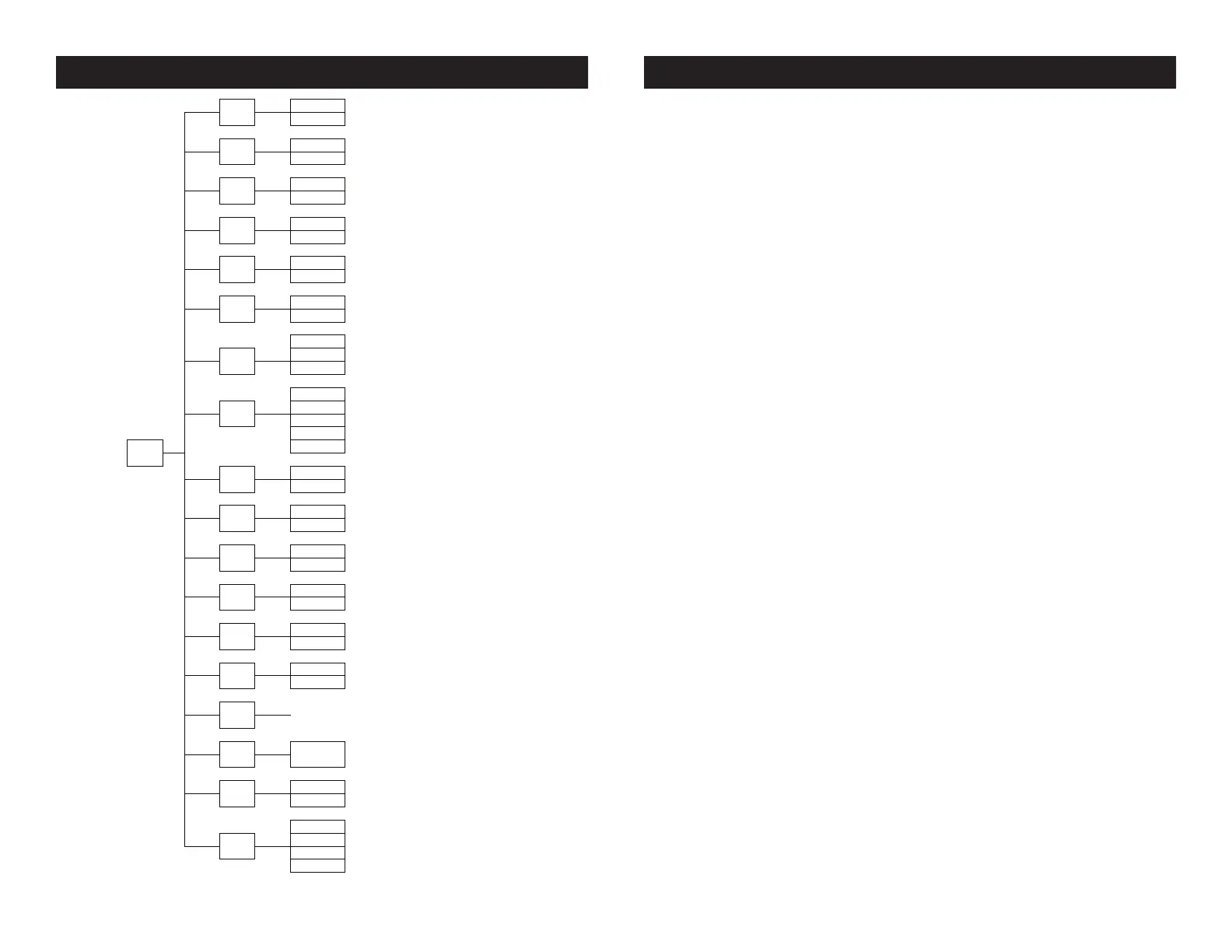
XS 600 System Menu XS 600 System Menu
System Menu: When making adjustments press ENTER to
conrm your setup then press and hold the MENU button
for at least 3 seconds. To exit without making any adjust-
ments press the MENU button. The display will lock after 30
seconds, press the MENU button for 3 seconds to unlock.
ADDR - DMX Address Setting.
1. Press the either the MENU, UP, or DOWN buttons until “ADDR” is
displayed, press ENTER.
2. The current address will now be displayed and ashing. Press the
UP or DOWN buttons to nd your desired address. Press ENTER to
set your desired DMX address.
CHND - This will let select your desired DMX channel
mode.
1. Press the MENU button until “CHND” is displayed, press ENTER.
The current DMX channel mode will be displayed
2. Press the UP or DOWN buttons to nd your desired DMX channel
mode and press ENTER to conm and exit.
STAL - This will let you set unit as a master or slave in a
master/slave conguration.
1. Press the MENU button until “STAL” is displayed, press ENTER.
Either “MAST” or “SLAv” will be displayed.
2. Press the UP or DOWN buttons until your desired setting is dis-
played, press ENTER to conm.
SHND - Show modes 0-8 (Factory programs).
1. Press the MENU button until “SHND” is displayed, press ENTER.
2. “Sh X” will now be displayed, “X” representing a number between
0-8. Shows 0-8 are preset shows, while “Show 0” is random show.
Press the UP or DOWN buttons to nd your desired show and press
Addr
A001
Starting DMX address
A512
Chnd
25CH
25CH=8bit
31CH
31CH=16bit DMX mode
StAl
nASt
nASt=Master
SLAu
SLAu=Slave
Shnd
Show0
Internal show, 0-8
Show8
Sond
ON
Show to sound
OFF
SoSE
005
Sound sensitivity, low~High
005-255
255
BLAc
BLAc=blackout
LASt
HOLD
HOLD=Hold last values
SHOu
SHOu=Show mode
StAn
StAn=Standard
DiND
StAG
StAG=Stage
tU
tU=TV
ArCH
ArCH=Architectural
MENU
tHE
tHEA=Theatre
PInt
ON
On=Counterclockwise
OFF
OFF=Clockwise
tIL1
OFF
OFF=Clockwise
ON
On=Counterclockwise
tIL2
OFF
OFF=Clockwise
ON
On=Counterclockwise
bAcL
on
Display back light
OFF
dISP
OFF
O=normal
on
On=reverse
Nan
CH01
000-255
CH31
Hrs
Total running hours
Uer
Vx.x
Current software version
rESt
on
All motors reset
OFF
rED 050- 255
White balance adjust
BALA
GrEN 050- 255
BluE 050- 255


 To Next Page