EasyManua.ls Logo

ADJ ZIPPER - User Manual

ADJ ZIPPER
14 pages
Print Icon
To Next Page IconTo Next Page
Loading...
User Instructions
11/14
©2014 ADJ Products, LLC all rights reserved. Information,
specications, diagrams, images, and instructions herein are
subject to change without notice. ADJ Products, LLC logo and
identifying product names and numbers herein are trademarks
of ADJ Products, LLC. Copyright protection claimed includes all
forms and matters of copyrightable materials and information
now allowed by statutory or judicial law or hereinafter granted.
Product names used in this document may be trademarks or
registered trademarks of their respective companies and are
hereby acknowledged. All non-ADJ Products, LLC brands and
product names are trademarks or registered trademarks of their
respective companies.
ADJ Products, LLC and all aliated companies hereby dis-
claim any and all liabilities for property, equipment, building,
and electrical damages, injuries to any persons, and direct or
indirect economic loss associated with the use or reliance of
any information contained within this document, and/or as a
result of the improper, unsafe, unsucient and negligent as-
sembly, installation, rigging, and operation of this product.
Europe Energy Saving Notice
Energy Saving Matters (EuP 2009/125/EC)
Saving electric energy is a key to help protecting the enviroment.
Please turn o all electrical products when they are not in use. To
avoid power consumption in idle mode, disconnect all electrical
equipment from power when not in use. Thank you!
ZIPPER
Question and Answer IconNeed help?

Do you have a question about the ADJ ZIPPER and is the answer not in the manual?

Summary

Handling Precautions

Safety Precautions

General Safety Guidelines

Includes avoiding water, checking power cords, and proper grounding.

Operational Safety Rules

Covers ventilation, avoiding operation if damaged, and indoor use limitations.

Set Up Procedures

Power Supply and DMX Basics

Covers auto sensing voltage and the DMX-512 protocol for fixture communication.

DMX Linking and Cables

Explains DMX linking between fixtures and data cable requirements.

System Menu Navigation

DMX Address and Channel Mode

Instructions for setting DMX address and selecting DMX channel mode (1CH, 3CH, 11CH).

Master;Slave Configuration

Guides on setting the unit as a Master or Slave in a multi-fixture setup.

Operation Modes Explained

DMX Control Mode

Control individual fixture traits with a standard DMX-512 controller.

Master-Slave Configuration

Master-Slave Setup Guide

Links up to 16 units to operate without a controller, with one unit acting as master.

DMX Traits and Values

Maintenance and Troubleshooting

Trouble Shooting Common Issues

Solutions for common problems like no light output or unit not responding to sound.

Manufacturers Limited Warranty

Specifications Overview

Summary

Handling Precautions

Safety Precautions

General Safety Guidelines

Includes avoiding water, checking power cords, and proper grounding.

Operational Safety Rules

Covers ventilation, avoiding operation if damaged, and indoor use limitations.

Set Up Procedures

Power Supply and DMX Basics

Covers auto sensing voltage and the DMX-512 protocol for fixture communication.

DMX Linking and Cables

Explains DMX linking between fixtures and data cable requirements.

System Menu Navigation

DMX Address and Channel Mode

Instructions for setting DMX address and selecting DMX channel mode (1CH, 3CH, 11CH).

Master;Slave Configuration

Guides on setting the unit as a Master or Slave in a multi-fixture setup.

Operation Modes Explained

DMX Control Mode

Control individual fixture traits with a standard DMX-512 controller.

Master-Slave Configuration

Master-Slave Setup Guide

Links up to 16 units to operate without a controller, with one unit acting as master.

DMX Traits and Values

Maintenance and Troubleshooting

Trouble Shooting Common Issues

Solutions for common problems like no light output or unit not responding to sound.

Manufacturers Limited Warranty

Specifications Overview

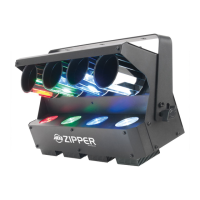
ADJ ZIPPER Specifications

Power IconPower
voltage100V ~ 240V/50~60Hz
power consumption66W
fuse7 Amp
Lighting IconLighting
LED configuration4 x 8W LEDs (1 Red, 1 Green, 1 Blue, 1 White)
power cord daisy chain10 Fixtures Max. (120V), 18 Fixtures Max. (230V)
DMX modes3 DMX Modes: 1 Channel Mode, 3 Channel Mode, & 11 Channel Mode
Weight and Dimensions IconWeight and Dimensions
dimensions18.75” x 9.75” x 5.25” / 479 x 247 x 132 mm
weight13 Lbs. / 6 kgs
beam angle128 Degrees

Related product manuals