PYRO A/V LINK 35
Windows Millennium Edition (Me)
Windows Me fully supports the IEEE 1394 card. Check that the following devices
are working properly:
• 1394 Bus Controller
• 61883 Device Class
• AVC Device Class
• (Brand name) DV Camcorder: The brand name depends on the DV cam-
corder connected to the IEEE interface card.
Windows XP
Windows XP fully supports IEEE 1394.
* PYRO A/V Link will be listed as AVC Compliant DV Tape Recorder/Player under
the Device Manager.
To run VideoStudio under Windows XP, check that the following devices are
working properly:
• 1394 Bus Controller
• 61883 Device Class
• AVC Device Class
• (Brand name) DV Camcorder: The brand
name depends on the DV camcorder con-
nected to the IEEE interface card.
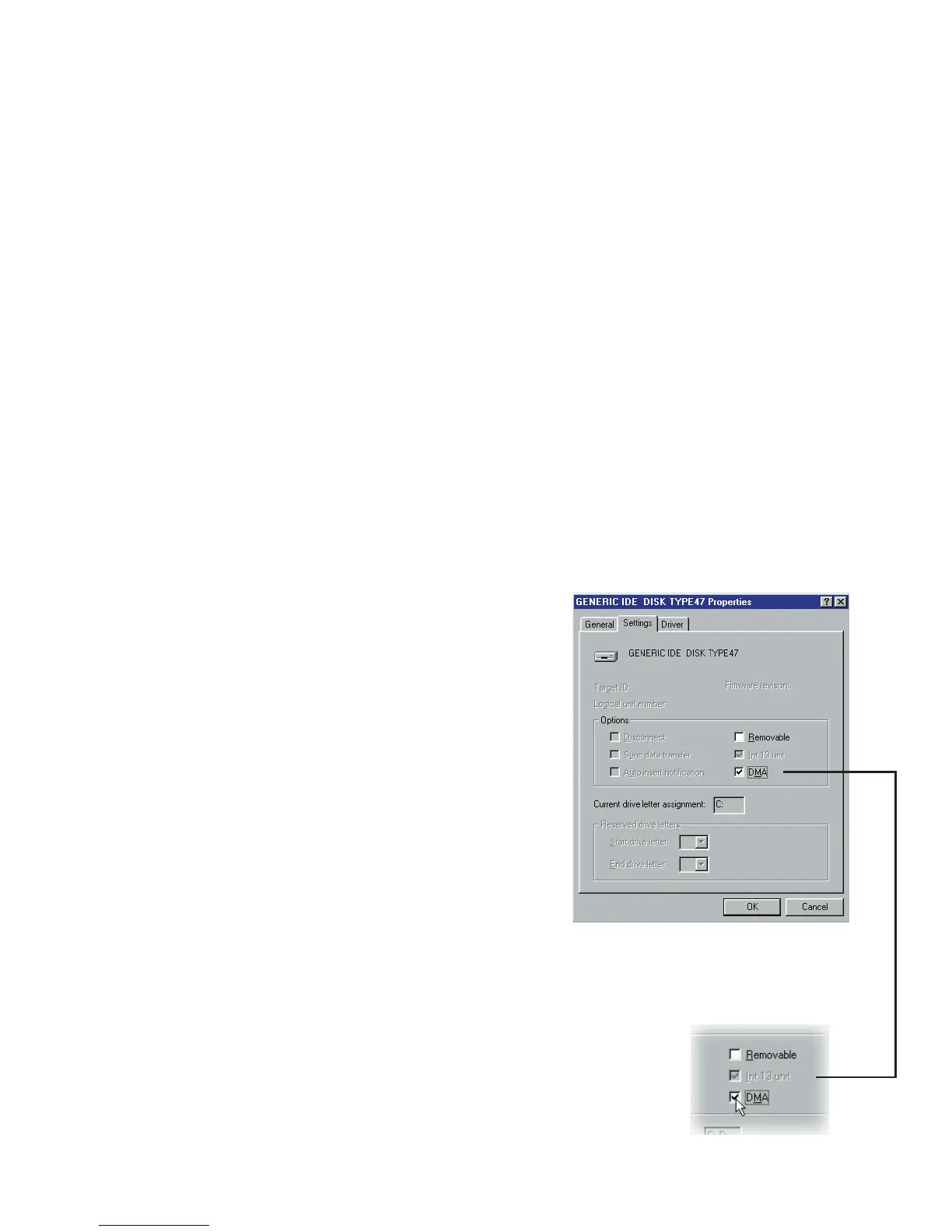
Settings Tab after clicking Properties
when a hard drive is selected from Control
Panel: System - Device Manager
For Windows 98 and Windows Me, select the
DMA option in Device Manager: Disk drive
Settings Tab. In Windows 2000, the DMA
option is hidden but it is always enabled. DMA
avoids possible drop frame problems later
when you are capturing video.
Note:In addition to commonly used Texas Instruments and Micro-
soft DV drivers, there are other drivers available. Consult your
camcorder’s manual for suitable drivers.


 To Next Page