This document describes the ADXK1224 TKL Gaming Keyboard, a compact mechanical keyboard designed for gaming.
Function Description:
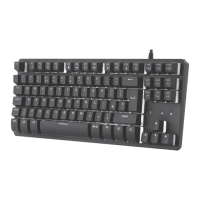
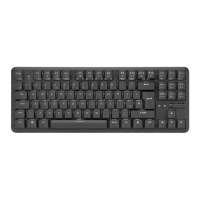
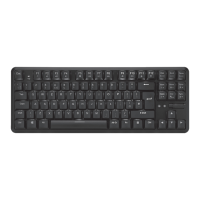
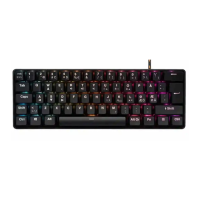
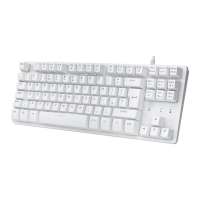
The ADXK1224 is a TKL (Tenkeyless) gaming keyboard, meaning it lacks the numeric keypad typically found on full-sized keyboards, making it more compact and suitable for gamers who prefer more desk space for mouse movement. The keyboard features a standard QWERTY layout with 87 keys. It includes a range of function keys (F1-F12) that double as multimedia controls and system shortcuts when pressed in conjunction with the FN key. These shortcuts allow users to control media playback (play/pause, stop, previous/next track), adjust volume (decrease, increase, mute), launch the web browser, open the default email program, lock all keys, and open the calculator. The keyboard also boasts RGB backlighting with various effects and adjustable brightness and speed, enhancing the gaming experience and aesthetic appeal. Dedicated indicator lights are present for Caps Lock, Scroll Lock, and Keys Lock, providing visual feedback on the keyboard's status.
Important Technical Specifications:
- Model: ADXK1224
- Dimensions (L x W x H): 360 x 137 x 37.2 mm
- Net Weight: 551.5 g
- Operating Systems: Microsoft® Windows® 10/11
- Hardware Requirements: 2 available USB ports
Usage Features:
The ADXK1224 keyboard is designed for ease of use and enhanced functionality, particularly for gaming and multimedia tasks.
- Function Keys (FN + F1-F12):
- FN + F1: Start the default Media Player program.
- FN + F2: Decrease the Volume.
- FN + F3: Increase the Volume.
- FN + F4: Mute sound.
- FN + F5: Stop playback.
- FN + F6: Go back to the previous track.
- FN + F7: Play/pause track.
- FN + F8: Go to the next track.
- FN + F9: Start the default Web browser and load the Home Web page.
- FN + F10: Start the default e-mail program.
- FN + F11: Lock all keys.
- FN + F12: Open Calculator.
- Note: Not all functions may be available depending on the operating system.
- Backlight Effect Controls (FN + specific keys):
- FN + (key with sun icon and up/down arrows): Adjust the backlight flashing speed.
- FN + (key with sun icon and circle): Switch the backlight on/off.
- FN + (key with sun icon and "Mode"): Change the backlight effect (different RGB patterns).
- FN + (key with sun icon and up/down triangles): Adjust the backlight brightness.
- Compact TKL Design: The tenkeyless design provides a smaller footprint, saving desk space and allowing for more comfortable mouse movements, which is beneficial for gamers.
- Plug and Play: The keyboard connects via USB and is compatible with Windows 10 and 11, requiring two available USB ports for full functionality.
- Indicator Lights: Clear LED indicators for Caps Lock, Scroll Lock, and Keys Lock provide immediate visual feedback on the keyboard's active modes.
Maintenance Features:
The manual provides general care and safety guidelines to ensure the longevity and proper functioning of the ADXK1224 keyboard.
- General Care:
- Keep the keyboard away from direct sunlight, moisture, dirt, or abrasive chemical products (cleaning products, etc.).
- Do not immerse the keyboard in water or any liquid.
- Avoid using the keyboard close to heat sources or exposing it to high temperatures.
- Do not use the keyboard where strong electromagnetic waves are present, as this can cause damage.
- Troubleshooting (Hints and Tips):
- If the unit is not working properly, ensure the USB plug is fully inserted into a USB port.
- Try using a different USB port if issues persist.
- Ensure the computer is turned on.
- Safety Warnings:
- Read all instructions carefully before use and retain the manual for future reference.
- Do not disassemble the keyboard or remove any parts.
- This product has no serviceable parts; any adjustments or procedures other than those described in the manual may result in danger.
- Never point the optical sensor (if any, though not explicitly mentioned for this keyboard, it's a general safety warning for input devices) towards the face, particularly the eyes, to avoid possible injury.
- Disposal: The product packaging indicates that it should not be disposed of with general household waste. Users are responsible for disposing of waste equipment at a designated collection point for the recycling of waste electrical and electronic equipment to conserve natural resources and protect human health and the environment. Information on disposal can be obtained from local authorities or the place of purchase.
The ADXK1224 TKL Gaming Keyboard is designed to be a reliable and feature-rich input device for PC gamers, offering customizable backlighting and convenient multimedia controls in a compact form factor.

 Need help?


 To Next Page
 General