13
GB
Open
Volume Control
Window Media Player
Sound Recorder
Multimedi Preperties
Settings
Exit
10:00
1/10/2014
Speakers
Volume Control
Master
8.00
dB
Front
-7.00
dB
-7.00
Mic
Volume Control
Sample Rate
Equalizer
Xear Surround Headphone
Xear Audio Brilliant
Xear Dynamic Bass
Xear Smart Volume
Xear Voice Clarity
Xear Surround Max
RL
Playback
Out In
EQ DB SMX MV
XHP SVN
AB VC
Speakers Out
48 KHz
7.1
Capture
Mic In
Speaker Setting
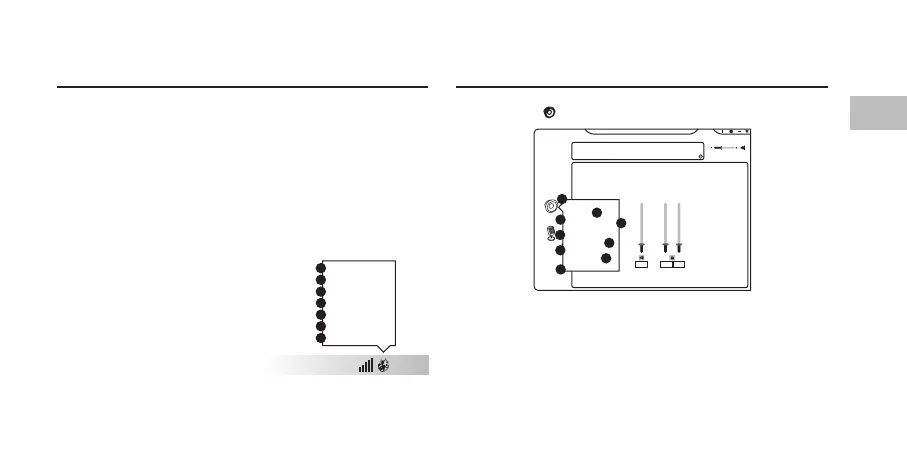
Right click on to show a speaker menu.
1. Volume Control
2. Sample Rate
3. Equalizer
4. Surround Headphone
5. Audio Brilliant
6. Dynamic Bass
7. Smart Volume
8. Voice Clarity
9. Surround Max
User Interface
Right click the icon from the system tray will pop up a
menu that links to Windows default software.
1. Open the headset software.
2. Open the default Windows Volume Control.
3. Open the default Windows Media Player.
4. Open the default Windows Sound Recorder.
5. Open the default Windows Multimedia Properties.
6. Open the headset software Settings.
7. Exit the headset software.
1
2
6
5
7
9
8
4
3
1
2
3
4
5
6
7


 To Next Page