EasyManua.ls Logo

ADX FIRESTORM H09 - MIC Setting

ADX FIRESTORM H09
78 pages
Print Icon
To Next Page IconTo Next Page
To Previous Page IconTo Previous Page
Loading...
19
GB
Speakers
Volume Control
Mic-In
8.00
dB
Monitor
-7.00
dB
Mic
Playback
Out In
EQ DB SMX MV
XHP SVN
AB VC
Speakers Out
48 KHz
7.1
Capture
Mic In
Volume Control
Mic-In
8.00
dB
Monitor
-7.00
dB
Playback
Out In
EQ DB SMX MV
XHP SVN
AB VC
Speakers Out
48 KHz
7.1
Capture
Mic In
Speakers
Mic
Volume Control
Sample Rate
Xear Magic Voice
1. Volume Control
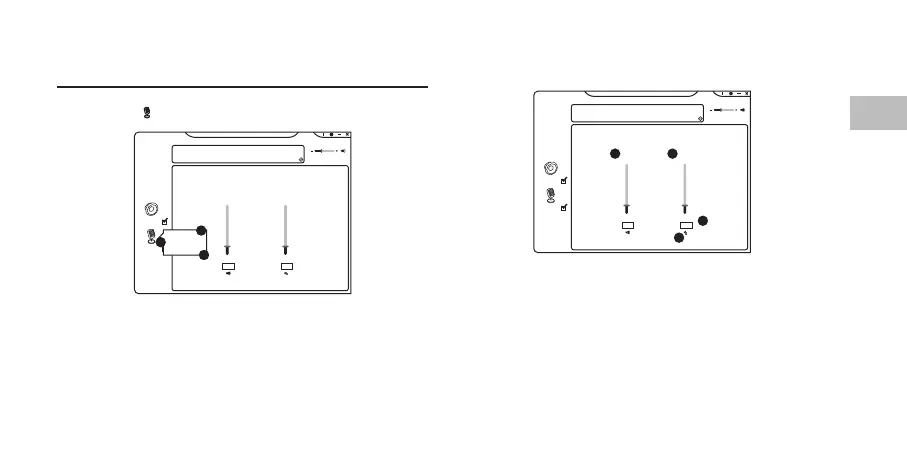
Mic Setting
Right click on to show microphone menu.
1. Volume Control
2. Sample Rate
3. Magic Voice
2
3
4
1
1. Adjust the microphone
volume.
2. Listen to your own voice
when using microphone
to speak.
3. Mute or restore the
microphone.
4. Range of volume in dB is
between -37.00 and 0.00.
1
2
3

Related product manuals