26
NO
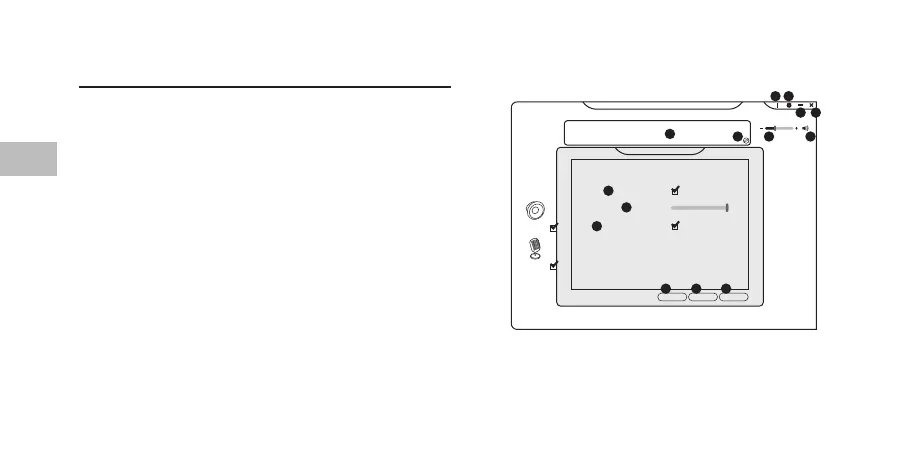
Brukergrensesnitt
Velg AFSH0917 Conguration.exe fra skrivebordet for å
starte programvaren.
1. Programvareinformasjon.
2. Innstillingsvalg.
3. Minimer programmet.
4. Avslutt programmet.
5. Aktivert funksjon vil være uthevet.
6. Bytt mellom Status og Prol-panelet.
7. Juster lydstyrken.
8. Dempe eller gjenopprette lyden.
9. “Vis systemfeltikon” alternativ
10. Juster UI-gjennomsiktighetsnivå.
11. “Ikke vis oppstartsmelding” alternativ
12. Lagre gjeldende innstilling og avslutt.
13. Avbryt innstilling og avslutt.
14. Lagre gjeldende innstilling.
Playback
Out In
EQ KS SF
EM VF
VSS SMX
Speakers Out
48 KHz
7.1
Capture
Mic In
Show System Tray Icon :
Application Setting
Speakers
Mic
UI Transparent :
Don’t show start up message :
OK Cancel Apply
5
9
10
11
12 13 14
1 2
3 4
6 7 8


 To Next Page