15
aee.com
DE
EN
ES
PT
IT
EL
FR
NL
PL
CS
HU
SV
FI
NO
RU
DA
Playback
1. Operating Procedure for Playback
a. Pressthe"playback"keytoenterplaybackinterface;
b. Press"<"/">"keytoselectthefiletypeandpress"OK"keytoconfirm;
:Viewvideofiles
:Viewphotofiles
:Viewallvideo/audio/photofiles
c. Press"<"/">"/"+"/"-"keytomovethecursortothethumbnailofthefileyouwantto
play back;
d. Press"OK"keytoentertheplaybackinterfaceandpress"OK"keytoplayit.
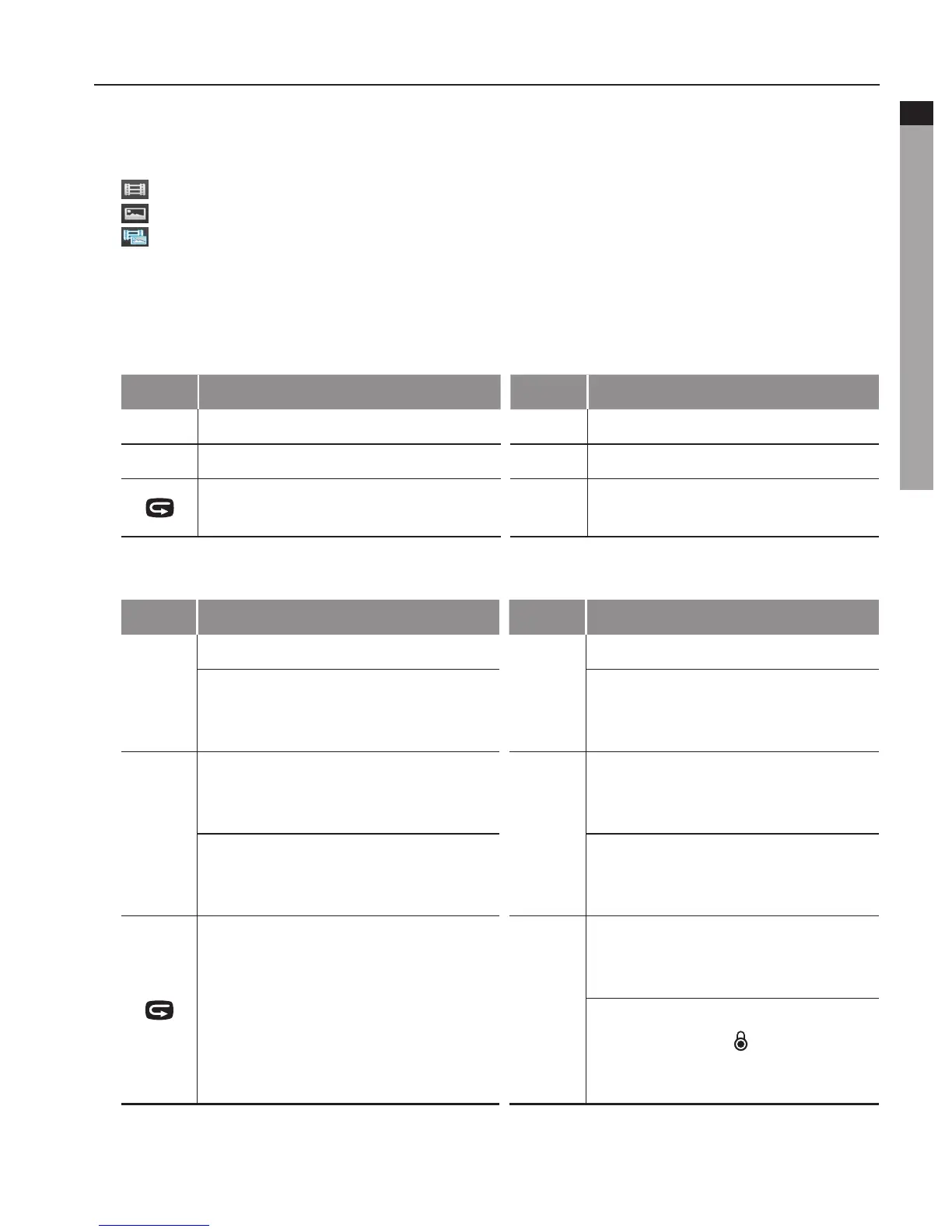
- When playing video files, the functions of various keys are listed as below:
Key Functions Key Functions
-
Decrease volume;
+
Increase volume;
<
Fast rewind;
>
Fast forward;
Pressittoreturntothefilepreview
interface;
OK
Play/pause.
- When reviewing photos, the functions of various keys are listed as below:
Key Functions Key Functions
-
Zoom out;
+
Zoom in;
Inzoom-inmode,whenyoupress
"
OK
", you can press "
-
" to move
the photo downward;
Inzoom-inmode,whenyou
press "
OK
", you can press "
+
" to
move the photo upward;
<
Inzoom-inmode,whenyoupress
"
OK
", you can press "
<
" to move
the photo rightward;
>
Inzoom-inmode,whenyou
press "
OK
", you can press "
>
" to
move the photo leftward;
When a photo is displayed in its
actualsize,press"
<
" to view the
previous photo;
When a photo is displayed in its
actualsize,press"
>
" to view the
next photo;
Pressittoreturntothefilepreview
interface;
OK
When a photo is displayed in its
actualsize,press"
OK
" to rotate
it;
Inzoom-inmode,whenyou
press "
OK
", the " " icon will
appear in the upper Right corner,
you can to move the photo;
:Viewvideofiles
:Viewphotofiles
:Viewallvideo/audio/photofiles



 To Next Page