23
aee.com
DE
EN
ES
PT
IT
EL
FR
NL
PL
CS
HU
SV
FI
NO
RU
DA
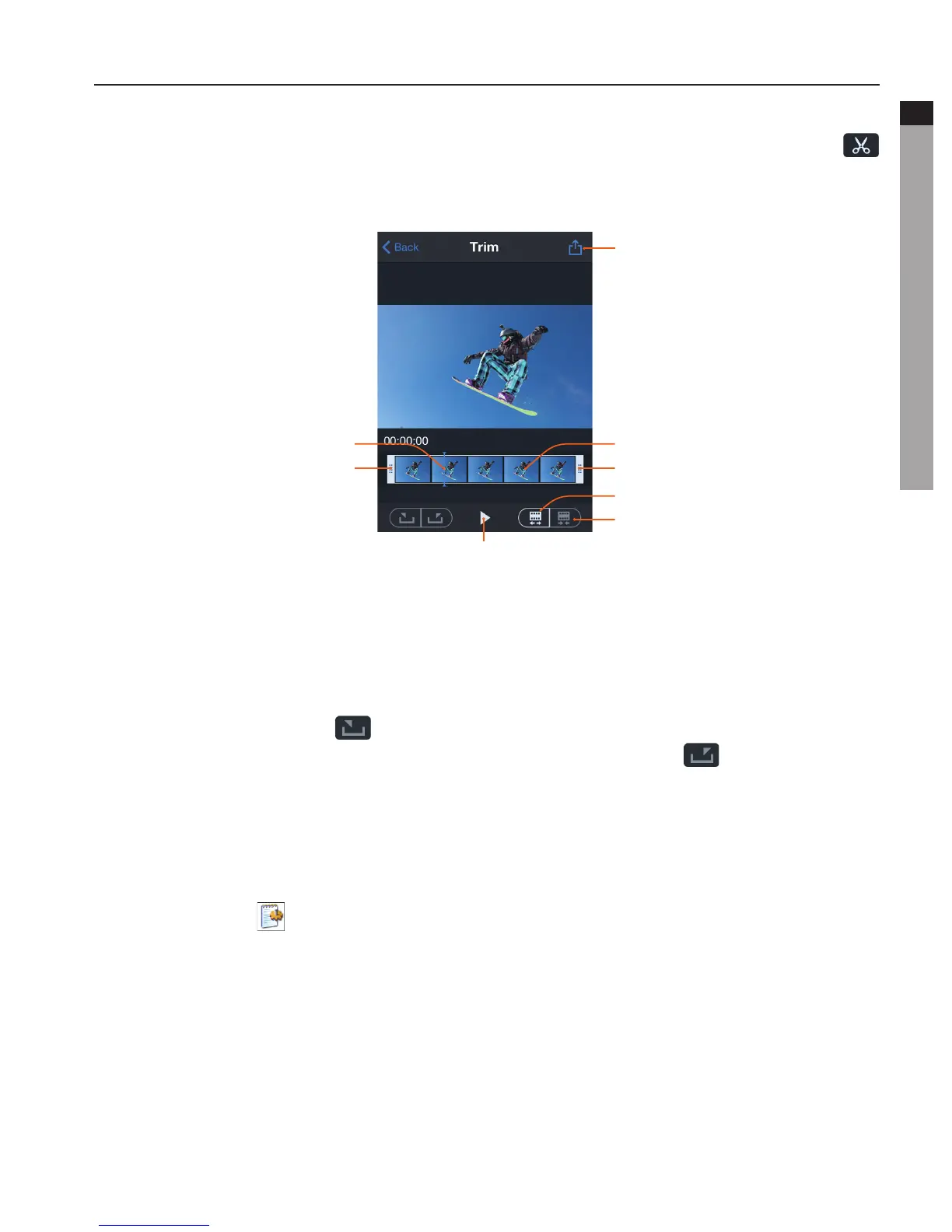
4. Trim Videos
- When viewing the downloaded files on the mobile device, you can click the icon "
" at the bottom of the screen to enter the video trimming interface shown in the figure
below:
Save and share
Expandtheframe
Narrow the frame
Storyboard
Endframe
Playicon
Current frame
Start frame
- This function allows you to take a clip out of the video to generate another video by
changing the starting frame and ending frame.
- The following two methods can be used to chang the starting frame and ending frame:
Onemethod:changethestartingframeandendingframebydirectlydraggingthetime
framepanel(clickthePlaykeyforpreviewinguntilthebestlocationisreached).
Anothermethod:click" " to set the current frame as the starting frame, drag the
time frame panel to change the current frame, and then click " " again to set the
current frame as the ending frame.
5. Change Wi-Fi Connection Name and Password
- Connect your camera (with TF card installed) to the computer and turn on your camera.
Onthecomputer,doubleclick"MyComputer"tofindandentertheremovabledisk,and
then open the " "WiFi.conffileinthefolder"MISC".
a.ChangetheWi-Ficonnectionname:Find"AP_SSID=AEEMagicam".Changethecontent
followingtheequalsign"="toyourdesirednameandsaveit.
b.ChangetheWi-Ficonnectionpassword:Find"AP_PASSWD=AEE12345".Changethe
contentfollowingtheequalsign"="toyourdesiredpassword(containingatleast8digits
and above) and save it.



 To Next Page