When you cook with the core temperature sensor, you can change the temperature shown
in the Temperature/Time display. After you put the core temperature sensor in the socket
and set an oven function and temperature, the display shows the current core temperature.
Touch
again and again to see three other temperatures:
• The current core temperature
• The oven set temperature
• The current oven temperature.
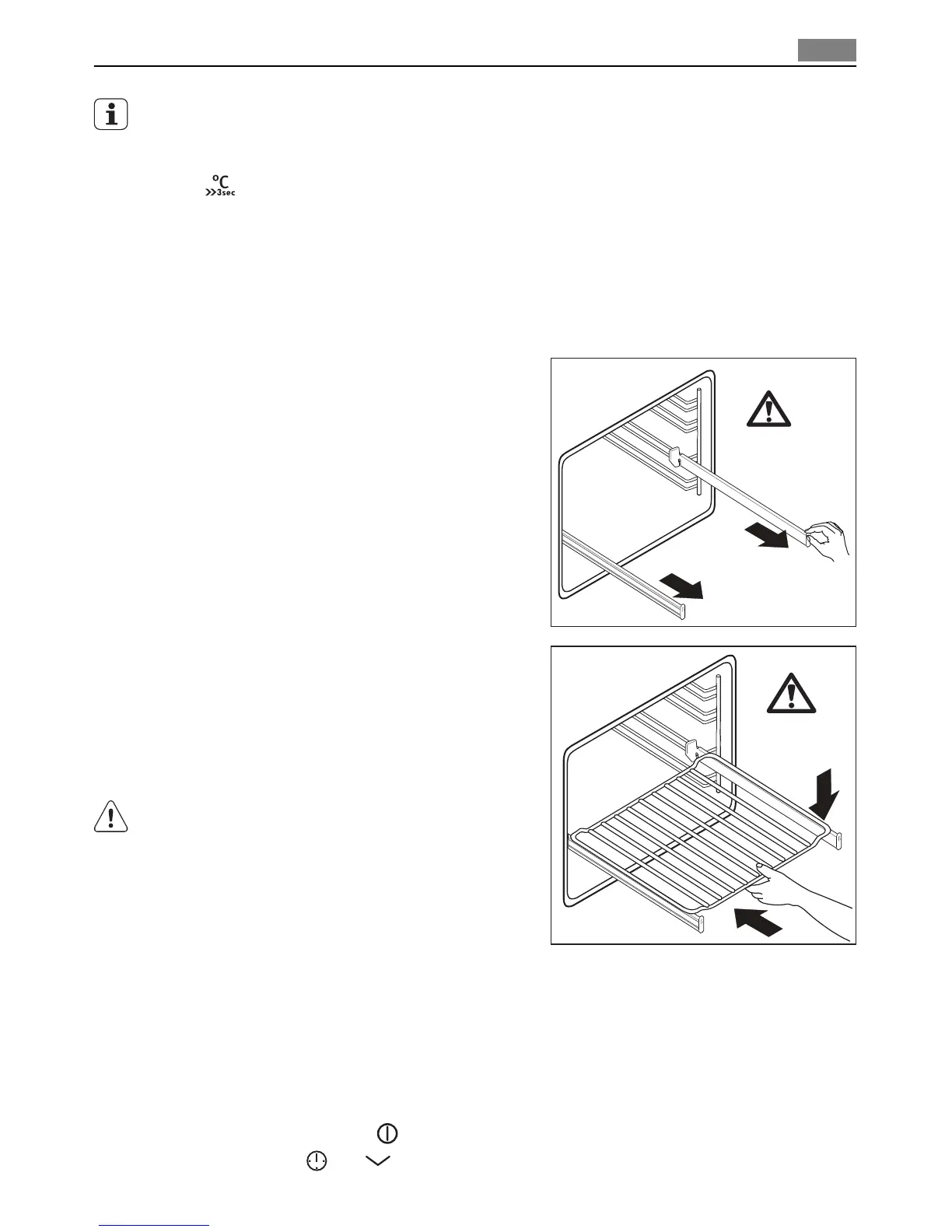
Telescopic runners
With telescopic runners you can put and remove the shelves more easily.
1. Pull out the right and left hand telescopic
runners.
2. Put the oven shelf on the telescopic run-
ners and carefully push them in the appli-
ance.
Make sure you push back the telescopic
runners fully in the appliance before you
close the oven door.
CAUTION!
Do not clean the telescopic runners in the
dishwasher. Do not lubricate the telescopic
runners.
ADDITIONAL FUNCTIONS
Child safety
You cannot activate the appliance on if the child safety device operates.
Activating/Deactivating the child safety device:
1. Deactivate the appliance
. Do not set any oven function.
2. Touch and hold
and at the same time for minimum 2 seconds.
°C
°C
Additional functions 19


 To Next Page