WARNING!
Before you remove the heating element switch off the appliance. Make sure that the appli-
ance is cold. There is a risk of burns!
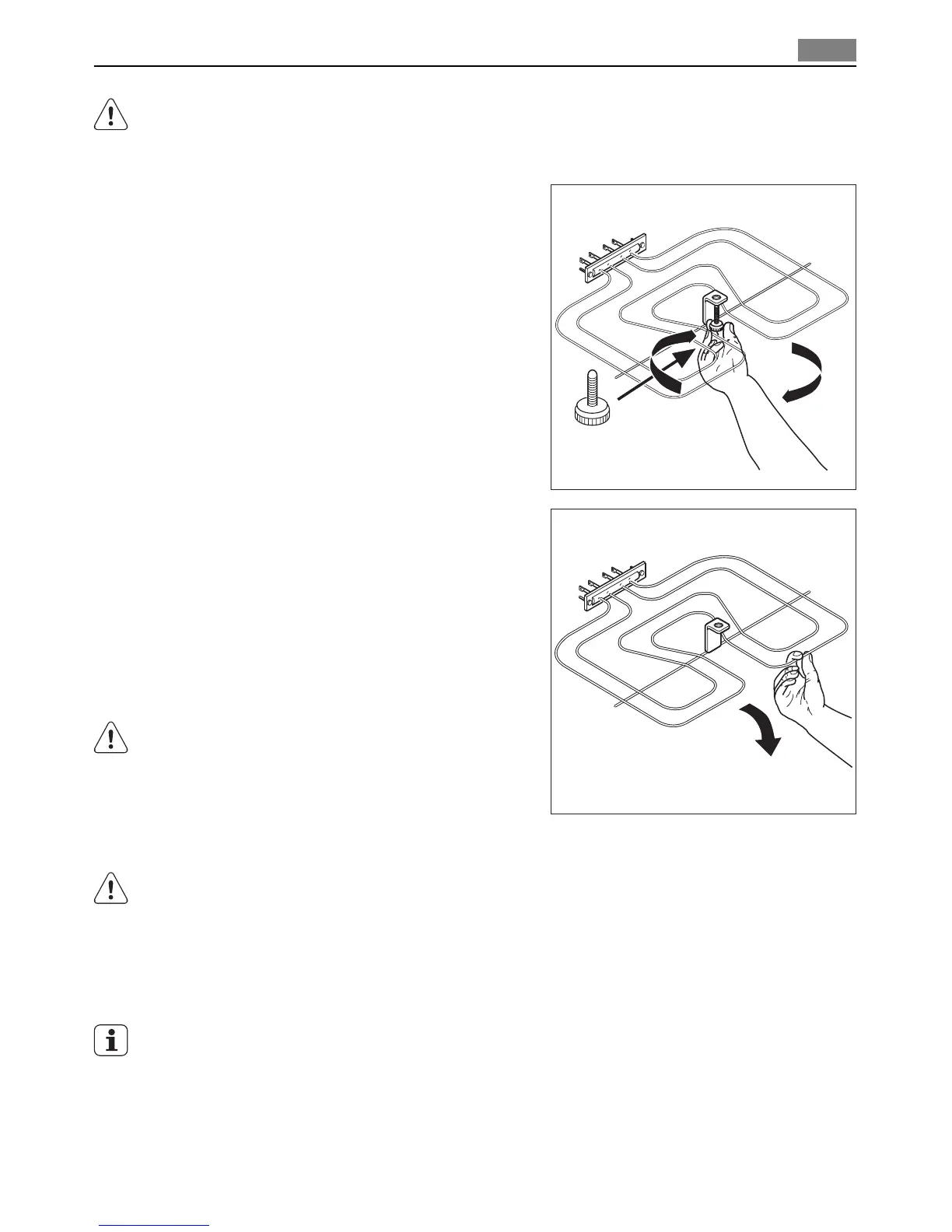
1. Remove the screw which holds the heat-
ing element. At first time, use a screw-
driver.
2. Carefully pull the heating element down.
At this time you can clean the oven ceil-
ing.
Clean the oven ceiling with a soft cloth with
warm water and cleaning agent and let it dry.
Installing the heating element
1. Install the heating element in opposite se-
quence.
WARNING!
Make sure that the heating element is cor-
rectly installed and it does not fall down.
Oven lamp
WARNING!
Be careful! There is the risk of electrical shock!
Before you change the oven lamp:
• Switch off the oven.
• Remove the fuses in the fuse box or switch off the circuit breaker.
Put a cloth on the bottom of the oven for protection of the oven light and glass cover.
1. Turn the glass cover anti-clockwise to remove it.
2. Clean the glass cover.
3. Replace the oven light bulb with applicable 300°C heat-resistant oven light bulb.
Use the same oven lamp type.
Care and cleaning 23


 To Next Page