WARNING!
Make sure that the glasses
are inserted in the correct
position otherwise the
surface of the door may
overheat.
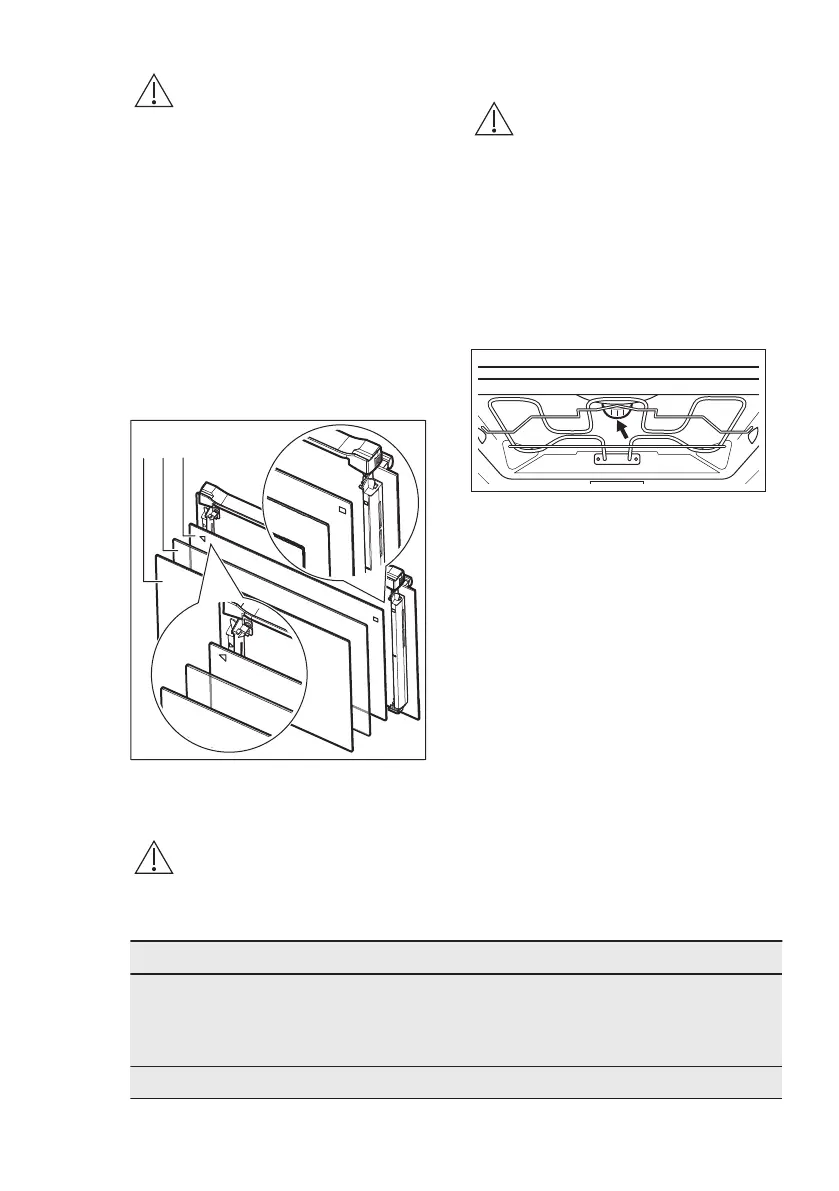
Make sure that you put the glass panels
(C, B and A) back in the correct
sequence. First, insert panel C, which has
a square printed on the left side and a
triangle on the right side. You will also
find those symbols embossed on the
door frame. The triangle symbol on the
glass must match the triangle on the
door frame, and the square symbol must
match the square. After that insert the
other two glass panels.
11.6 Replacing the lamp
WARNING!
Risk of electric shock.
The lamp can be hot.
1. Turn off the oven.
Wait until the oven is cooled down.
2. Disconnect the oven from the mains.
3. Put a cloth on the bottom of the
cavity.
The top lamp
1. Turn the lamp glass cover to remove
it.
2. Clean the glass cover.
3. Replace the lamp with a suitable 300
°C heat-resistant lamp.
4. Install the glass cover.
12. TROUBLESHOOTING
WARNING!
Refer to Safety chapters.
12.1 What to do if...
Problem Possible cause Remedy
You cannot activate or oper-
ate the oven.
The oven is not connected
to an electrical supply or it is
connected incorrectly.
Check if the oven is correctly
connected to the electrical
supply (refer to the connec-
tion diagram if available).
The oven does not heat up. The oven is deactivated. Activate the oven.
ENGLISH 31



 To Next Page