10
Shelf support, removable
11
Shelf positions
3.2 Accessories
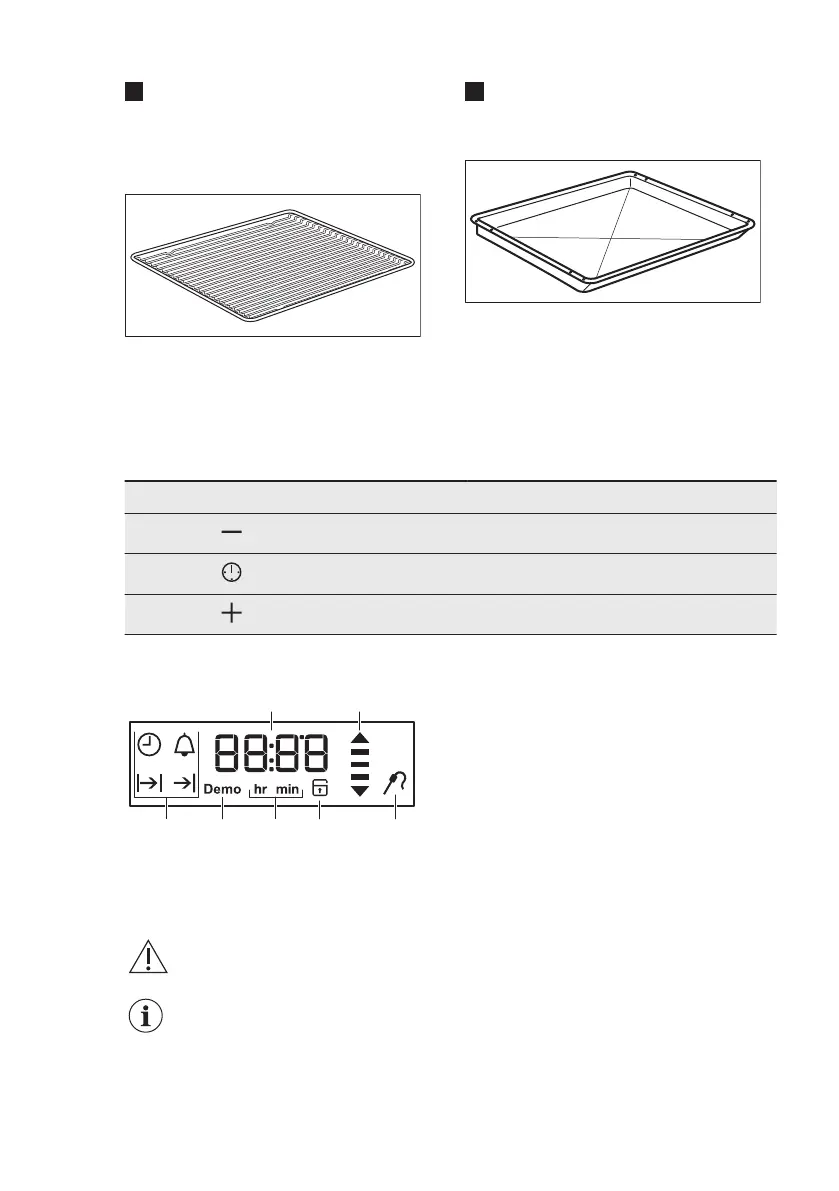
Wire shelf
For cookware, cake tins, roasts.
Combi pan
For cakes and biscuits. To bake and roast
or as a pan to collect fat.
4. CONTROL PANEL
4.1 Buttons
Sensor field / Button Function Description
MINUS To set the time.
CLOCK To set a clock function.
PLUS To set the time.
4.2 Display
A. Timer / Temperature
B. Heat-up and residual heat indicator
C. Core temperature sensor (selected
models only)
D. Door lock (selected models only)
E. Hours / minutes
F. Demo mode (selected models only)
G. Clock functions
5. BEFORE FIRST USE
WARNING!
Refer to Safety chapters.
To set the Time of day refer
to "Clock functions"
chapter.
5.1 Initial Cleaning
Remove all accessories and removable
shelf supports from the oven.
Refer to "Care and cleaning" chapter.
Clean the oven and the accessories
before the first use.
Put the accessories and the removable
shelf supports back to their initial
position.
www.aeg.com8



 To Next Page