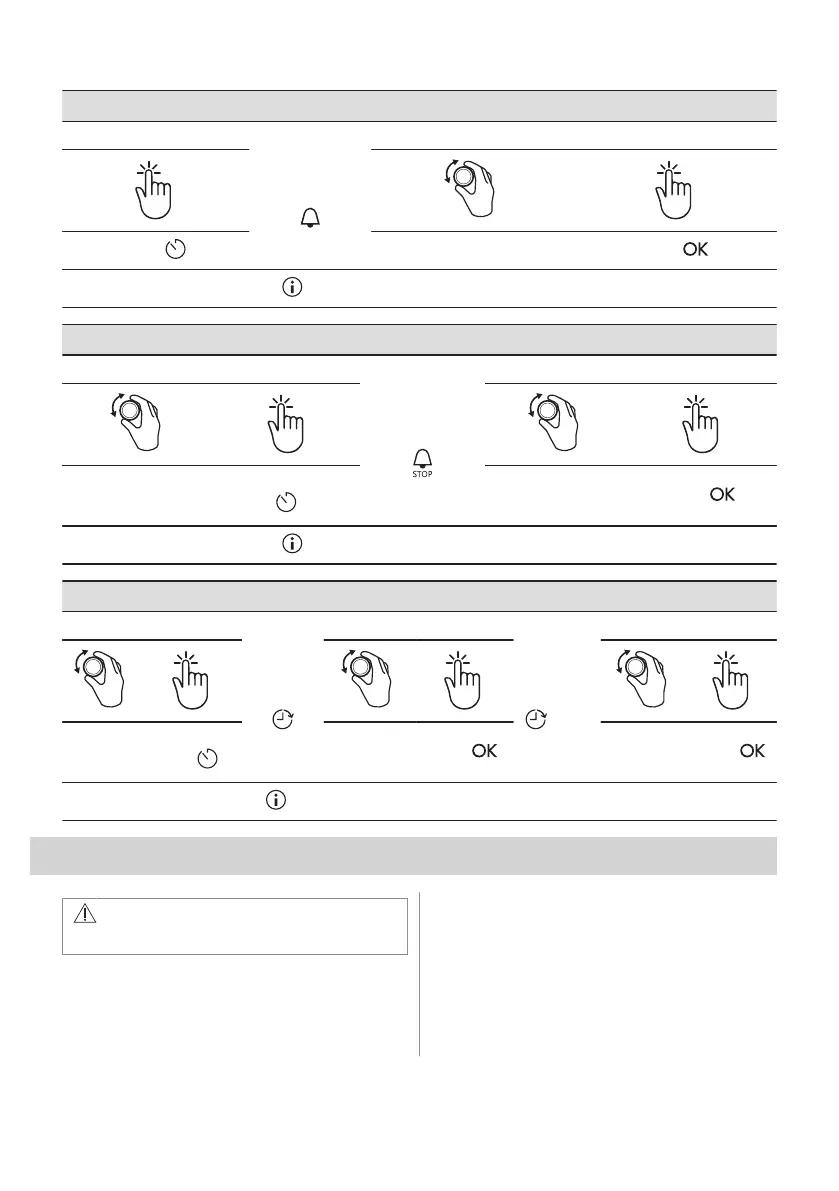
How to set: Minute minder
Step 1
The display
shows:
0:00
Step 2 Step 3
Press: .
Set the Minute minder
Press: .
Timer starts counting down immediately.
How to set: Cooking time
Step 1 Step 2
The display
shows:
0:00
Step 3 Step 4
Choose a heating
function and set the
temperature.
Press repeatedly:
.
Set the cooking time.
Press: .
Timer starts counting down immediately.
How to set: Time Delay
Step 1 Step 2
The dis‐
play
shows: the
time of day
START
Step 3 Step 4
The display
shows:
--:--
STOP
Step 5 Step 6
Select the
heating
function.
Press repeat‐
edly: .
Set the start
time.
Press: .
Set the end
time.
Press: .
Timer starts counting down at a set start time.
9. USING THE ACCESSORIES
WARNING!
Refer to Safety chapters.
9.1 Inserting accessories
A small indentation at the top increases
safety. The indentations are also anti-tip
devices. The high rim around the shelf
prevents cookware from slipping of the shelf.
ENGLISH 17


 To Next Page