You can turn on or turn off the function in the
menu: Basic Settings.
1. Turn on the oven.
2. Select the heating function.
3. Set the temperature above 80 °C.
4. Press again and again until the display
shows: Heat + Hold.
5. Press to confirm.
When the function ends, a signal sounds.
7.4 Extra Time
The function: Extra Time makes the heating
function continue after the end of Duration.
Applicable to all heating functions with
Duration or Weight Automatic.
Not applicable to heating functions with
the food sensor.
1. When the cooking time ends, a signal
sounds. Press any symbol.
The display shows the message.
2. Press to turn on or to cancel.
3. Set the length of the function.
4. Press .
8. AUTOMATIC PROGRAMMES
WARNING!
Refer to Safety chapters.
8.1 Recipes online
You can find the recipes for the automatic
programmes on our website. To find the
Recipe Book check the PNC number on the
rating plate on the front frame of the oven
cavity.
8.2 Recipes with Recipe Automatic
This oven has a set of recipes you can use.
The recipes are fixed and you cannot change
them.
1. Turn on the oven.
2. Select the menu: Recipes. Press to
confirm.
3. Select the category and dish. Press
to confirm.
4. Select a recipe. Press to confirm.
9. USING THE ACCESSORIES
WARNING!
Refer to Safety chapters.
9.1 Inserting accessories
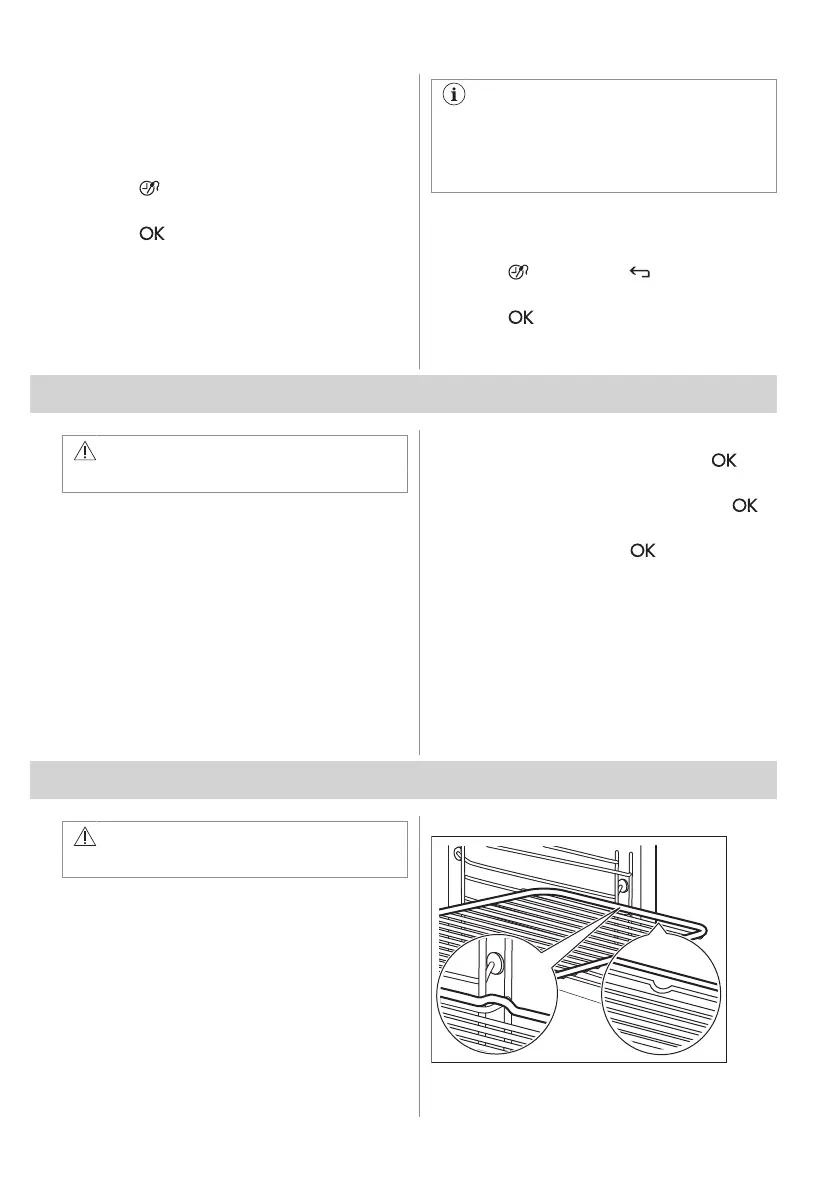
A small indentation at the top increases
safety. The indentations are also anti-tip
devices. The high rim around the shelf
prevents cookware from slipping off the shelf.
Wireshelf
16 ENGLISH



 To Next Page