Frequency 2.412 - 2.472 GHz for Eu‐
ropean market
Protocol IEEE 802.11b/g/n
Max Power <20 dBm
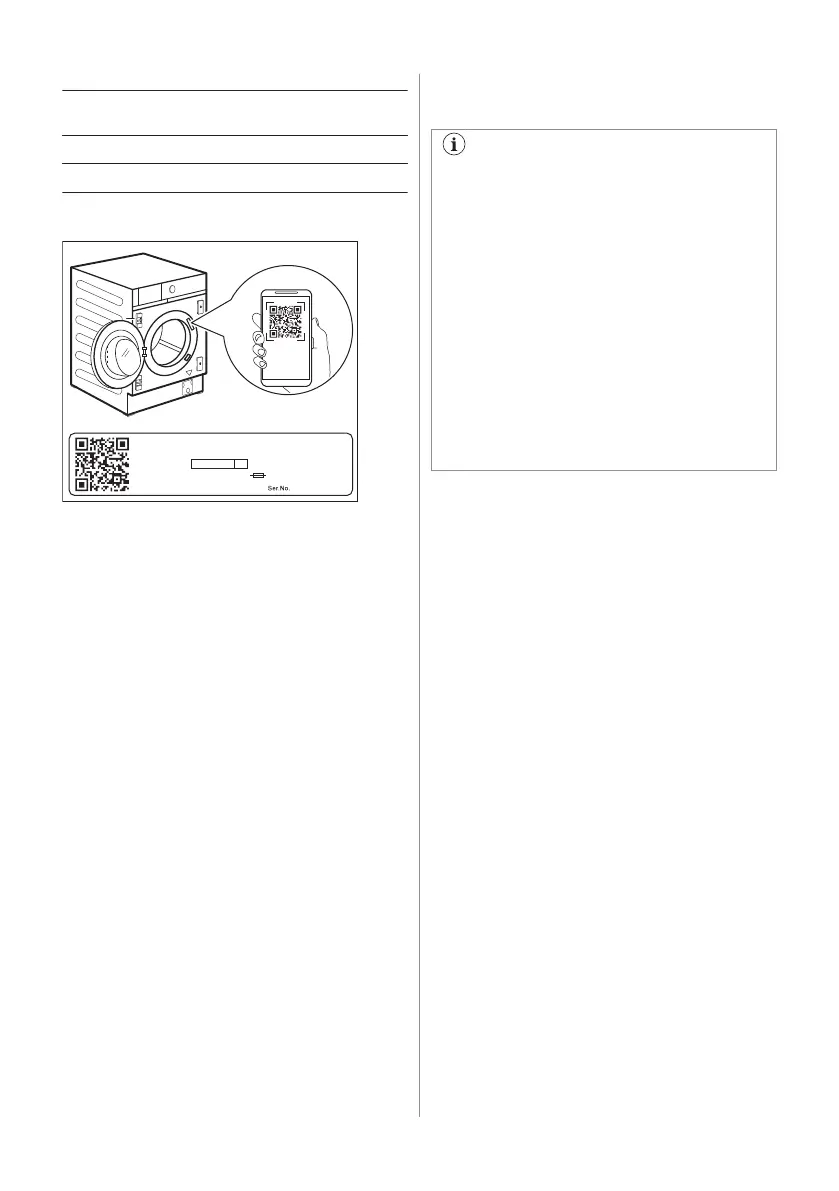
9.1 QR code on rating plate
00000000
00A
Mod.
xxxxxxxxx
000V ~ 00Hz 0000 W
910000000
00
Prod.No.
QR code can be used in two ways:
• Scan the QR code with the built-in camera
app to download the My AEG Care
application from the App store on your
smart device and follow the required
steps.
• Pairing your smart device with appliance
to simplify the process. Scan the QR code
with QR code scanner built-in My AEG
Care application.
9.2 Installing and configuring My
AEG Care
My AEG Care allows you to control your
laundry through a mobile device.
It contains a large number of
programmes, useful features and product
information tailored perfectly to the
appliance.
Through the app you can select the
programmes already available from the
appliance control panel, plus unlock
additional programmes available only
from a mobile device.
Additional programmes can change over
the time along with new versions of the
app.
It's personalized laundry care - all from
your mobile device.
When connecting the appliance to the
application, stand near it with your mobile
device.
Make sure that your mobile device is
connected to the wireless network.
1. Go to the App Store on your smart device
or scan QR code (
see 'QR code on rating
plate' paragraph
).
2. Download and install the My AEG Care
App.
3. Make sure you started a Wi-fi connection
in the appliance. If not, read the next
paragraph 'Configuring the appliance
wireless connection'.
4. Start the application. Select the country
and language and login with Your email
and password. If you do not have an
account, create a new one following the
instructions in My AEG Care.
5. Follow the instructions on the App for the
appliance registration and configuration.
9.3 Configuring the washing
machine wireless connection
1. Press the On/Off button for a few
seconds to activate the appliance. Wait
about 10 seconds before proceeding with
wireless configuration.
2. Select a programme by turning the
programme dial.
34 ENGLISH



 To Next Page