145
English
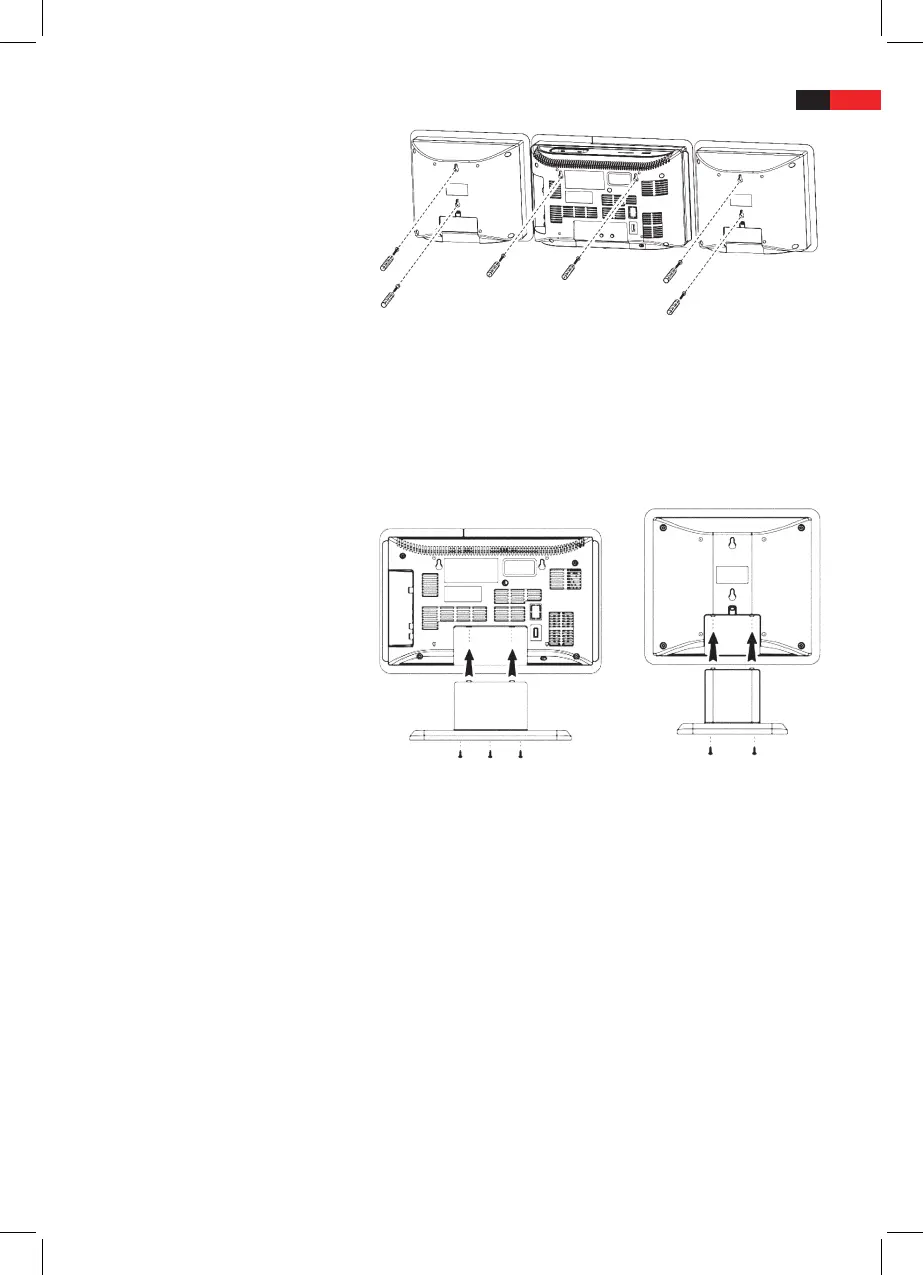
Wall Mounting
Level the drilling template horizontally and mark the drill holes for
wall mounting.
Drill the holes with a 6mm drill bit.
Insert the wall plugs to the drill holes.
Screw in the fastening screws, but let them stand out approx.
4mm.
Hang up device and speakers.
Mount Desk Stand
Attach device and speakers to the corresponding desk stands and
fasten with the supplied screws.
Connect Speakers
Connect the speakers to SPEAKERS R/L (28).
Connect Power
Follow these instructions for mains power connection for safe and
trouble-free operation:
Ensure that the mains cable is undamaged; do not rout the cable
■
over hot surfaces or sharp edges.
■ Do not tension the mains cable.
Connect the device to a properly installed wall outlet. The standby
■
LED lights up and the time (0:00) is shown on the display.


 To Next Page