158
English
Troubleshooting
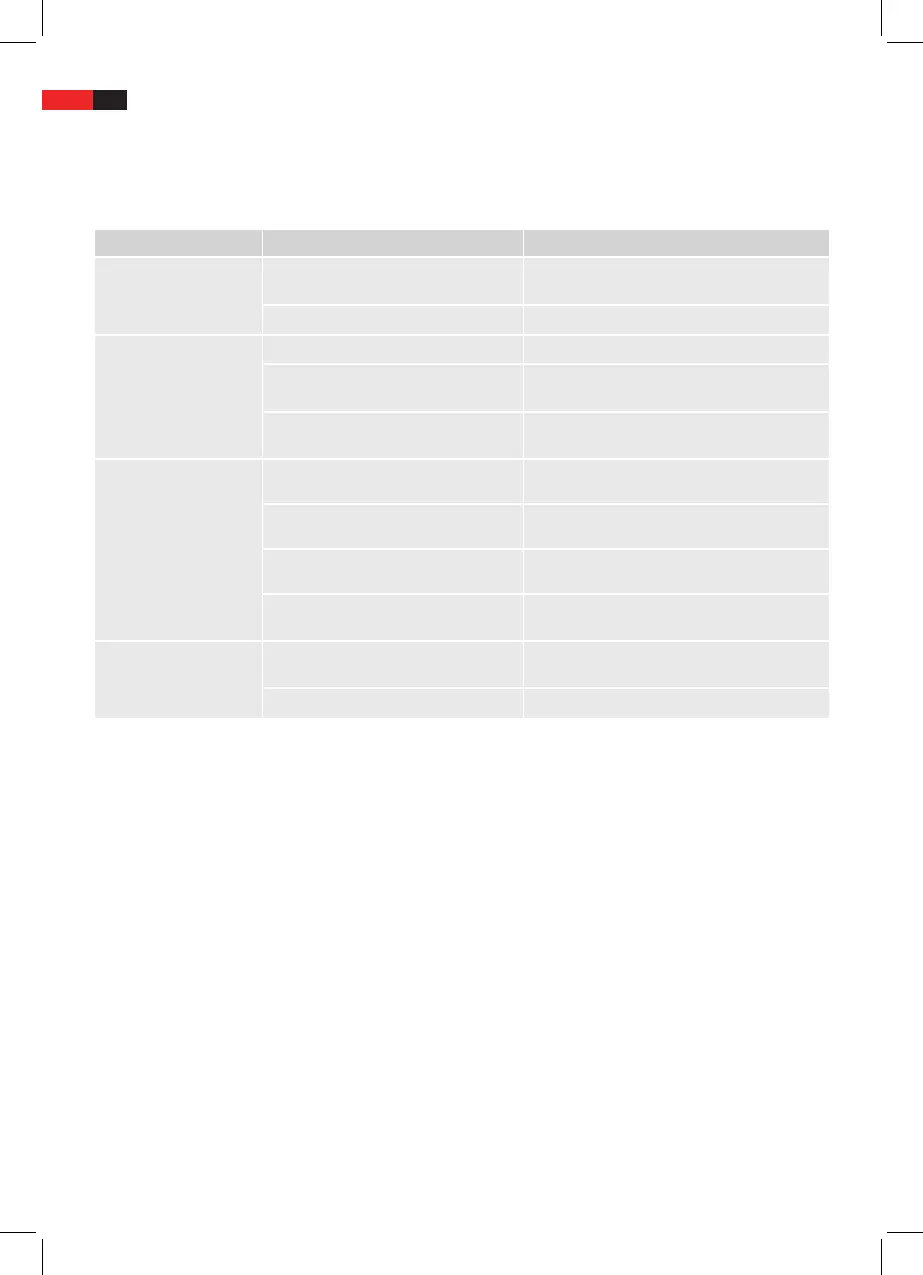
Please check with the following table if you can solve the problem yourself before contacting the service center.
Problem Possible Cause Solution
The device cannot be
turned on.
Mains cable is not connected to wall
outlet.
Connect the mains cable to the wall outlet.
Wall outlet has no power. Check your fuses.
No sound.
Volume level is set to minimum. Increase the volume level.
The sound is muted.
Press MUTE (41) on the remote control to
unmute the sound.
The speakers are not connected cor-
rectly.
Ensure that the speakers are connected to
SPEAKERS R/L (28).
CD is not recognized.
CD is inserted the wrong way round. Insert CD with the label to the front.
CD is dirty or defective. Clean CD or insert a dierent CD.
CD format not supported by the device. Insert a dierent CD.
Error on burnt CD.
Check you home-burnt CD on a dierent
player.
Remote control does not
work.
Distance between remote control and
device too big.
The remote control has a range of 5 meters.
Batteries are exhausted. Change the remote control batteries.


 To Next Page