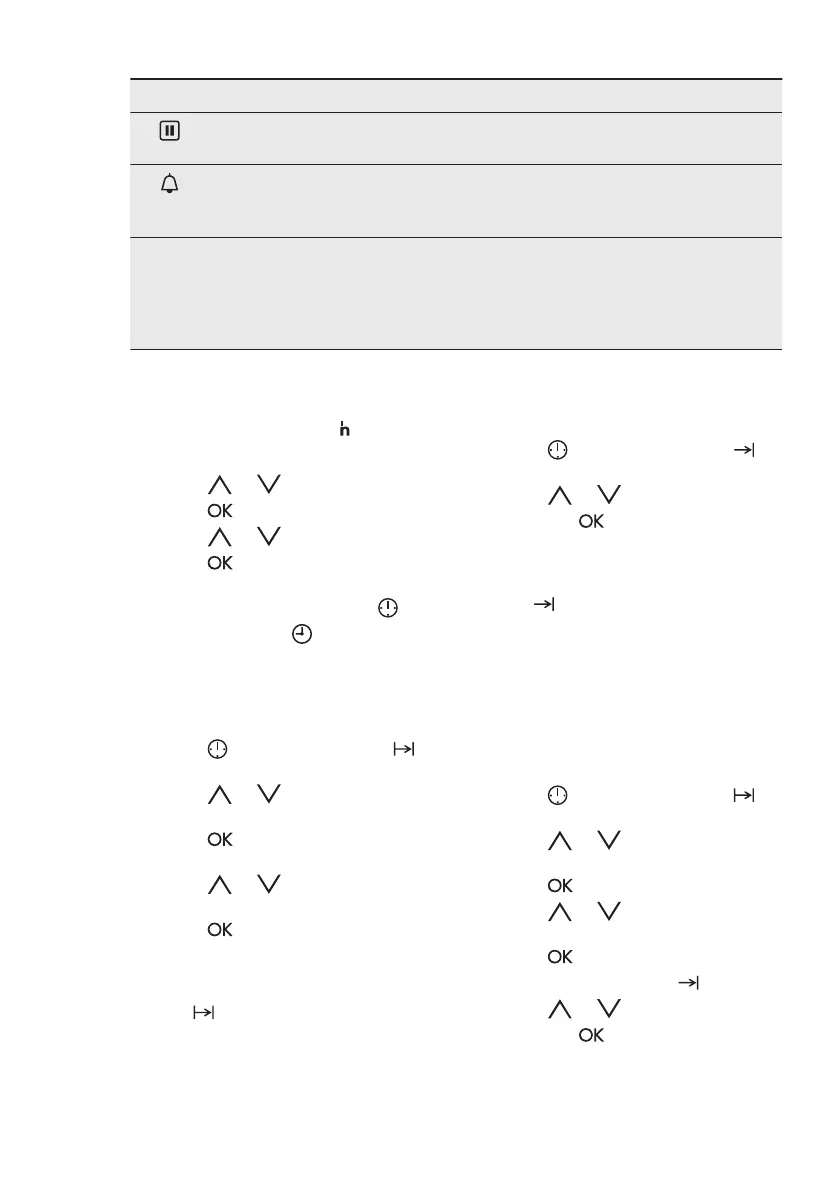
Clock function Application
Set + Go To turn on the oven with necessary settings with only
one press of the sensor field any time later.
Minute Minder To set a countdown time. This function has no effect on
the operation of the oven. You can set the Minute Minder
at any time and also when the oven is off.
00:00 Count Up Timer To set the count up, which shows how long the oven
works. It is on immediately when the oven starts to heat.
The Count Up Timer is not turned on if Duration and End
Time are set. This function has no effect on the opera‐
tion of the oven.
7.2 How to set: Time of Day
After the first connection to the mains,
wait until the display shows
and 12:00.
"12" flashes.
1. Press or to set the hours.
2. Press
.
3. Press or to set the minutes.
4. Press .
The display shows the new time.
To change the time of day press
again and again until starts to flash.
7.3 How to set: Duration
1. Set a heating function and
temperature.
2. Press again and again until
starts to flash.
3. Press or to set the minutes
for Duration.
4. Press or the Duration starts
automatically after 5 seconds.
5. Press or to set the hours for
Duration.
6. Press or the Duration starts
automatically after 5 seconds.
When the set time ends, the signal
sounds for 2 minutes. The display shows
flashing
and time setting. The oven
turns off.
7. Press a sensor field to stop the
signal.
8. Turn off the oven.
7.4 How to set: End Time
1. Set a heating function and
temperature.
2. Press
again and again until
starts to flash.
3. Press or to set the End Time
and press . First you set the
minutes and then the hours.
When the set time ends, the signal
sounds for 2 minutes. The display shows
flashing
and the time setting . The
oven turns off automatically.
4. Press a sensor field to stop the
signal.
5. Turn off the oven.
7.5 How to set: Time Delay
1. Set a heating function and
temperature.
2. Press again and again until
starts to flash.
3. Press or to setthe minutes for
Duration.
4. Press
.
5. Press or to set the hours for
Duration.
6. Press .
The display shows flashing .
7. Press
or to set the End Time
and press . First you set the
minutes and then the hours.
The oven turns on automatically later on,
works for the set Durationand stops at
ENGLISH 13









 To Next Page