Home
Aegis
Desktop
MS-B901
Page 20
Aegis MS-B901 - Page 20
39 pages
Manual
Save Page as PDF
To Next Page
To Next Page
To Previous Page
To Previous Page
Loading...
Service Manual
20
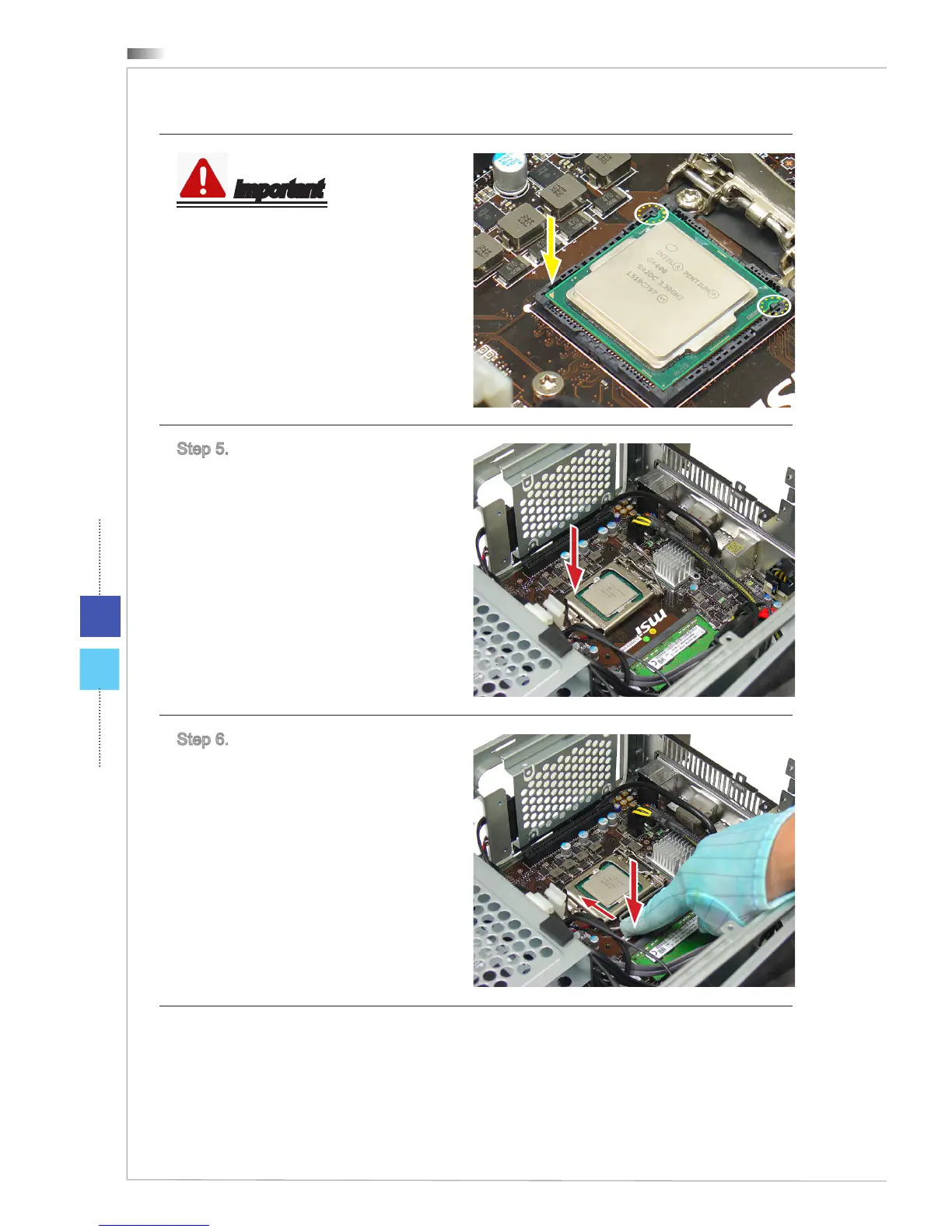
Important
The correct position of the CPU.
Step 5. Close and slide the load plate
under the retention knob.
Step 6. Close and engage the load
lever.
Follow the above procedures in re-
versed order to uninstall the CPU.
19
21
Table of Contents
Main Page
Table of Contents
2
How to Use this Service Manual
3
Necessary Tools
3
Safety Precautions
4
Other Notice
4
Upgrade and Warranty
4
Acquisition of Replaceable Parts
4
Arrow Used in this Manual
5
Tutorial Video
5
Removing Chassis
6
Installing Chassis
9
Removing CPU Fan & VGA Card Bracket
12
Removing CPU Cooler
14
Installing Memory Module
15
Removing Memory Module
16
Installing CPU
17
Installing CPU Cooler
21
Installing CPU Fan & VGA Card Bracket
23
Installing Graphics Card
25
Removing Graphics Card
29
Installing 3.5" HDD
31
Installing 2.5" HDD
34
Upgrading Memory Module
36
Removing Memory Module
37
Upgrading SSD
38
Compatible SSD Type
39


 To Next Page