Need help?
Do you have a question about the Aeotec Water Sensor 7 Pro and is the answer not in the manual?
Read this manual carefully. Failure to follow recommendations can be dangerous or violate the law.
Explains Z-Wave as an international wireless protocol for Smart Home communication.
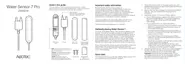
The AEOTEC Water Sensor 7 Pro detects water leakage, measures temperature and humidity.
Instructions for including the device, resetting to factory default, and physical installation.
Important precautions regarding the use, mixing, and disposal of batteries.
Steps to add (Inclusion) or remove (Exclusion) the device from a Z-Wave network.
Reports leakage status and controls devices via association group 2; protected by a tamper switch.
How the sensor reports water hits and when the leakage stops.
Procedure to test Z-Wave link strength using the tamper switch and LED indicators.
Explains the NIF's role in Z-Wave communication and how to issue one.
Hints for network installation issues, including factory reset and frequency checks.
Steps to perform a firmware update 'over the air' with controller support.
How Z-Wave devices control each other through association groups and commands.
Details the purpose and maximum nodes for each association group.
Configures which events trigger LED indications and the option to disable them.
Enables Z-Wave range testing via a double-click on the tamper switch.
Defines water leakage status that triggers BASIC commands to Association Group 2.
Specifies the commands ('On', 'Off', 'On and Off') sent to Association Group 2.
Sets BASIC command values for 'On' and 'Off' events to Association Group 2.
Configures time delays for sending 'On' and 'Off' command frames.
Sets delay for tamper alarm cancellation and reporting.
Sets minimum temperature/humidity changes to trigger unsolicited reports.
Defines the time interval for sending periodic unsolicited reports.
Resets configuration parameters or the entire device to factory defaults.
Lists the Z-Wave command classes supported by the device and their versions.
Defines key Z-Wave terms like Controller, Slave, Primary Controller, Inclusion, and Association.
Provides physical dimensions, hardware platform, and IP rating.
Specifies battery type, device type, generic, and specific device classes.
Details network operation mode, firmware version, and Z-Wave version.
Lists Z-Wave product ID, frequency, and maximum transmission power.
The Aeotec Water Sensor 7 Pro is a sophisticated and easily retrofittable sensor designed for comprehensive water leakage detection, temperature monitoring, and humidity measurement within a Smart Home environment. This device leverages the international Z-Wave wireless protocol, ensuring reliable communication through two-way messaging and the ability for mains-powered nodes to act as repeaters in a meshed network, extending its range and stability.
At its core, the Water Sensor 7 Pro serves as a crucial component for safeguarding your home against water damage. It actively detects water leakage, providing immediate alerts to a central Z-Wave controller. Beyond just water detection, the sensor integrates internal temperature and humidity sensors, enabling it to report significant changes in these environmental parameters. This multi-functional capability makes it a versatile tool for maintaining optimal conditions and preventing potential issues in various areas of your home. The device is also equipped with a tamper switch, offering an additional layer of security by notifying you if the sensor itself has been interfered with.
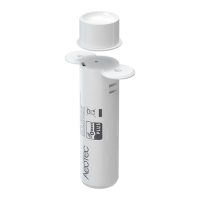
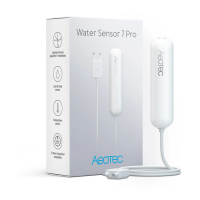
The Water Sensor 7 Pro is designed for ease of installation and integration into an existing Z-Wave network. Its slim and compact design allows for discreet placement in tight spaces, such as behind kitchen sinks, in bathrooms, or any other area where water leakage is a concern. The main unit is wall-mountable, and its hardwired sensor probe is positioned on the floor or surface where water detection is needed.
Inclusion (adding the device to your Z-Wave network) and Exclusion (removing it from the network) are straightforward processes. For gateways supporting SmartStart, simply scanning the QR code on the sensor's packaging with the gateway's app will automatically add the device to your network. For other Z-Wave controllers, inclusion and exclusion can be initiated by triple-clicking the tamper button on the side of the appliance. A single click on the button will also wake up the device. The sensor supports the Z-Wave Security S2 framework, offering authenticated and unauthenticated network keys for enhanced security.
Once installed and included, the sensor will report "Leakage Detected" and "No Leakage" status changes to the central Z-Wave controller using notification commands. It can also directly control other Z-Wave devices through association group 2, allowing for automated responses to detected events. For instance, upon detecting water, it could trigger a smart valve to shut off the water supply or activate an alarm.
The device provides precise environmental monitoring, with humidity measurements accurate to ± 3% RH (max) within a 0-80% RH range, and temperature measurements accurate to ±0.4 °C (max) within a –10 to 85 °C range. These internal sensors ensure that any significant changes in temperature or humidity are promptly reported to your central controller.
A useful feature is the link testing capability, which can be activated via configuration parameter #4. Double-clicking the tamper button initiates a link test with device No.1. A green LED blink indicates a successful connection, while three red LED blinks signify a failure, providing immediate feedback on network connectivity.
The sensor communicates various notifications to the central controller, including "Water Leakage Unknown Location," "Tamper Removed," and "Replace Battery Now," ensuring you are kept informed of its status and any potential issues. The device also supports sending a Node Information Frame (NIF) by pressing the tamper once, which is essential for certain network operations and confirms its inclusion or exclusion.
Configuration parameters offer extensive customization options to adapt the sensor's functionality to specific user needs. These parameters allow you to define when LEDs indicate events, enable or disable the range test function, and set triggers for the 2nd Association Group, among other settings. For example, you can configure the sensor to send BASIC commands to associated devices either when water leakage starts and stops, or just when it starts. You can also define the specific BASIC command values sent on "On" and "Off" events, as well as time delays for these commands. Furthermore, delays for tamper alarm cancellation can be configured, and you can choose whether to report the tamper alarm cancellation event.
The sensor also allows for the configuration of minimum temperature and humidity changes that trigger an unsolicited report to the central controller via Lifeline. This ensures that only significant environmental shifts are reported, preventing excessive network traffic. Periodic reports can also be configured, defining the time interval for unsolicited reports, which can be disabled if reports based on temperature/humidity changes are sufficient.
Maintenance of the Water Sensor 7 Pro is designed to be straightforward. The device operates on 1 * 1/2 AA batteries, and it's crucial to ensure fresh, fully charged batteries are used upon installation. The DSK for S2 inclusion is conveniently located inside the sensor's packaging.
For troubleshooting network installation, several hints are provided: ensuring the device is in factory reset state before inclusion, excluding it if in doubt, checking for frequency compatibility between devices, removing dead devices from associations to avoid delays, and ensuring sufficient mains-powered devices are present to benefit from the meshing network.
The device supports "Firmware-Update over the Air," allowing for future enhancements and bug fixes. If your central controller supports this function, the firmware update process can be confirmed by removing the cover to wake up the device and then hitting the tamper switch once.
In cases where the primary controller is inoperable, the device can be reset to factory default without its involvement. This is achieved by removing the cover, tripping the tamper switch, pushing the tamper for 5 seconds until the red LED blinks once, releasing it, and then pushing it again for 5 seconds while the red LED blinks until the green LED blinks once.
Battery safety is emphasized, advising users to remove batteries when the device is not in use and to avoid mixing batteries of different charging levels or brands. Configuration parameter 255 allows for a complete factory reset of the sensor, including all parameter settings, and can also send a device reset locally notification.
 General
| Battery Life | Up to 2 years |
|---|---|
| Connectivity | Z-Wave |
| Water Detection | Yes |
| IP Rating | IP67 |
| Wireless Protocol | Z-Wave Plus |
| Alarm Sound | Yes |
| LED Indicators | Yes |
| Battery Type | CR123A |
| Operating Humidity | 0% to 95% |
| Z-Wave Frequency | 868.42 MHz (EU) |
| Wireless Range | Up to 100 m |
| Water detection probes | 2 |
| Compatibility | Z-Wave certified |
| Operating Temperature | -10°C to 50°C |




 To Next Page