EasyManua.ls Logo

Aeotec ZW187 - User Manual

Aeotec ZW187
9 pages
Print Icon
To Next Page IconTo Next Page
Loading...
Recessed Door Sensor Gen 7 user guide.
Modified on: Mon, 16 Mar, 2020 at 2:10 AM
Aeotec Recessed Door Sensor Gen7.
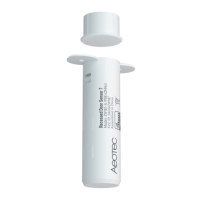
Aeotec Recessed Door Sensor Gen 7 was developed to detect the status of a door and transmit it via Z-Wave Plus
(http://aeotec.com/z-wave-plus). It is powered by Aeotec’s Gen7 (https://aeotec.com/z-wave-home-automation/z-
wave-gen7.html) technology. You can find out more about Recessed Door Sensor Gen7 (http://aeotec.com/hidden-
z-wave-door-sensor) by following that link.
To see whether Recessed Door Sensor Gen7 is known to be compatible with your Z-Wave system or not, please
reference our Z-Wave gateway comparison (http://aeotec.com/z-wave-gateways) listing. The technical
specifications of Recessed Door Sensor Gen7
(https://aeotec.freshdesk.com/support/solutions/articles/6000226851-recessed-door-sensor-gen7-technical-
specifications-) can be viewed at that link.
Question and Answer IconNeed help?

Do you have a question about the Aeotec ZW187 and is the answer not in the manual?

Summary

Important Safety Information

General Safety Precautions

Guidelines for safe handling, storage, and use of the sensor and batteries, including fire and heat warnings.

Quick Start Guide

Prepare the Main Sensor

Steps to open and activate the main sensor component by removing the pull tab and reinserting internals.

Add to Z-Wave Network

Instructions for pairing the sensor using SmartStart or Classic inclusion methods with a Z-Wave network.

Install Your Recessed Door Sensor

Drill for Main Sensor Body

Guidance on drilling the correct size and depth hole for the main sensor into the doorframe.

Drill for Magnet Piece

Instructions for drilling the correct size and depth hole for the magnetic sensor component into the door.

Mounting and Gap Check

Steps for securing the main sensor and magnet, and verifying the final gap between them.

Advanced Functions

Software Reset

Procedure for removing the sensor from your Z-Wave network using the controller.

Manual Factory Reset

Steps to reset the sensor to factory default settings when the primary controller is unavailable.

Wakeup for Configuration

Instructions on how to wake the sensor to communicate with the Z-Wave gateway for configuration.

Testing Health Connectivity

Connectivity Test Procedure

How to test the sensor's direct connection health to the Z-Wave gateway using button presses.

More Advanced Configurations

Configuration Options

Information on available device configurations and where to find the configuration sheet.

Summary

Important Safety Information

General Safety Precautions

Guidelines for safe handling, storage, and use of the sensor and batteries, including fire and heat warnings.

Quick Start Guide

Prepare the Main Sensor

Steps to open and activate the main sensor component by removing the pull tab and reinserting internals.

Add to Z-Wave Network

Instructions for pairing the sensor using SmartStart or Classic inclusion methods with a Z-Wave network.

Install Your Recessed Door Sensor

Drill for Main Sensor Body

Guidance on drilling the correct size and depth hole for the main sensor into the doorframe.

Drill for Magnet Piece

Instructions for drilling the correct size and depth hole for the magnetic sensor component into the door.

Mounting and Gap Check

Steps for securing the main sensor and magnet, and verifying the final gap between them.

Advanced Functions

Software Reset

Procedure for removing the sensor from your Z-Wave network using the controller.

Manual Factory Reset

Steps to reset the sensor to factory default settings when the primary controller is unavailable.

Wakeup for Configuration

Instructions on how to wake the sensor to communicate with the Z-Wave gateway for configuration.

Testing Health Connectivity

Connectivity Test Procedure

How to test the sensor's direct connection health to the Z-Wave gateway using button presses.

More Advanced Configurations

Configuration Options

Information on available device configurations and where to find the configuration sheet.

Overview

The Aeotec Recessed Door Sensor Gen7 is a discreet, Z-Wave Plus enabled device designed to detect the open/closed status of a door. It integrates seamlessly into a Z-Wave smart home network, providing real-time updates on door activity. The sensor is powered by Aeotec's Gen7 technology, ensuring reliable performance and compatibility with a wide range of Z-Wave gateways and controllers. Its recessed design allows for a nearly invisible installation, blending into the doorframe for an aesthetically pleasing solution.

Function Description:

The primary function of the Recessed Door Sensor Gen7 is to monitor the state of a door (open or closed) and transmit this information wirelessly to a connected Z-Wave gateway. This allows users to receive notifications, trigger automations, or simply check the status of their doors from anywhere. The sensor operates using two main components: the Main Sensor and the Magnetic Sensor. When the door is closed, the Main Sensor and Magnetic Sensor are in close proximity, indicating a closed state. When the door opens, the Magnetic Sensor moves away from the Main Sensor, triggering an open state detection. This information is then relayed to the Z-Wave network. The device supports both SmartStart Inclusion for easy pairing with compatible gateways and Classic Inclusion for broader compatibility. It also features S2 encryption for enhanced security during communication within the Z-Wave network.

Usage Features:

Installation of the Recessed Door Sensor Gen7 involves two key steps: physically installing both parts of the sensor and connecting it to your Z-Wave network. To prepare the Main Sensor, you first press a latch with a slotting screwdriver to remove its lid. Then, you squeeze the sides of the sensor casing to slide out the internal chipboard. A "Pull Tab" must be removed to engage the pre-installed battery, which will cause the LED to slowly fade in and out red, indicating power is on. After removing the battery insulator, the internal components are reinserted into the Main Sensor's enclosure, ensuring the button aligns with the buttonhole on the lid.

Adding the sensor to your Z-Wave network can be done via two methods:

  1. SmartStart Inclusion: If your Z-Wave gateway/controller/hub supports SmartStart, you can open your smartphone app, select SmartStart inclusion, and scan the QR code located on the Recessed Door Sensor Gen7. The sensor will automatically join your network within 10 minutes of being powered up.
  2. Classic Inclusion: For this method, you first decide on the sensor's placement and set your Z-Wave Controller into pairing mode. Then, you quickly press and release the Z-Wave Button on the Recessed Door Sensor 7. The sensor's red LED will flash for up to 30 seconds or until it successfully pairs, at which point it will become solid for 10 seconds. If pairing fails, the LED will return to a slow breathing pattern, indicating a need to repeat the process. If S2 encryption/security is used, the first 5 digits of the DSK (Device Specific Key) may need to be entered into the controller/gateway/hub interface.

For physical installation, the sensor should be placed at the top or side of a door, away from metal objects that could interfere with its magnetic or wireless functions. It requires a clear separation of 1mm to 5mm between the Main Sensor and Magnetic Sensor when the door is closed. The Main Sensor and Magnetic Sensor must be positioned exactly above or beside each other. The installation process involves drilling two holes:

  • For the Main Sensor: A hole 20mm/0.75 inches wide and 65mm/2.56 inches deep is drilled into the doorframe. A slightly larger drill bit (20-21mm) is recommended for easier removal later. The Main Sensor is then inserted into this hole and secured with two screws.
  • For the Magnetic Sensor: A corresponding hole, 19mm wide and 15mm deep, is drilled into the door, aligning precisely with the Main Sensor's hole. A small amount of white glue (PVA) is placed inside this hole, and the Magnetic Sensor is inserted, gently tapped into place with a rubber hammer. After installation, it's crucial to ensure the gap between the two sensor parts is between 1mm and 5mm when the door is closed. If the gap is outside this range, the Main Sensor's hole may need adjustment.

Maintenance Features:

The Recessed Door Sensor Gen7 offers several maintenance and advanced configuration features:

  • Removing from Z-Wave Network (Software Reset): To remove the sensor, set your Z-Wave Controller into 'Remove Device' mode. Ensure the product is powered, then click the Action Button once. The LED will flash red for 5 seconds. If removal fails, the LED will extinguish without a slow fade-in/fade-out red color. If successful, the LED will show a slow fade-in/fade-out red for 10 seconds before extinguishing, indicating successful removal.
  • Manually Factory Reset: If the primary controller is missing or inoperable, the device can be factory reset. With the product powered, press and hold the Action Button for at least 20 seconds. At 2 seconds, the LED will show a slow pulsing red. At 5 seconds, it will pulse faster. At 10 seconds, it will flash even faster. At 20 seconds, the LED will become solid for 2 seconds, indicating a factory reset, and you can release the button. At 22 seconds, the LED will breathe slowly to indicate it is factory reset. Releasing the Action Button when the LED becomes a slow fade-in/fade-out red color confirms the reset. A factory reset removes the product from the Z-Wave network, deletes association settings, and restores configuration settings to default.
  • Wakeup for Configuration: To wake up the sensor and communicate with the Z-Wave gateway or push configuration settings, press and hold the Action Button for at least 2 seconds (but before 5 seconds). At 2 seconds, the LED will show a slow pulsing red. Releasing the action button at this point will toggle a 10-minute wakeup period. If successful, the LED will remain solid until the sensor goes back to sleep.
  • Testing Health Connectivity: This function helps determine the direct connection quality to the gateway (without other repeater nodes). To test, press and hold the Z-Wave Button for 5-10 seconds. At 1 second, the LED turns off. At 2 seconds, it breathes. At 5 seconds, it flashes. Releasing the Action Button then tests the health. If the LED flashes too quickly, it indicates the button was held for too long. After the test, the sensor forwards a Power Level Report command to the Z-Wave gateway to display communication quality, though some gateways may not display this in their interface.
  • Advanced Configurations: The Recessed Door Sensor Gen7 has a comprehensive list of device configurations. While these may not be fully exposed in all gateways, they can often be manually set through most Z-Wave gateways. Users can refer to a dedicated configuration sheet for detailed information. For assistance with these settings, users are advised to contact support and specify their gateway model.

The Recessed Door Sensor Gen7 is intended for indoor use in dry locations only and should not be used in damp, moist, or wet environments. It contains small parts and should be kept away from children. Batteries should be kept away from open flames and extreme heat, and direct sunlight or heat exposure should be avoided. Batteries should be removed from products being stored or not in use to prevent leakage and potential appliance damage. Rechargeable batteries should not be used, and correct polarity must be ensured when inserting batteries to prevent product damage.

Aeotec ZW187 Specifications

General IconGeneral
Dimensions43.5x63x23 mm
Weight45 g
CompatibilityZ-Wave
Z-Wave VersionZ-Wave Plus
Operating Temperature0°C to 40°C
Operating Humidity8% to 80%
Frequency908.42 MHz (US)
Z-Wave Frequency908.42 MHz (US)

Related product manuals