44
Depressing and holding the S button for 2 seconds while
viewing the NORM Surface screen will activate the EPIC's
Receiver and access a series of screens that will indicate
the Status of the system's Batteries and Pressures of the
Tanks in use. Transmitter Battery Status is not displayed for
TMT 2 and 3 if TMT 2-3 USE is set for BUD (Buddy Check).
If a T ransmitter is not active and linked to the EPIC, the
message NotA vAil (Not A vailable) will appear.
Each screen will be displayed for 3 seconds. EPIC Battery
Status, then Transmitter 1 Battery Status and Tank Pressure,
then T ransmitter 2 Battery Status and Tank Pressure, then
Transmitter 3 Battery Status and Tank Pressure.
The screen will then revert to NORM SURF MAIN Display.
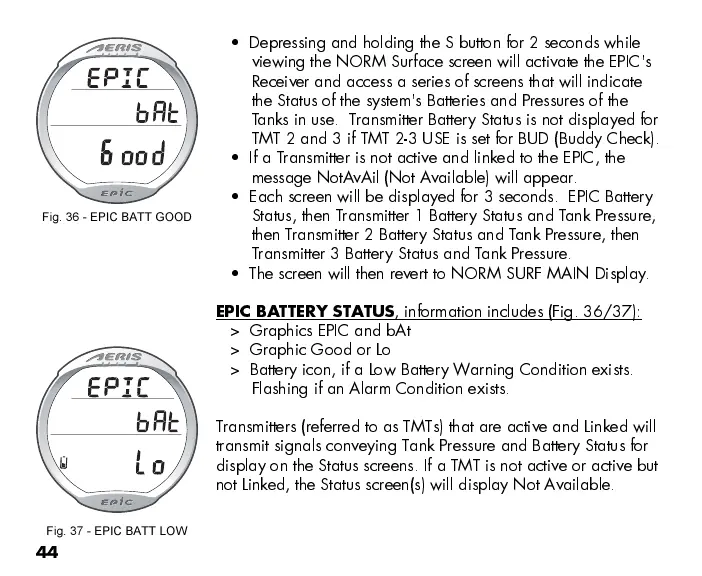
EPIC BATTERY STATUS
, information includes (Fig. 36/37):
> Graphics EPIC and bAt
> Graphic Good or Lo
> Battery icon, if a Low Battery Warning Condition exists.
Flashing if an Alarm Condition exists.
Transmitters (referred to as TMTs) that are active and Linked will
transmit signals conveying Tank Pressure and Battery Status for
display on the Status screens. If a TMT is not active or active but
not Linked, the Status screen(s) will display Not Available.
Fig. 36 - EPIC BATT GOOD
Fig. 37 - EPIC BATT LOW



 To Next Page