22
1
2
3
4
5
6
7
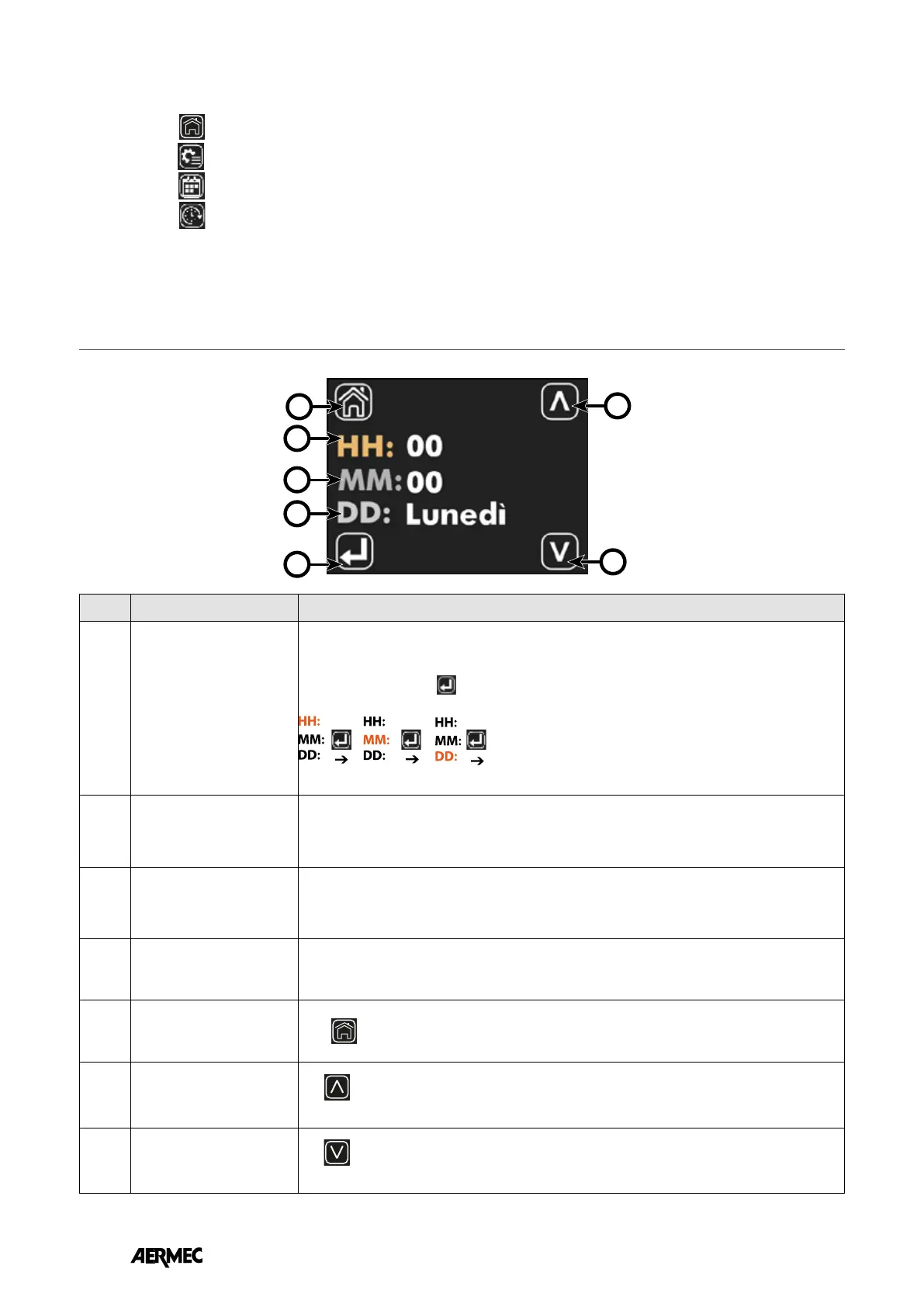
Index Name Description
1
Parameter selection button
to be updated
Each time the button
is pressed, the parameter to be changed is selected, and the
selection is highlighted by the change of colour of the HH, MM and DD lettering:
2
DD Indicates the day of the week
3
MM Minutes
3
HH Time
5
Return-to-home button
Press
to return to the menu selection page display.
6
Increase button
The
button can be used to increase the values of the parameter currently selected and
highlighted by the ochre-coloured text
7
Decrease button
The
button can be used to decrease the values of the parameter currently selected and
highlighted by the ochre-coloured text.
On this page you can:
1. Select the sub-menus in which you want to continue browsing
• A. Press
to return to the main page
• B. Press
to enter the parameter edit menu
• C. Press
to enter the time programming menu
• D. Press
to enter the clock menu
2. With the QR Code read the data required for peering and commissioning the Control App.
3. Check the rmware version in the panel.
CLOCK PAGE DISPLAY
EN



 To Next Page