11
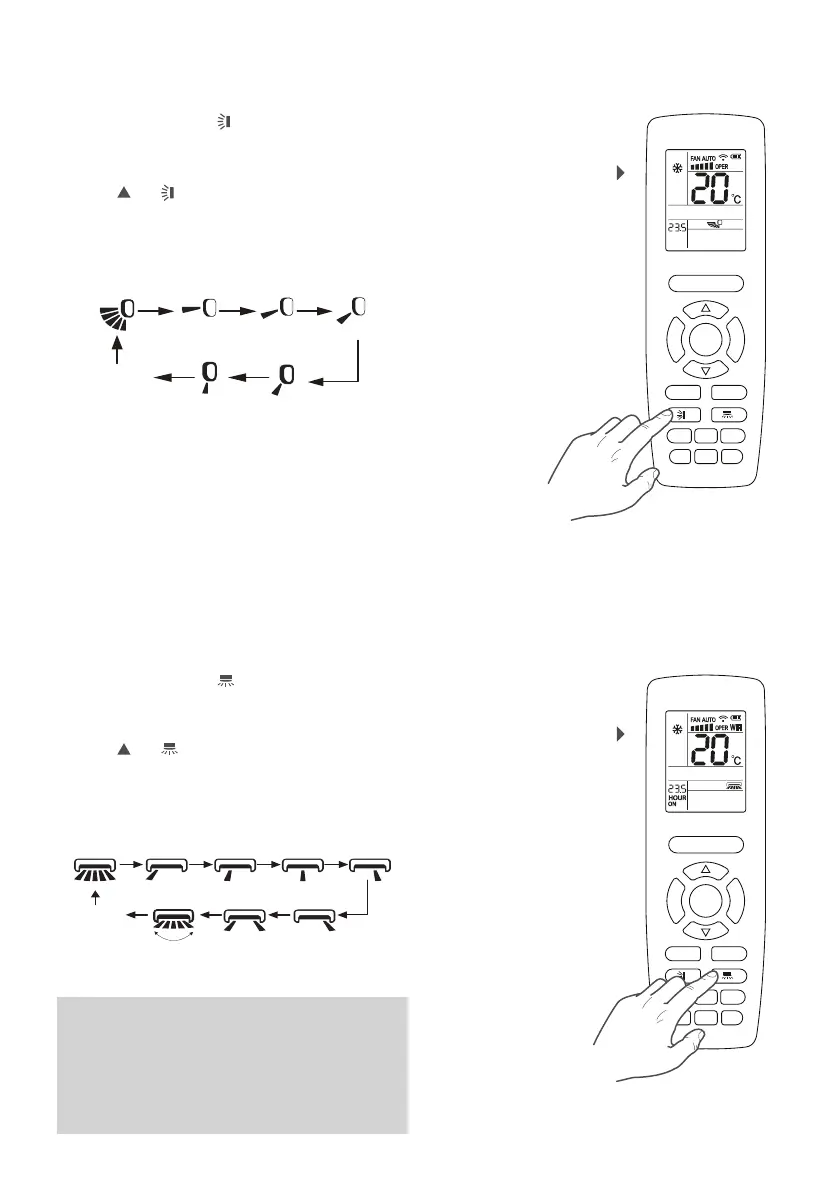
If the unit is on, press the button to activate the
swing function of the motorised delivery fin. This fin
varies the direction of the flow of air into the ambient,
on the basis of the selected position. With the unit on,
press the
and buttons to set the following steps,
one by one:
If the unit is on, press the
button to activate the
swing function of the motorised delivery fin. This fin
varies the direction of the flow of air into the ambient,
on the basis of the selected position. With the unit ON,
press the
and buttons to set the following steps,
one by one:
Continuous
swing
Continuous
swing
(*)
Continuous
swing
(*)
Fixed
(Step 1)
Fixed
(Step 1)
Fixed
(Step 2)
Fixed
(Step 2)
Fixed
(Step 3)
Fixed
(Step 3)
Fixed
(Step 4)
Fixed
(Step 4)
Fixed
(Step 5)
Setting the vertical motorised
delivery fin (swing)
Setting the horizontal motorised
delivery fin (swing)
F
A
N
M
O
D
E
ON/OFF
SAVE
HEATCOOL
TIMERQUIET
SLEEP
LIGHT
X-FAN
E-HEATER
WiFi
F
A
N
M
O
D
E
ON/OFF
SAVE
HEATCOOL
TIMERQUIET
SLEEP
LIGHT
X-FAN
E-HEATER
WiFi
SETTING THE VERTICAL MOTORISED DELIVERY
FIN SWING UP&DOWN
SETTING THE HORIZONTAL MOTORISED
DELIVERY FIN SWING LEFT&RIGHT
No
oscillation
Fixed
(Step 5)
No oscillation
(**)
WARNING
(*) there are different icons for continuous swing,
but all four of them activate the same mode:
continuous swing.
(**) although there are various icons that stop the
oscillation (fixed position steps), both the steps
indicated will deactivate oscillation mode.
LEFT&RIGHT
UP&DOWN
No oscillation
(**)



 To Next Page