18
NOTE
• Remove the batteries if the remote control is
not used for a long time.
• The remote control can emit a signal up to a
maximum distance of 8 metres.
• The unit can be affected by signals
transmitted by the remote control units of
televisions, video recorders, or other devices
used in the same room.
WARNING
the battery charge level is shown on the remote
control. When the icon
ON/OFF
Light
I FeelFan
HeatCool
Sleep
Wifi
X-Fan
Temp
T-ON
Clock
Mode
T-OFF
INTELLIGENT
HOUR ON OFF
WIFI
flashes, replace the
batteries as otherwise the remote control cannot
work properly.
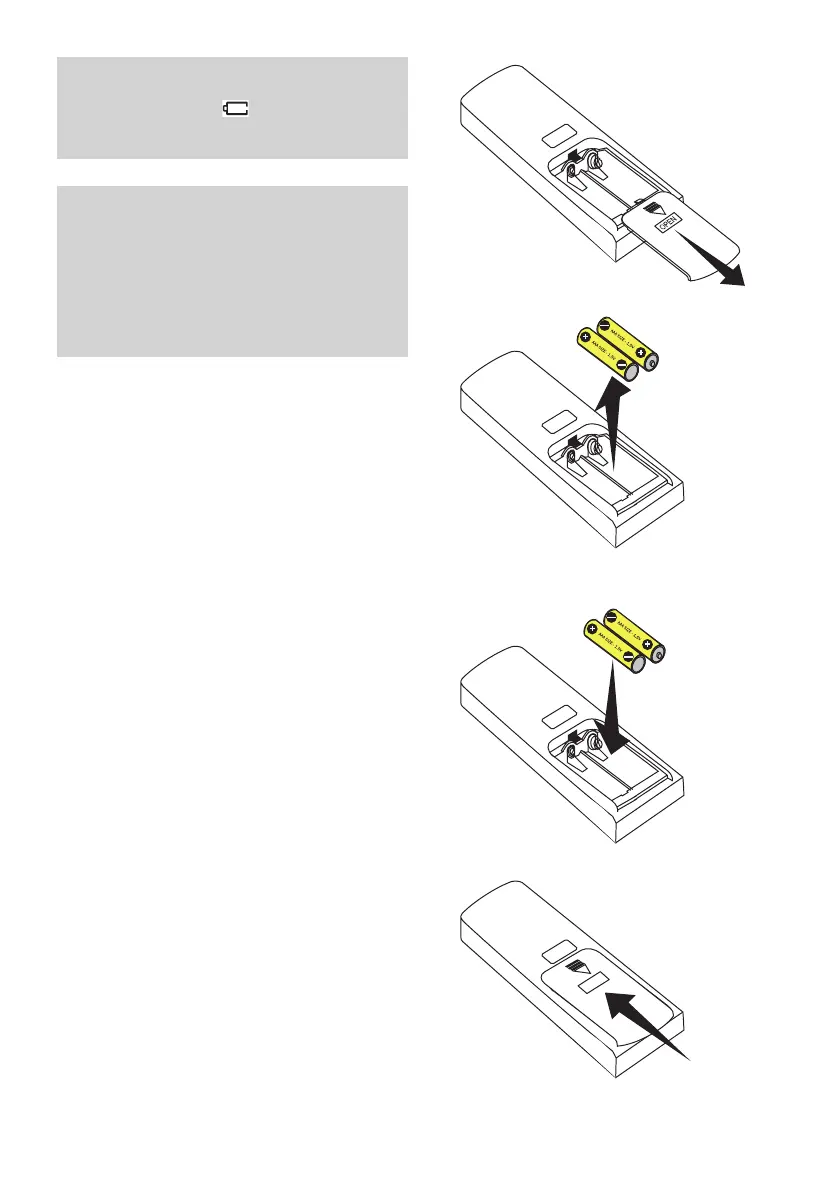
REPLACING THE REMOTE CONTROL BATTERIES
To replace the batteries of the infrared remote control,
proceed as follows:
1. Open the battery cover by sliding it in the direction
of the arrow.
2. Take out the old batteries
3. Insert new alkaline high-performance LR03 (AAA)
1.5V (penlight) batteries, being careful not to invert
the polarity.
4. Close the battery cover.
1.
2.
3.
4.



 To Next Page