9
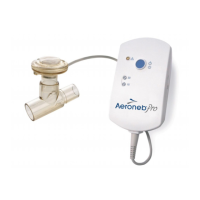
Table 1. Aerogen Pro-X Controls & Indicators
Control / Indicator Function
30 Min. Indicator
• Green (steadily lit) = 30 Minute
nebulization cycle on
• Green(ashing)=Lowbatterypower
• Nebulizerautomaticallypowersoffafter
30 minutes have elapsed
Continuous Indicator
• Green (steadily lit) = Continuous
nebulization cycle on
• Nebulizerdoesnotpoweroff
automatically
Error Indicator
• Amber (steadily lit) = Aerogen Solo
nebulizer disconnected from Aerogen
Pro-X Controller
• Amber (flashing) = Aerogen Pro-X drive
voltage error
On/OffPowerButton
• To operate in 30 Minute Mode, press the
On/Off button once
• To operate in Continuous Mode, press
and hold the On/Off button for greater
than 3 seconds from off
• Pressing during nebulization turns off
powertothenebulizer
BatteryStatus
Indicator
• Green=Batteryfullycharged
• Amber=Batterycharging
• Nolight=Batteryinoperation
RechargingtheBattery
To recharge the battery, connect the AC/DC adapter to the controller and
connect to AC power source. The battery status indicator is amber while
charging and green when fully charged.
If the controller is placed in long-term storage, it is recommended that the
battery be recharged every 3 months.
Allow a minimum of four hours for the internal battery to fully recharge.


 To Next Page