Notifications
ONE PHONE can receive a SMS notification when the
intercom triggers the gates.
Remember only one phone at a time can use this
feature.
IMPORTANT: Activating notifications will mute the
keypad confirmation tones.
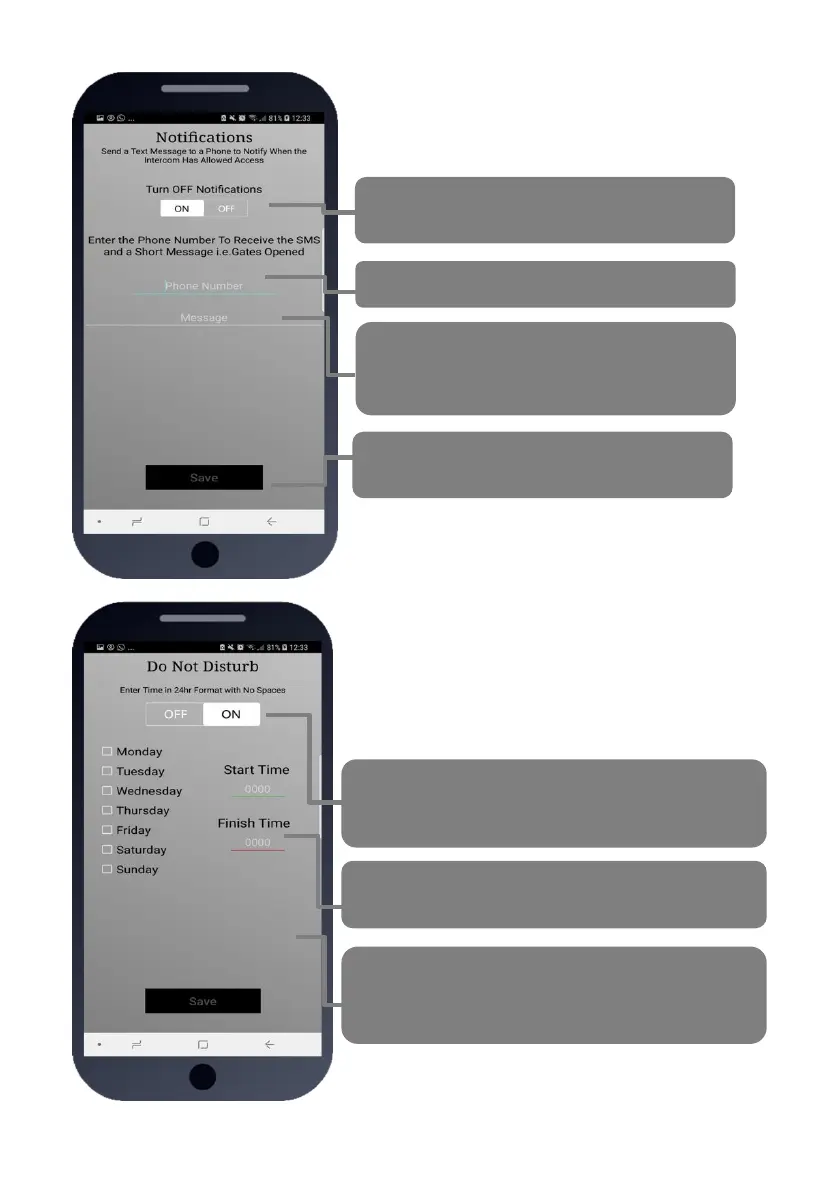
Turn this feature on and off quickly with this
button.
Enter your cell phone number here
Enter a SMS message which will be sent each
time the gates are triggered. E.g. “Gates
Opened”
Press Save to send SMS (iphone users must
also confirm from SMS screen).
Do Not Disturb
This feature can be used to prevent calls during
unsociable hours or at weekends. Simply turn the
feature ON and then enter ACTIVE times which you
want the call button to work for. Outside of these times
the intercom can still be used for caller ID access or pin
codes but the push button will not operate.
Quick turn ON or OFF. Note: turning ON without any
times being entered will disable the call button all of
the time!
Select the start and finish time for button activity and
select the days.
TIP: To have the call button active from 9am to 10pm
Monday to Friday, select the 5 days, enter 0900 as a
start time, and 2200 as a finish time and press SAVE.


 To Next Page