P a g e | 3
Overview of System
Thank you for purchasing an AES Intercom system. This product is a GSM Intercom system,
which operates on GSM phone networks.
You will need to ensure you have adequate cellular coverage at your location before using this
product. You will also need to ensure that this product has an active SIM card inside. Failure to
maintain the SIM card plan will render the product un-operational until cellular service is restored.
Receiving A Call and Opening Gates / Door
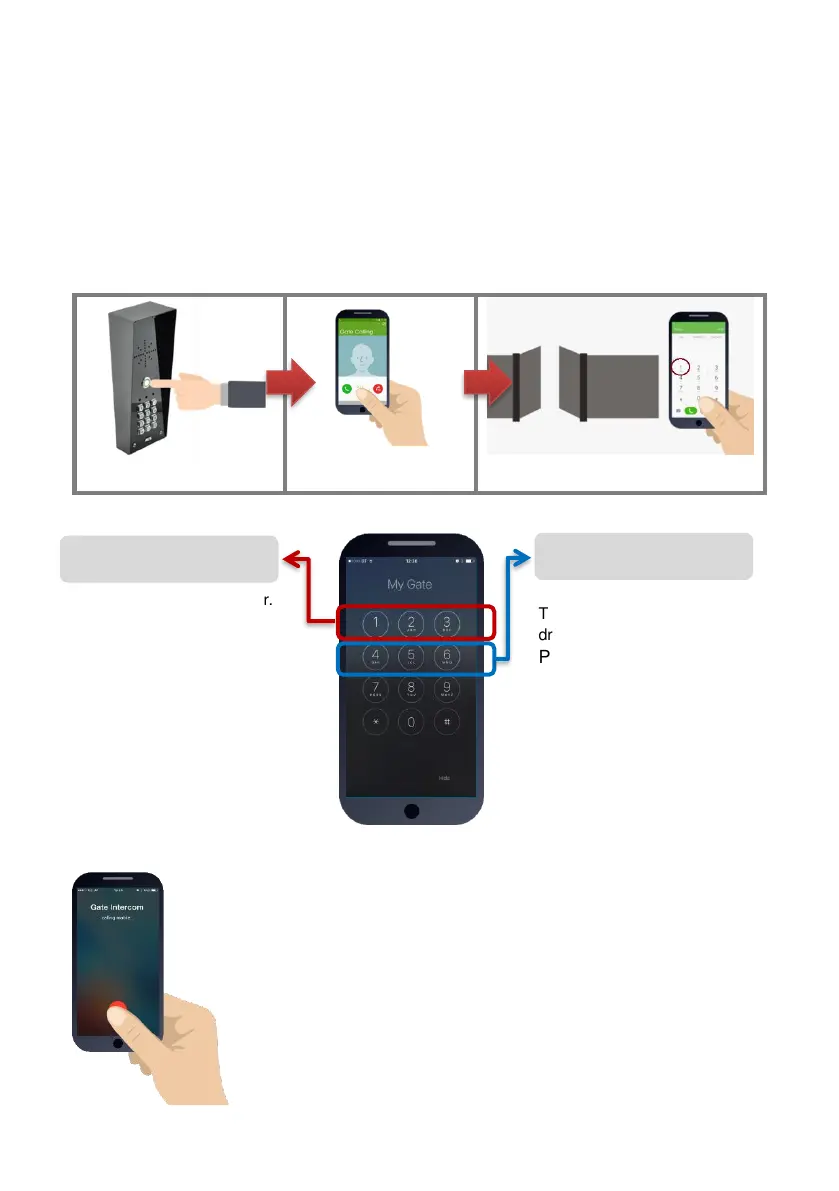
Visitors can press the call button, which will initiate a call from your intercom to the designated
phone numbers which will have been programmed by your installer.
2.Intercom calls up to 4
phones in sequence
3.Answer the call, speak to visitor,
and grant access with telephone.
Access Control by Calling the intercom (CallerID)
This is usually main gate/door.
Press 1 to open
Press 2 to hold open
Press 3 to un-hold
(Note: Hold open features are only
available on certain gate/door
systems. Contact your installer for
details)
This can be pedestrian gate,
driveway lights or other.
Press 4 to open/activate
Press 5 to hold open/on
Press 6 to un-hold/off
(Note: Hold open features are only
available on certain gate/door
systems. Contact your installer for
details)
This product can store up to 100 phone numbers, which we shall call
“Authorized phone users”. While these users will not receive a call
from the intercom on visitor arrival, they can call the intercom from
their phone which will trigger output 1 and open the gate/door.
To open your gate or door (output1), simply call the sim card
number of the intercom from your phone.
If your number has been stored by your installer, then relay 1 will
trigger and open the gate or door and the call will be rejected,
making this a free call.


 To Next Page