AIMS (AGA INTELLIGENT MANAGEMENT SYSTEM)
17
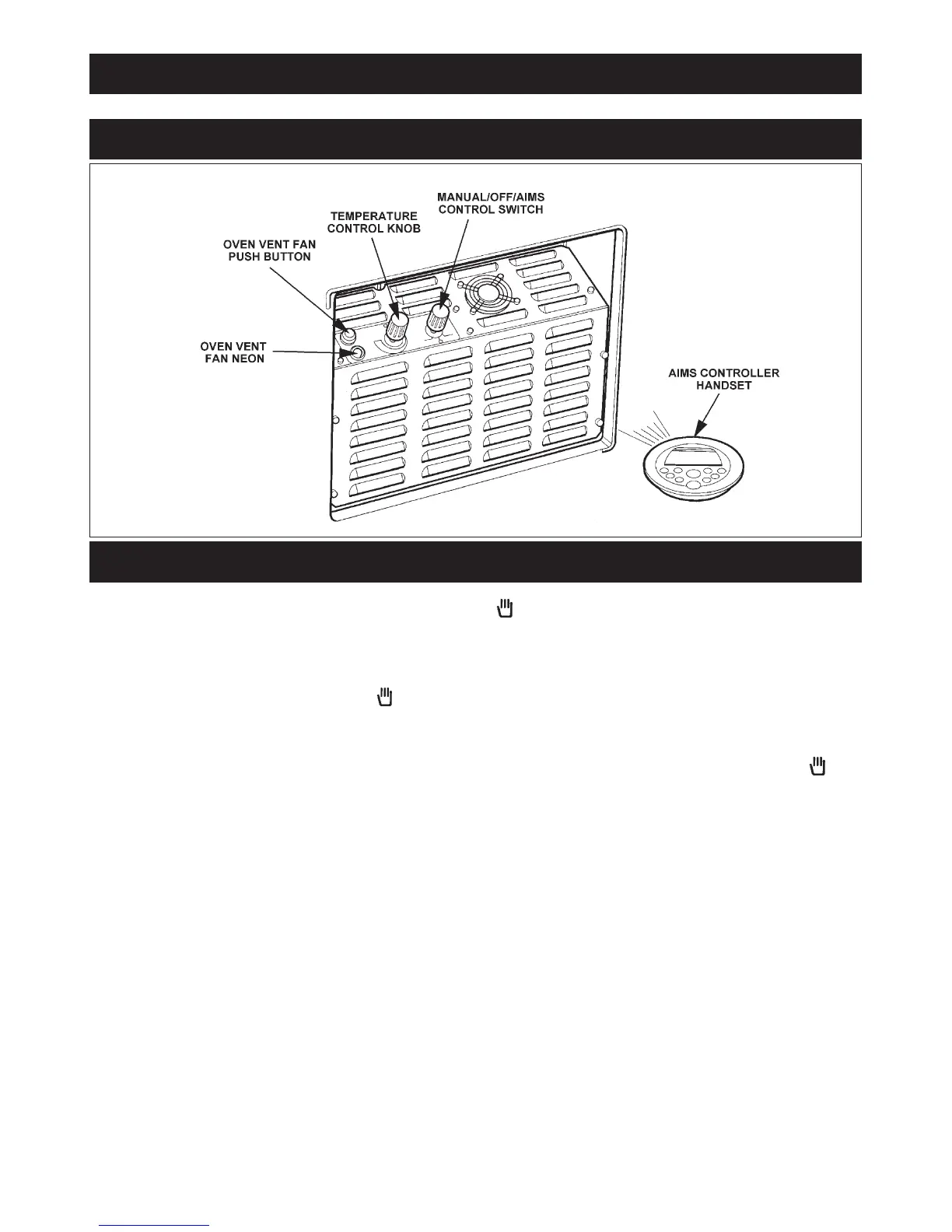
AIMS SET-UP (SEE FIG. 16)
Fig. 16 DESN 515283
CONTROLS
1. Connect the electricity supply.
2. Turn the right hand control knob from the OFF setting to the normal manual control setting. The cooker will heat
up until it reaches the normal temperature as indicated by the black line on the heat indicator.
3. The left hand control knob will alter the oven temperature. Turn it clockwise to increase the temperature and anti-
clockwise to decrease the temperature.
To obtain the required roasting oven temperature of 240°C this control knob will need to be set about halfway. We
recommend that the cooker is run on the Normal manual setting for two days, before switching to AIMS (automatic
control).
4. When the normal temperature has been set with heat indicator on or near the black line, it should not be necessary
to alter the temperature control again.
5. The cooker can now be switched to AIMS (automatic control), by turning the right hand control knob from the
setting to the AIMS setting.
6. The AIMS hand set can then be used to programme the required settings (see AIMS (automatic) control instructions.


 To Next Page