AIMS HANDSET CARE
Operating Distance
The Handset will only operate in the same room as the appliance and up to a maximum distance of 4 metres from the
appliance. If out of recommended operating range, the handset may show “OFFLINE”. Move handset back to within the
recommended distance and the handset should correct itself. See note at foot of page for “Handset to Base Unit Signal
Check”.
Cleaning
The Handset should be wiped clean using a soft clean cloth.
Do not use abrasive cleaning products or submerge the Handset in water.
Batteries
The Handset is fitted with four 'AAA' batteries.
Batteries life will depend on usages.
Replace the batteries when the battery symbol on the Handset is down to one bar following the instructions below.
- Remove the Handset from the backplate.
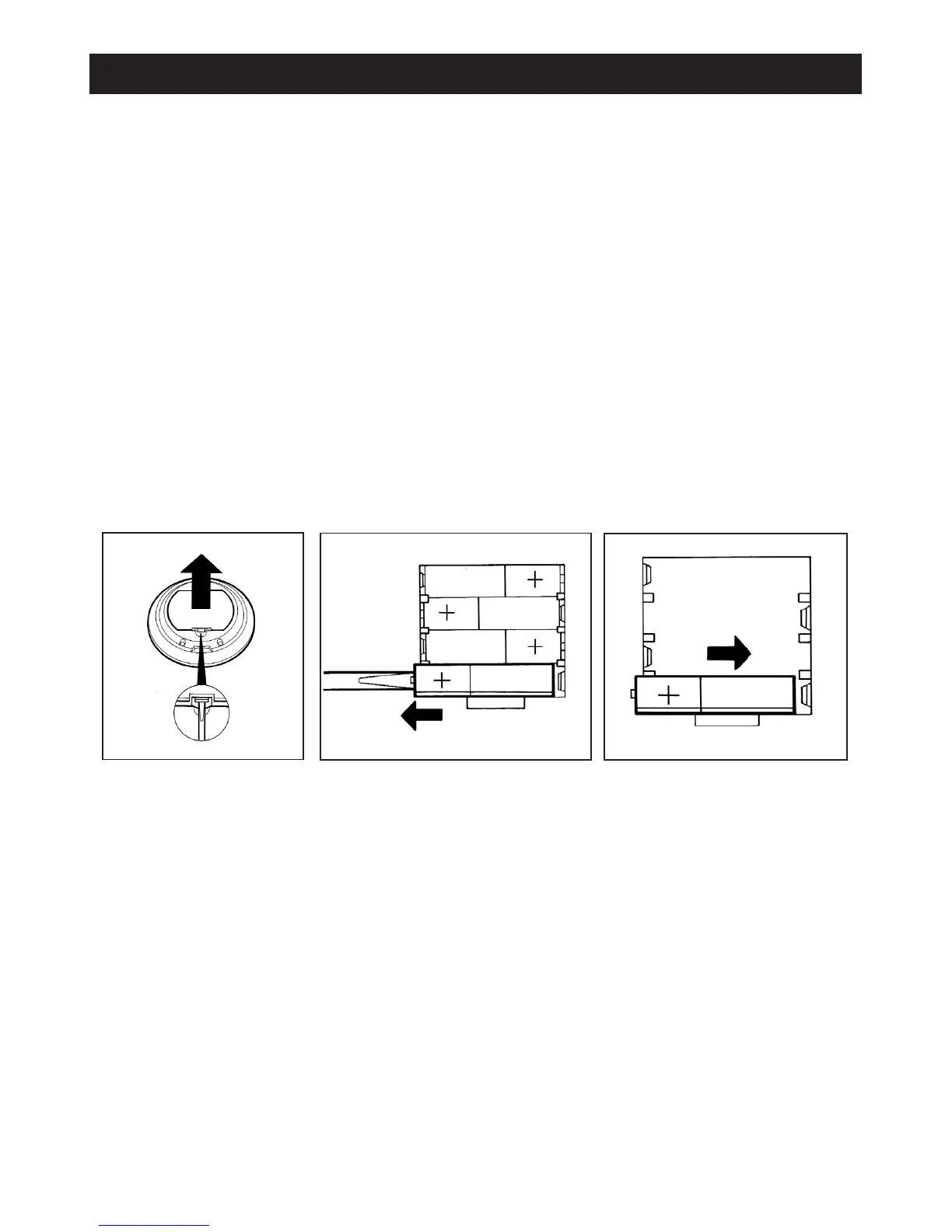
- Remove the battery cover plate from the rear of the Handset (fig 22)
- Carefully lever out the batteries commencing with the bottom one first pushing and pulling out on the positive (+) end
only (fig 23).
- Repeat the procedure to remove the other batteries.
- Always use long life batteries for replacements.
- Replace batteries commencing with the bottom one working to the top (fig 24) Ensure that the negative (-) end of
the batteries is under the location pegs in the housing before pushing the other end into position.
Handset Failure
In the event of Handset failure, the appliance would still be operational with the last selected programme. The appliance
can also be changed to manual mode if required using the control knob (see fig 16).
If the Handset is damaged or lost, replacement can be obtained from Aga and re-programmed to suit your appliance.
Handset to Base Unit Signal Check
Follow the following procedure to check that Handset is communicating with the base unit.
- Press the oven vent fan button on the control panel and hold down for five seconds.(fig.16)
- On the release of the vent fan button blue neon on the control panel should flash.
- Immediately press + and - buttons together on the Handset (fig.17) until the blue light goes out completely.
- If the blue light has not gone out completely, repeat the above operation again.
22
Fig. 22
Fig. 24
Fig. 23



 To Next Page