images. More frequent cleaning is required in case of excessive dust or under
very dry conditions.
Permitted cleaning products?
For the image plates only use AGFA CR Phosphor Plate Cleaner and a soft lint-
free cellulose cloth or Polynit wipes to clean the image plate.
Note: It is advised to wear gloves while cleaning the image plates
and cassettes.
How to clean the image plate?
To clean the image plate:
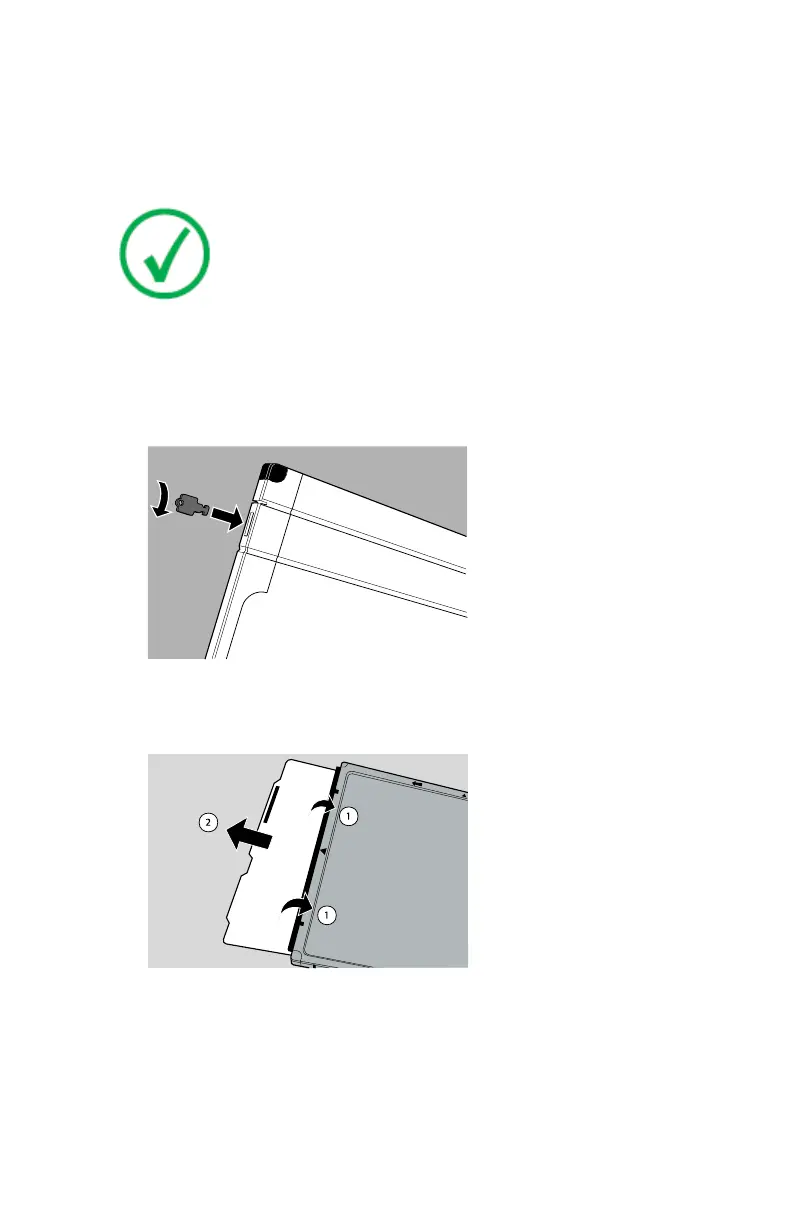
1. Insert the Agfa cassette key into the cassette lock to open the shutter. Push
the key firmly and turn it 90 degrees clockwise.
2. Turn the cassette around, so that the black tube side is above.
3. Hold back the shutter with both thumbs (1) and let the image plate slide
out carefully (2) onto the table.
4. Put the image plate onto the cassette.
5. Clean the image plate as follows:
a) Take an appropriate wipe or moisten the cloth with cleaner and wipe
the image plate surface softly and evenly.
AGFA CR Plates and Cassettes | Using the Agfa CR Plates and Cassettes | 47
2492F EN 20180417 1049



 To Next Page