EasyManua.ls Logo

Agilent Technologies 8360 B Series - Page 271

Agilent Technologies 8360 B Series
603 pages
Print Icon
To Next Page IconTo Next Page
To Previous Page IconTo Previous Page
Loading...
4.
YO Driv
er +10
V
Reference
Description
and Procedure
No test
equipment
is required
for this
pro cedure.
As
the in
ternal D
VM monitors
the
+10
V
reference,
y
ou
mak
e
the
adjustmen
t.
1.
T
urn
the
syn
thesizer
on
and
press
4
PRESET
5
.
Let
the
instrumen
t
w
arm
up
for
at
least one
hour.
2.
Select
the
A13
adjustmen
t
men
u.
On
the
syn
thesizer,
press:
4
SERVICE
5
N
N
NN
NN
NN
NN
N
N
N
N
N
N
N
N
N
N
N
N
N
N
N
N
N
NN
NN
NN
NN
Adjust Menu
N
N
NN
NN
NN
NN
N
N
N
N
N
N
N
N
N
N
N
N
N
N
N
N
N
NN
NN
NN
NN
N
N
N
AssyAdj Menu
N
N
NN
NN
NN
NN
N
N
N
N
N
N
N
N
N
N
N
N
N
N
N
N
N
NN
NN
NN
NN
N
N
N
A13 Adj
Menu
3.
Select
the
A13
+10
V
reference
adjustmen
t,
NN
NN
NN
N
N
N
N
N
N
N
N
N
N
N
N
N
N
N
N
N
N
N
NN
NN
NN
N
N
N
N
A13+10V
Ref
.
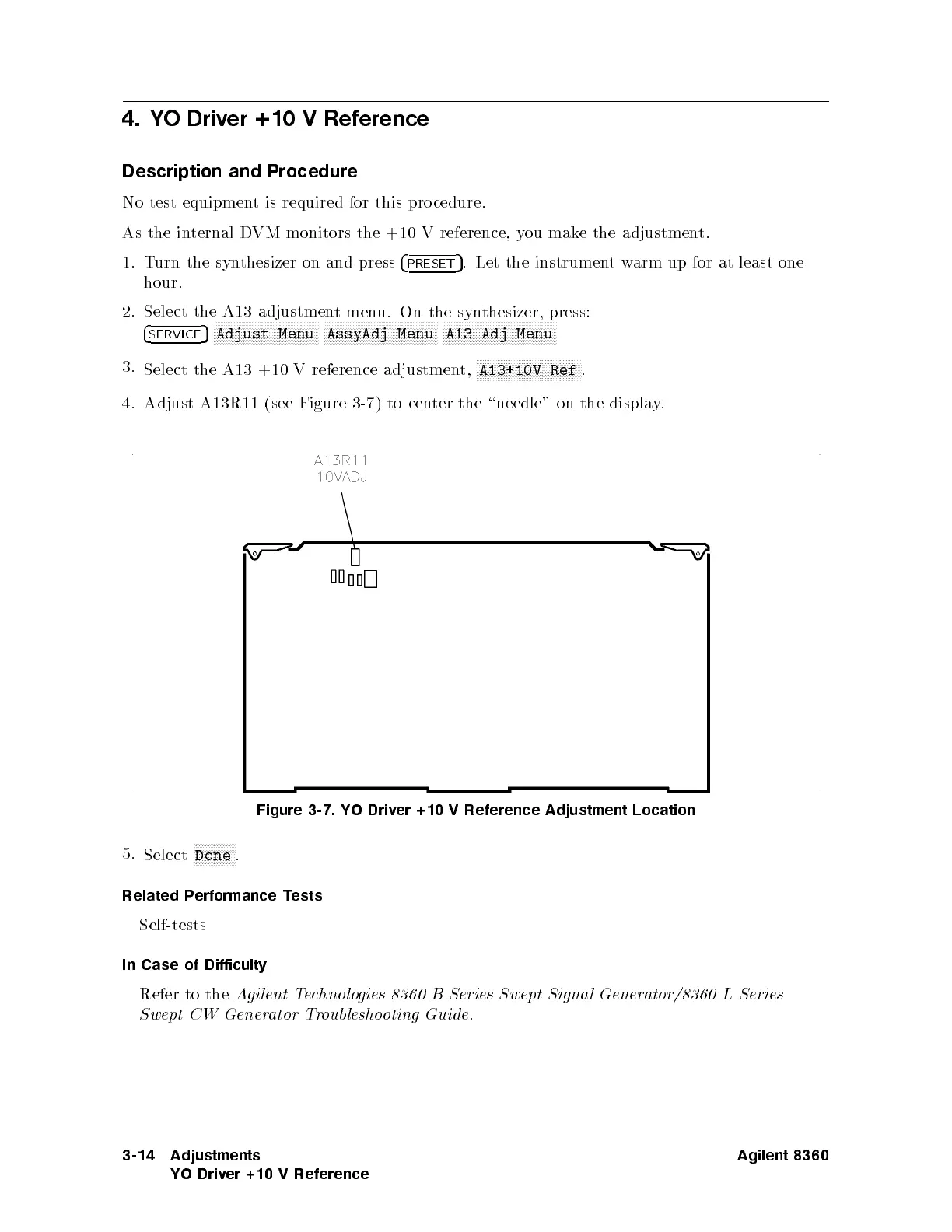
4. Adjust
A13R11 (see
Figure 3-7
)
to
cen
ter
the
\needle"
on
the
displa
y
.
Figure 3-7.
YO Driv
er
+10
V
Reference
Adjustment
Location
5.
Select
N
NN
N
N
N
N
N
N
N
N
N
N
N
Done
.
Related P
erformance T
ests
Self-tests
In Case
of Difficulty
Refer to the
Agilent Technologies 8360 B-Series Swept Signal Generator/8360 L-Series
Swept CW Generator Troubleshooting Guide
.
3-14 Adjustments
YO Driver +10 V Reference
Agilent 8360

Table of Contents

Other manuals for Agilent Technologies 8360 B Series

Related product manuals