AGM Global Vision12
2.2 MAIN FUNCTIONS
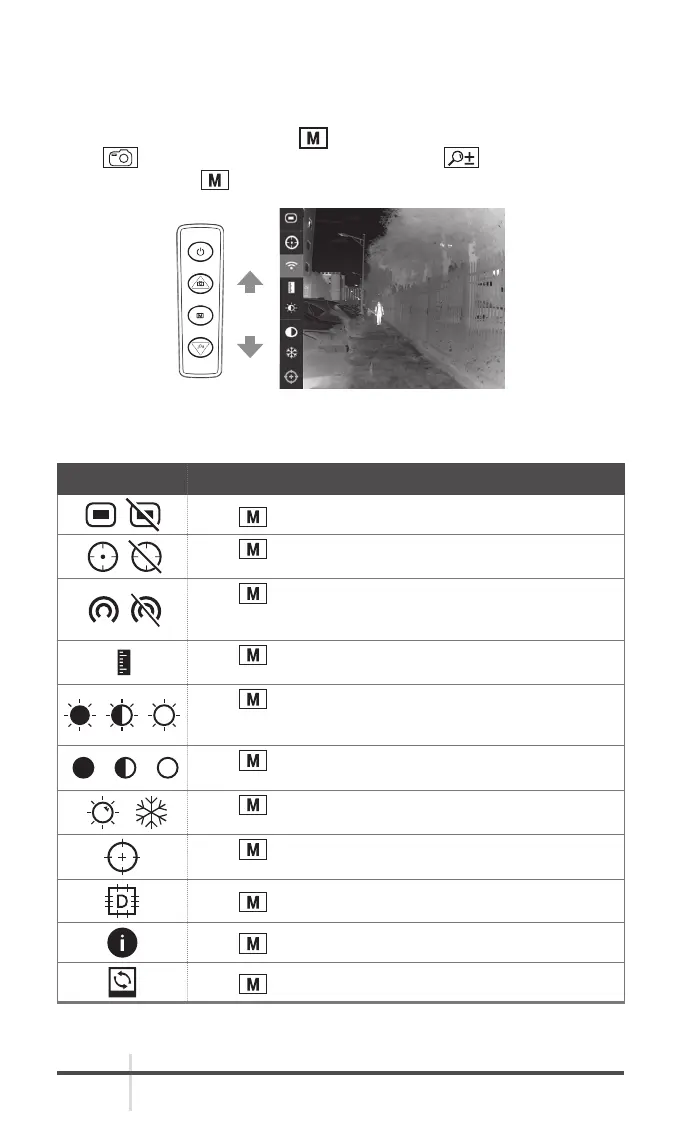
2.2.1 MENU OPERATION
When the device powers on, hold button to display the menu.
Press
button to move the cursor up, and press button to move the
cursor down. Press button to confirm.
OK
FIGURE 2-6. THE MAIN MENU
TABLE 2-3. MENU FUNCTION
MENU ITEM FUNCTION
Press to display or hide the OSD information.
Press
to enable/disable hot spot mark (marking the
spot of highest temperature).
Press to enable or disable the Wi-Fi hotspot. Connect
your phone to the monocular via the Wi-Fi hotspot and
record/capture with App.
Press
to enter distance measurement mode. For
details, refer to Section 2.2.2 Distance Measurement.
Press
to adjust the brightness. The icons on the left
indicate: high Brightness, medium Brightness, and low
Brightness.
Press
to adjust the contrast. The icons on the left
indicate: high contrast, medium contrast, and low contrast.
Press
to switch between the summer mode and winter
mode.
Press to adjust the FFC mode to auto, manual, or
external.
Press to correct dead pixel manually.
Press to view the version number and serial number.
Press to restore the device to defaults.



 To Next Page