ASP-MICRO USER MANUAL 15
1. Hold button to show the menu.
2. Select
menu item and press button to go to the setting interface.
1) Press
or to select the target from Deer, Wolf, Bear, and
Custom.
2) Set the target height.
NOTE:
The available height ranges from 0.1 m to 9.9 m.
3) Press
to confirm.
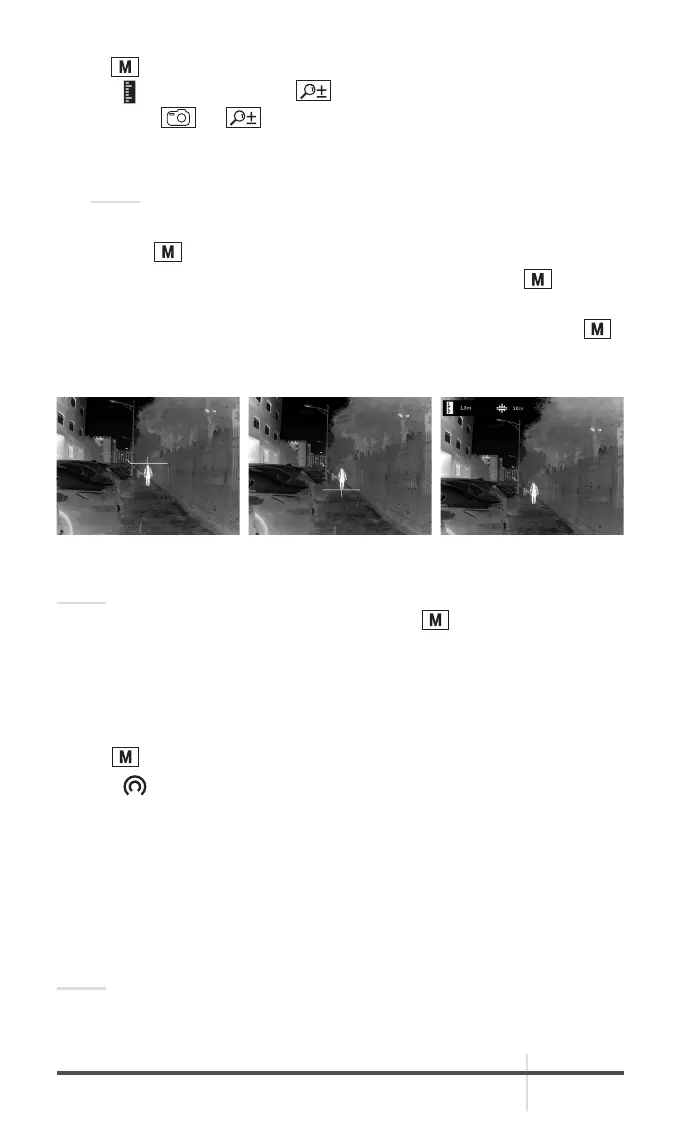
3. Align the center of top mark with the edge of target top. Press
.
The cursor blinks on the top edge of the target.
4. Align the center of bottom mark with the edge of target bottom. Press
.
The left top of the image displays the distance measurement result and the
height of the target.
NOTE:
Go to distance measurement interface, and press
to view the result of the
previous measuring target.
2.2.11 NETWORK CONFIGURATION
Connect your phone to the Wi-Fi hotspot of the monocular, you can configure
the parameters and realize functions of the device.
1. Hold
button to show the menu of monocular.
2. Select
to enable Wi-Fi hotspot function.
3. Turn on the WLAN and connect to the Wi-Fi hotspot.
- Hotspot Name: Wlan-IPTS Serial No.
- Hotspot Password: Serial No.
4. Search the client software on App Store (iOS System) or Google Play
TM
(Android System) to download and install the app.
5. Open the APP and connect your phone with the device. You can view the
interface of monocular on your phone.
NOTE:
When the power is less than 15%, the Wi-Fi hotspot function will be turned off
automatically.
FIGURE 2-8. DISTANCE MEASUREMENT



 To Next Page