AGM Global Vision18
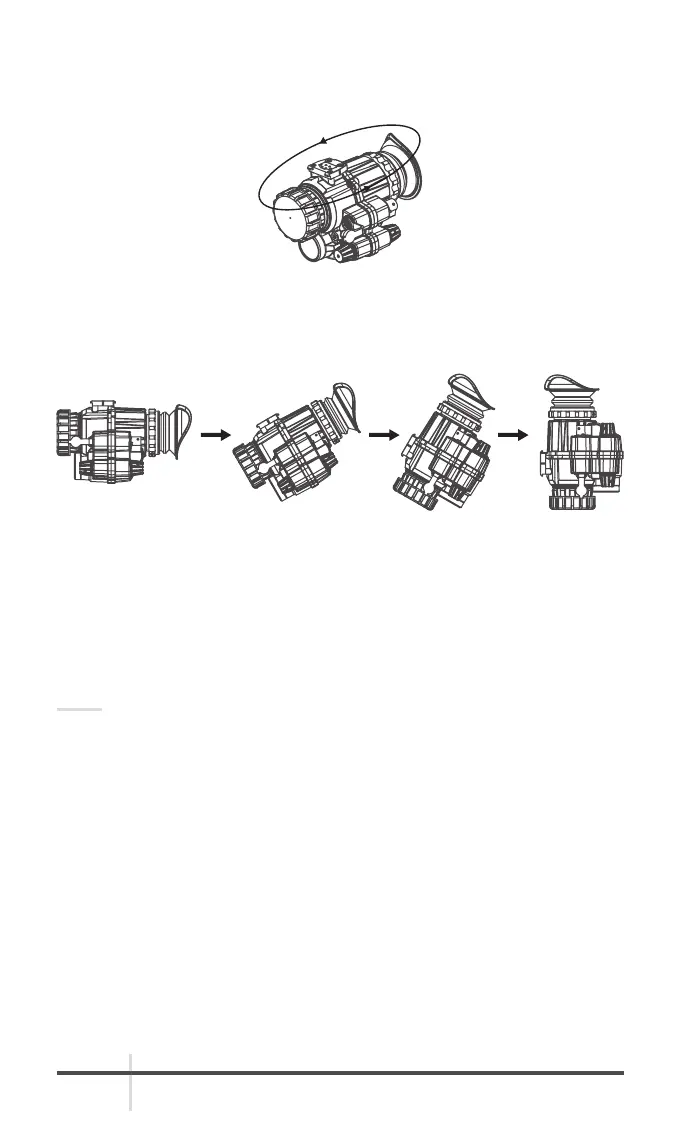
Horizontal calibration: Put the equipment horizontally and short press the
infrared adjusting knob. Rotate around the equipment for 360° and short press
the knob to end horizontal calibration.
FIGURE 2-10. HORIZONTAL ROTATION
After that, the screen displays “Please keep the equipment stable and erect
downward at a constant speed. Press again to start.”
Vertical calibration: Put the equipment horizontally on a table and short press
the infrared adjusting knob. Erect the equipment at a constant speed (objective
lens facing downward and ocular lens upward) and short press the knob again
to end the calibration.
The screen displays “Calibration completed. Press again to exit.” Short press
the infrared adjusting knob and exit compass calibration.
NOTE:
To ensure the accuracy of compass calibration, please perform the calibration
in a stable environment in one time.
2.7.6 INTERFACE INFORMATION
You can enable/disable the display of azimuth, pitch, inclination, and battery
level on the screen by long pressing the infrared adjusting knob.
2.7.7 LANGUAGE
You can change the language of the interface by long pressing the infrared
adjusting knob. See Figure 2.9 for the English menu.
FIGURE 2-11. VERTICAL ROTATION



 To Next Page