F14 USER MANUAL 9
2 OPERATING INSTRUCTIONS
2.1. BASIC OPERATIONS
2.1.1 UNPACKING
The following steps must be completed prior to each mission.
1. Open the carrying case, remove the monocular, and verify that all components
are included.
2. Inspect the monocular for any obvious evidence of damage to the optical
surfaces, body, eyecup, operation buttons, etc. Ensure that all optical
surfaces are clean and ready for use. Clean all optical surfaces with a lens
tissue.
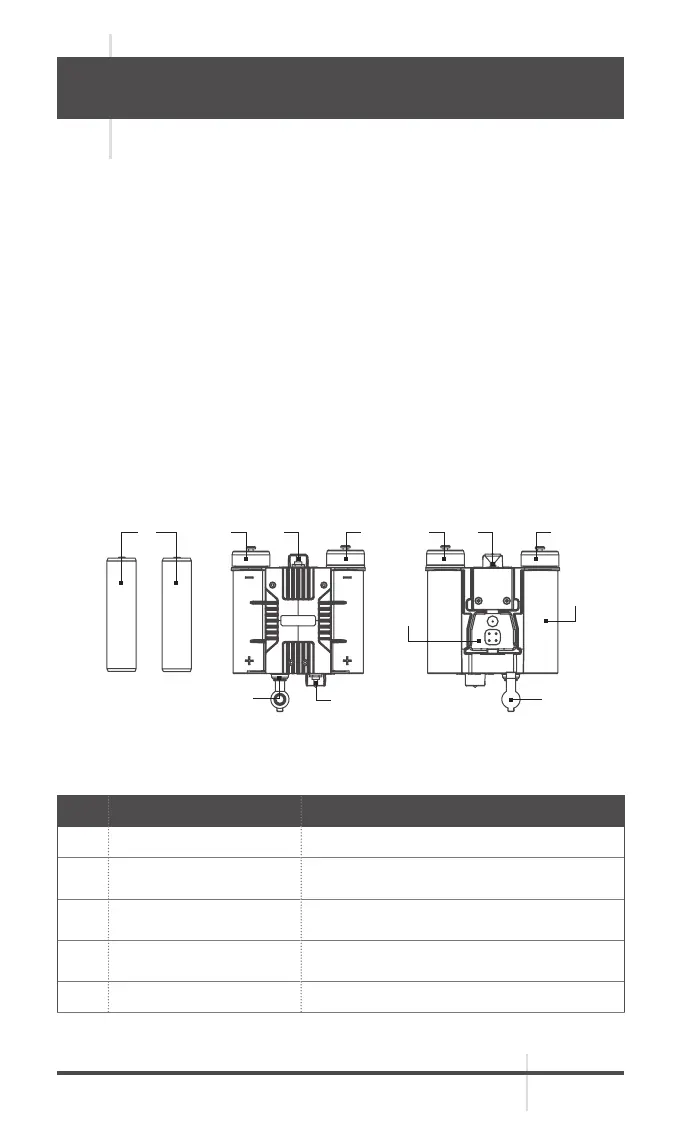
2.1.2 BATTERY HOLDER COMPONENTS AND THEIR FUNCTIONS
TABLE 2-1. BATTERY HOLDER COMPONENTS
ITEM COMPONENT FUNCTION DESCRIPTION
1 Battery Two 18650 rechargeable Lithium batteries.
2
Battery compartment
cover
Enables battery assembly and
disassembly, and seals the compartment.
3 Quick removal interface
Connects to the interfaces for installing
the hook-loop support.
4 Disassembly pull
Pull it out when disassembling the battery
holder.
5 Master power switch Powers on/off the equipment.
1 2
7
3
9
7
22 25
6
4
FIGURE 2-1. BATTERY HOLDER COMPONENTS



 To Next Page