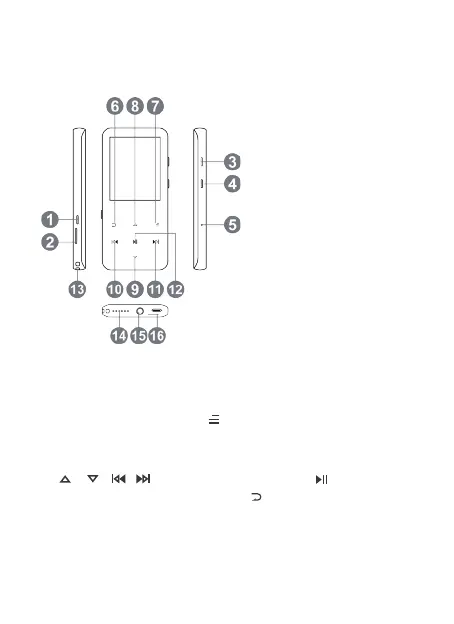
• Power On/Off. Hold button ① to turn on/off the player. Screen
lock. Hold down the button to lock screen and all the buttons
will be unavailable. Repeat the above steps to unlock.
• Screen display. Press ① to activate screen.
• Browse item. On home menu or list menu, press button
/ / / to browse item, press button to enter.
• Back. When on any interface, press to go back; hold down to
back to home menu directly.
• Volume +/-. On the non-list menu, press ③/④ to adjust volume.
Product Overview
Basic Operation
Buttons and Controls
Power On/Off
TF Card Slot
Vol +
Vol -
Reset Hole
Return
Submenu
Scroll Up
Scroll Down
Previous/Fast Rewind
Next/Fast Forward
Play/Pause/Enter
Lanyard Hole
Speaker
Earphone Jack
Type-C Port
①
②
③
④
⑤
⑥
⑦
⑧
⑨
⑩
⑪
⑫
⑬
⑭
⑮
⑯
02



 To Next Page