Menu page 2 Options
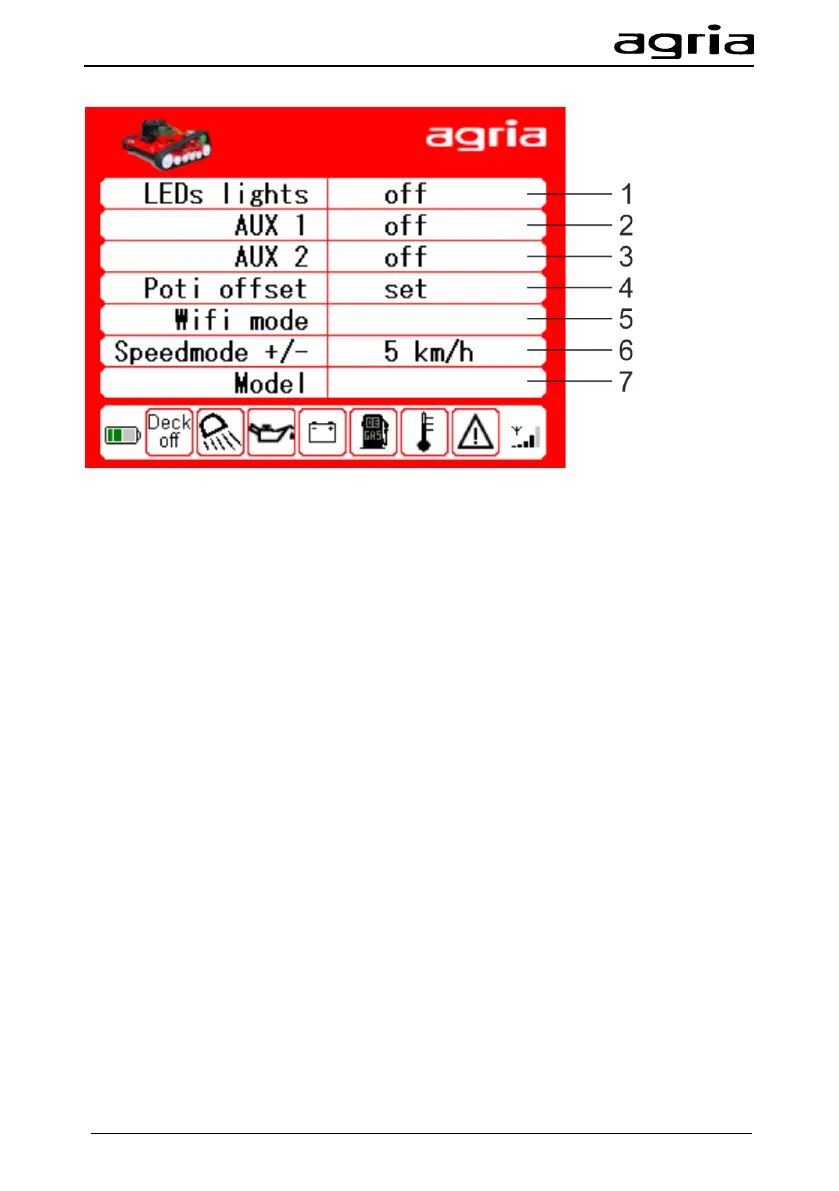
Here you can see additional options and setting possibilities of the remote control:
(1) Option: LED function headlights, the On or Off status is indicated here.
Navigate with the arrow keys (B/18, B/19) to the field LEDs lights and press Enter
(B/20) to switch on the LED auxiliary lights; press Enter again to switch the auxiliary
lights off again.
(2) Not assigned
(3) Not assigned
(4) Drift potentiometer
Adjusting the drift potentiometer: Move the cursor with the arrow keys (A/18, A/19) to
position potentiometer offset - Move the drift potentiometer (B/14) to mechanical cen-
tre position - Press Enter (B/20)
(5) WiFi mode - Setting see video -agria-Service-
(6) Not assigned
Using the arrow keys (B/18, B/19), navigate to the Speedmode +/- field. Press Enter
(B/20) to confirm. Select the required driving position with (B/3).
Driving position 1 is up to 2.5 km/h, driving positions 2 and 3 are individually se-
lectable. Using the arrow keys (B/18, B/19), set the selected driving position and
press Enter (B/20) to confirm.
(7) Not assigned


 To Next Page