Menu page 4 Error codes
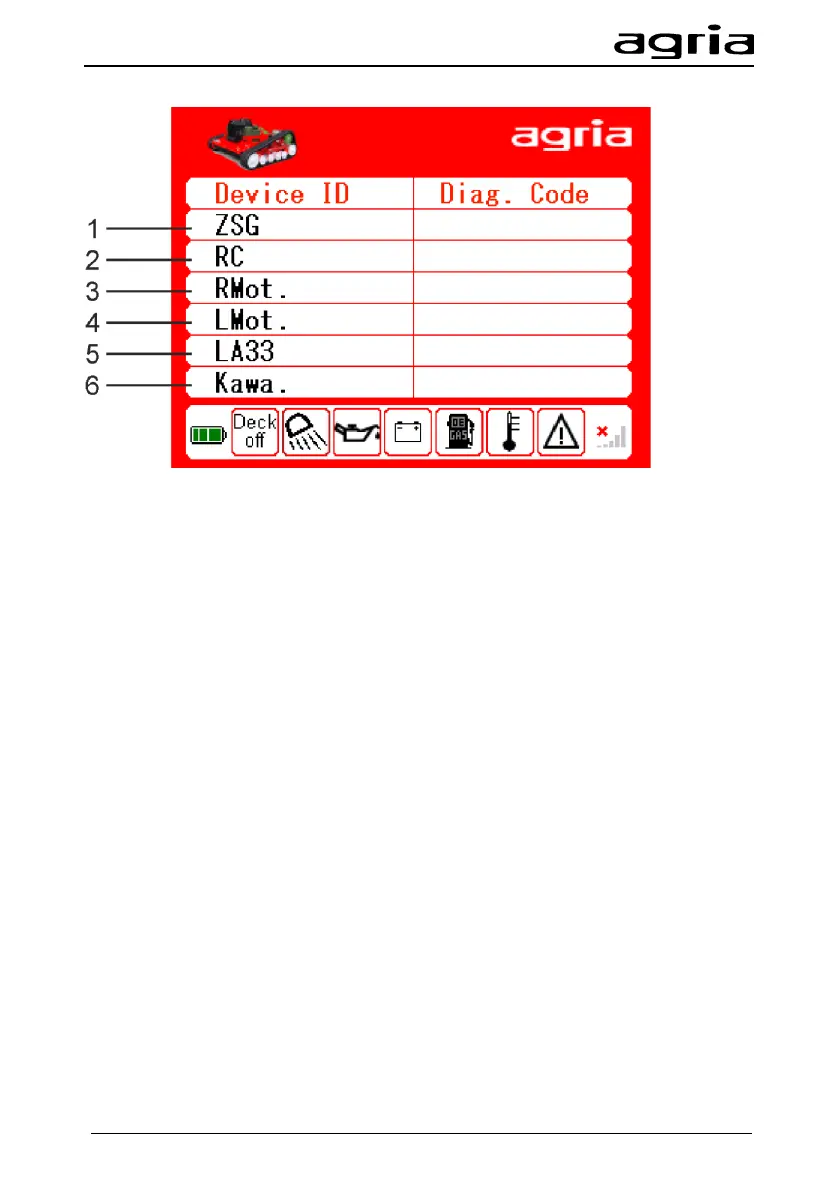
The display shows error codes of individual components in the hexadecimal system:
(1) Central control unit
(2) Remote control
(3) Wheel motor right
(4) Wheel motor left
(5) Height adjustment
(6) Optional: Kawasaki engine control unit
On the next page you can find the main error codes.
There may be temporary errors, or errors with minor effect. Such errors can be rec-
ognised by the fact that the machine stops, the engine continues to run, or an error
is displayed on this side of the remote control.
You can reset these errors without having to switch off the machine completely:
• Stop the machine, ensure a safe stand and a clear environment. The machine
cannot be steered for 3 seconds.
• Press the green unlock button (6) on the remote control
• After three seconds, the error memory of the traction drive as well as the display
on the remote control is cleared.
• The machine can be steered again and continue to be operated as usual.
• If the machine does not continue to run, contact the -agria Customer Service- or
read out the errors and report them to your dealer (see Operation Manual).


 To Next Page