Rd-03E Gesture Recognition User Manual V1.0.0
Copyright © 2023 Shenzhen Ai-Thinker Technology Co., Ltd All Rights Reserved
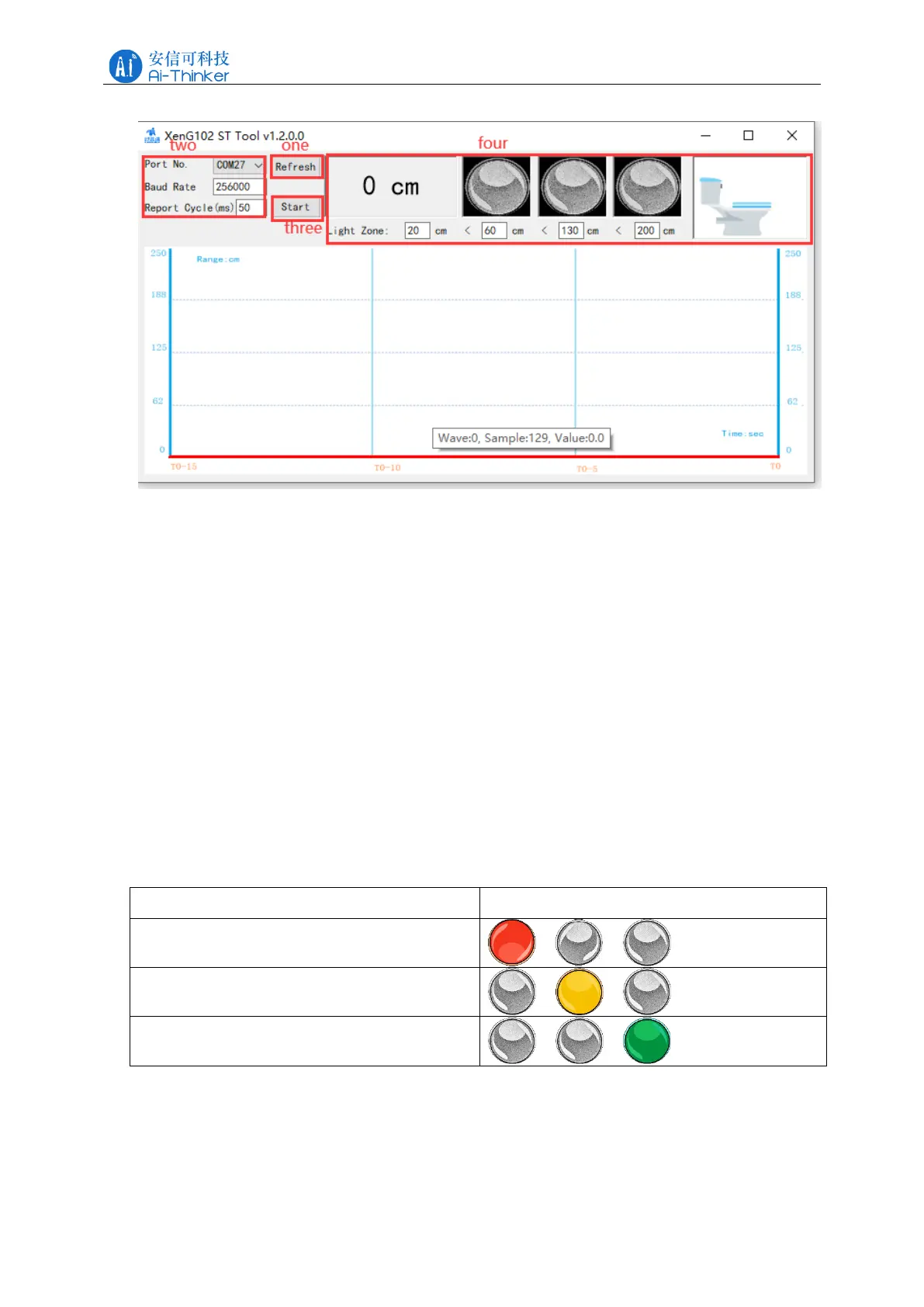
Figure 4-2 Upper computer tool ICLM_XenG102STTool configuration interface
The distance information can divide the gears by setting different distances. The upper
computer tool divides the sensing distance into 3 gears, which are respectively represented by
colored lights of different positions and colors. The display principle is as follows:
⚫ When the target distance is between 0cm and 60cm, the leftmost red light is on, and the
lights in other gears are off;
⚫ The yellow light in the middle of the target distance of 60cm and all 130cm is on, and
the lights on both sides are off;
⚫ The green light on the right side of the target distance of 130cm to 200cm is on, and the
two lights on the left are off.
The target distance interval and the on-off state of the colored lights are shown in Figure 4-3.
The distance interval corresponding to each gear can be customized through the upper computer
tool interface.
Figure 4-3
Toilet cover ring 5 different states, respectively:
⚫ No one (the cover ring is closed by default);
⚫ Open the cover by a person (when the cover is closed);



 To Next Page