This document describes the AIGURD F22 Fingerprint Smart Door Lock, a security device designed for convenient and secure access control.
Function Description
The AIGURD F22 is a fingerprint touchscreen door lock that eliminates the need for traditional keys. It utilizes a live semiconductor sensor with 360-degree fingerprint recognition for quick and easy unlocking. The lock features an OLED display for visual menu-based operations, simplifying user interaction. It also includes software that allows the lock owner to copy and recover user data, as well as track entry records. Double verification features are incorporated to enhance security.
The lock supports up to 200 user IDs, with both fingerprint and code unlocking available for each ID. User types include:
- Administrator: Up to 10 IDs (0001-0010) with the highest privilege, capable of unlocking and setting up the lock.
- Normal User: Up to 140 IDs (0011-0150) who can only unlock the lock.
- Guest User: Up to 50 IDs (0151-0200) who can unlock the door within a permitted time period, ideal for babysitters or hourly employees.
Each ID can be registered with either a fingerprint, a password, or both. The lock offers password protection with an anti-peep function, allowing users to add 1-6 random digits before and after the real password while still opening the lock. A double ID combination mode enhances security, requiring two user IDs (e.g., two fingerprints, two passwords, or a fingerprint and a password from different users) for unlocking.
An "Open Mode" function allows anyone to open the door by pushing down the handle without fingerprint or password verification, suitable for offices, clubs, or shops during working hours. The "Software Assistant" enables copying user data from one lock to another and allows administrators to check up to 10,000 entry records. A low power alert system notifies users when the battery voltage drops below 4.6V, indicated by a blinking red light and an alarm.
Important Technical Specifications
- Material: Stainless steel 304 for the entire lock body, providing anti-rust and anti-fading properties for 10 years.
- Sensor: Semiconductor sensor with 360-degree fingerprint recognition.
- Security: Anti-fake fingerprint technology and leaf core opening design for high security.
- Durability: Precision copper gear transmission design, ensuring a long lifetime of 600,000 operations.
- Chip: USA TI code chip, preventing high-frequency pulse unlocking.
- Latch Type: Single latch, American standard.
- Door Thickness Compatibility: Fits door thicknesses between 1 1/5" and 2 2/5" (30-60mm).
- Operation Temperature: -4°F to 140°F.
- Power Source: Powered by 4 AA Alkaline batteries (not included).
Usage Features
Registration:
- Administrator Registration: The first time the lock is used, at least one administrator must be registered. This can be done in "Factory default" mode or "With Master code" mode. The process involves touching the screen, verifying the master (if applicable), entering the menu, selecting "Enroll Master," and then enrolling fingerprints (3 times) or passwords (6-8 digits).
- User Registration (Normal/Guest): Similar to administrator registration, but selecting "Enroll User" or "Enroll Guest" respectively. Guest users require scheduling a permitted time period.
Modification:
- Modify Fingerprint/Password: Users can modify their registered fingerprints or passwords by accessing the "Modify User" menu, selecting "Modify FP" or "Modify PW," entering their ID, and following the prompts for re-enrollment.
- Modify Schedule (Guest): Guest user schedules can be adjusted via the "Modify Schedule" menu.
Deletion:
- Delete Master/User/All Users: Individual master or normal users can be deleted. The first master ID cannot be deleted in this mode. The "Delete All Users" function removes all registered users.
System Setup:
- Set Up Date and Time: The lock's date and time can be configured through the "System Setup" menu.
- Sound Setup: Key sound and prompt sound can be toggled on/off.
- System Init: Resets the system to factory default, removing all user IDs.
Record Check:
- Unlock Log/User Info: Allows administrators to check unlock records and user information.
Special Modes:
- Open Mode: Activated by an administrator to allow anyone to open the door without verification. Deactivated by activating the panel and pressing specific keys.
- Combine Mode: Requires two IDs (e.g., two fingerprints, two passwords, or a fingerprint and a password) for unlocking, enhancing security. Any combination of two administrator IDs can log in.
Unlocking:
- Key Unlock: A mechanical key can be used to unlock the door by inserting it, rotating 180° counter-clockwise, pushing down the handle, and then rotating 180° clockwise to remove the key.
- Additional Power Source: If batteries run out, a power bank can be connected via the Micro USB charging port to power the system.
System Reset:
- If unable to log in, the system can be reset to factory default by pressing the reset button on the outside handle until a long beep is heard.
Maintenance Features
- Cleaning: Always use a clean hand to operate the lock. Clean the touchscreen frequently with a soft cloth; avoid water or alcohol. If the stainless steel panel becomes dirty, use a small amount of car table wax to clean it.
- Corrosion Prevention: Never allow corrosive materials or liquids to touch the lock.
- Physical Protection: Avoid knocking the touchscreen with hard objects.
- Key Storage: Keep mechanical keys in a safe place for use in case of fingerprint or password failure.
- Battery Replacement: Replace batteries when the low-voltage alarm sounds.
The manual also provides contact information for after-sales service, including email, website, and links to setup and installation guide videos.

 Need help?
 General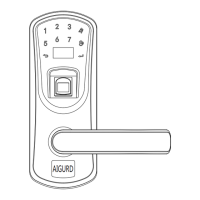

 To Next Page