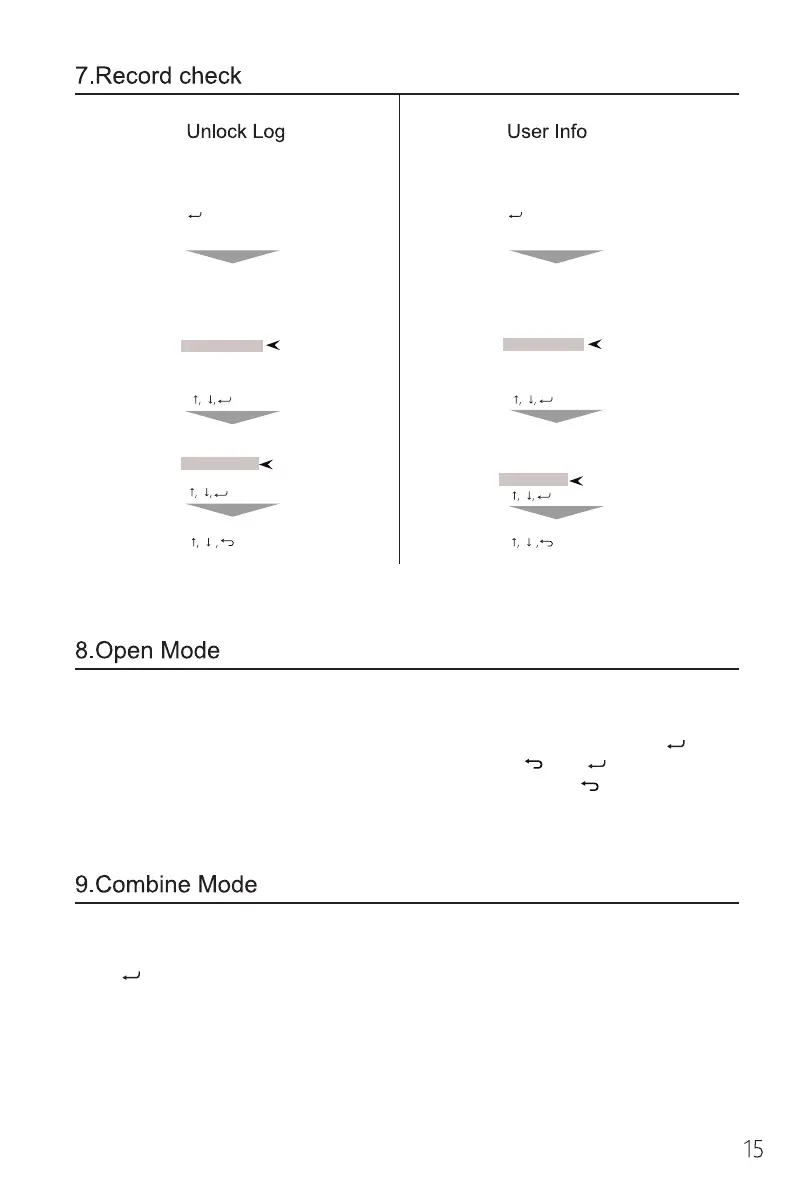
Active the lock by
touching the screen
enter
Verify Master
Verify OK
Active the lock by
touching the screen
enter
Verify Master
Verify OK
System Menu
Enroll User
Modify User
Date Transfer
Delete User
System Setup
Record Check
System Menu
Enroll User
Modify User
Date Transfer
Delete User
System Setup
Record Check
4 8 enter 8
8
8
4
4
4
enter
enter
enter
Record Check
User check
Record Check
Unlock check
Unlock check
User check
4 8 Exit 4 8 Exit
When the lock is in the open mode, anybody could open the door by pushing down
the handle.
How to set the open mode:Login to the system, go to the menu page,press to
confirm or unlock the lock by the administrator, then press and at the same time
for 3s to 5s. How to disable the open mode: .Activate panel,press for 5s.
Combine Mode exists for the high-security needs.
Enable and disable the combine mode: login to the system, go to the menu page,
press to confirm;
When using this mode, the lock has to be unlocked by 2 IDs (fingerprint + finger-
print, fingerprint + code, code + code ); Any combinations of 2 administrator IDs
(fingerprint + fingerprint, fingerprint + code, code + code ) can login to the system.


 To Next Page