73
To copy a file from disk to local:
1. Select the
Local: Box by pressing the Local soft-key.
2. Select the local store to receive the file from disk.
3. Select the Disk Box by pressing the Disk soft-key.
4. Select the file to be copied.
5. Press the Copy soft-key.
5. Optionally modify the name of the local store to receive the copy. This will default to the
name of the file selected in step 4 above if it is not modified.
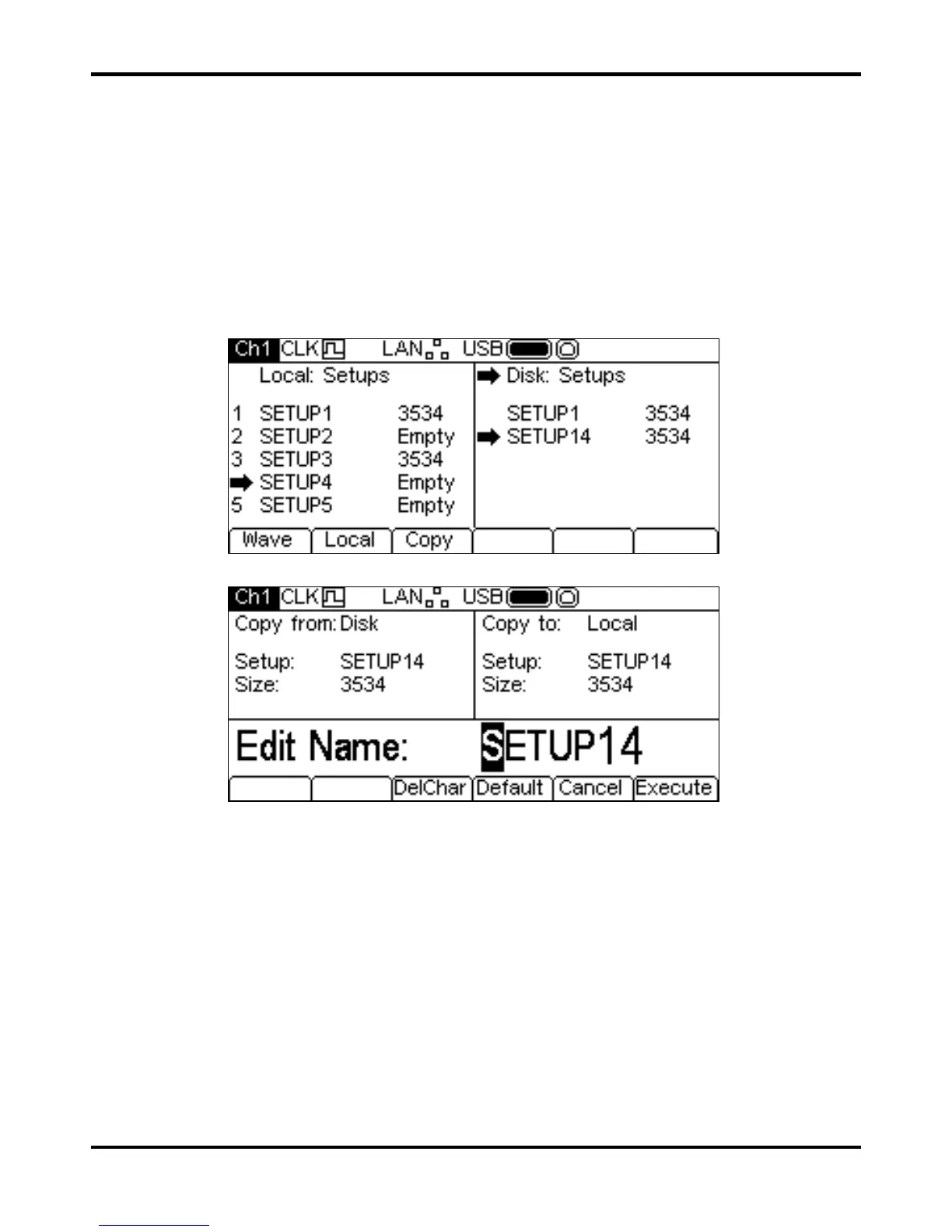
The screen below shows an example after performing the above actions. Here the set-up in store
4 will be overwritten by the disk file SETUP14.
Pressing the
Copy soft-key will then show the following.
The
Copy from: Box shows that the source is Disk and shows the file to be copied. The
Copy to: Box shows the file that will be written to the Local store. The Edit Box shows the
name of the file that will be written and the soft-key labels, KNOB and cursor keys allow the name
to be edited.
The
DelChar key allows characters to be deleted from either end of the name but not from the
centre.
The
Default soft-key displays the name of the source file again.
The
Cancel key cancels the copy operation and returns to the top level Stores menu.
The
Execute soft-key starts the copy operation and returns to the top level Stores menu when
complete
The cursor keys will move the edit cursor through the name and turning the KNOB will cycle
through all valid characters, numbers and symbols.


 To Next Page