81
Point Editing
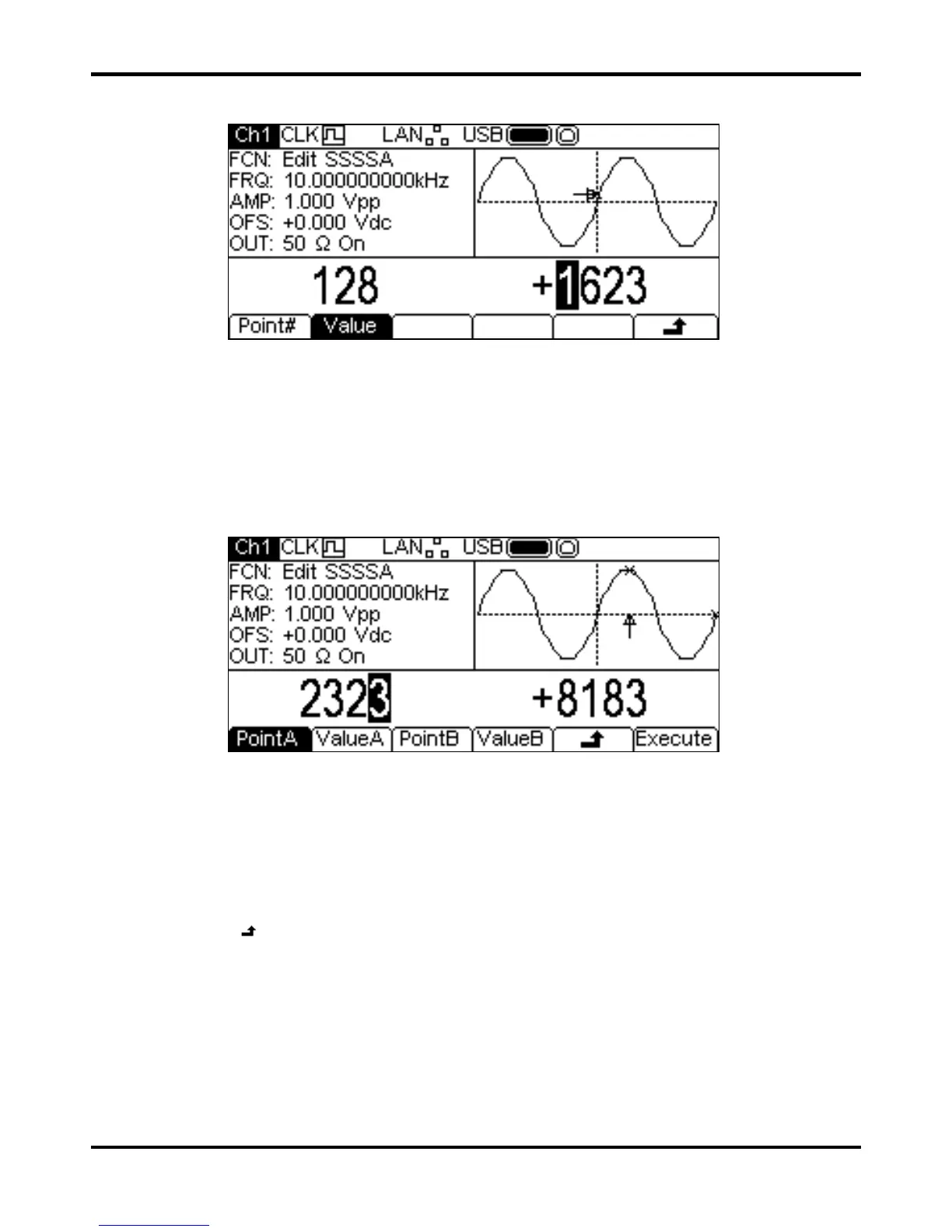
Pressing the Point soft-key shows the point edit menu in the Edit Box.
The point edit menu allows individual points in the waveform to be set to any vertical level value.
The
Point# soft-key selects setting of the point number; pressing the Value soft-key then
enables the value to be changed. The point number and point value may be changed in either of
the ways detailed in General: Numeric Editing. The point which is being edited is shown in the
Graph Box by an arrow and a
x. The point value is changed in the actual waveform immediately it
is edited.
Line Drawing
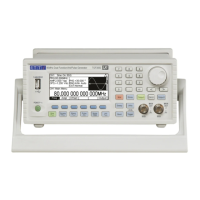
Pressing the Line soft-key shows the line edit menu in the Edit Box.
The Line edit menu allows a line to be drawn between any two points in the waveform. The end
points of the line may be set to any vertical level value. The
PointA soft-key selects setting of the
first point number; pressing the
ValueA soft-key then enables the value to be changed. The
PointB and ValueB soft-keys are use to set the second point. The point numbers and point
values may be changed in either of the ways detailed in General: Numeric Editing. The point which
is being edited is shown in the Graph Box by an arrow and a
x. The line is drawn in the actual
waveform by pressing the
Execute soft-key after which the instrument will return to the top level
edit menu.
Pressing the
soft-key will return without drawing the line.


 To Next Page